EasyManua.ls Logo

Vivitar VEC S130 - Page 4

Vivitar VEC S130
20 pages
Print Icon
To Next Page IconTo Next Page
To Previous Page IconTo Previous Page
Loading...
3
Initial
Initial
Initial
Initial Camera
Camera
Camera
Camera Setup
Setup
Setup
Setup
Built-in the Batter y Installing Memory Card
Before
Before
Before
Before using
using
using
using the
the
the
the camera,
camera,
camera,
camera, switch
switch
switch
switch on
on
on
on
the
the
the
the DC5V
DC5V
DC5V
DC5V power
power
power
power supply
supply
supply
supply and
and
and
and plug
plug
plug
plug in
in
in
in
t
t
t
t he
he
he
he T
T
T
T ype-C
ype-C
ype-C
ype-C USB
USB
USB
USB cable
cable
cable
cable to
to
to
to charge
charge
charge
charge
camera.
camera.
camera.
camera. When
When
When
When the
the
the
the battery
battery
battery
battery is
is
is
is fully
fully
fully
fully
charged,
charged,
charged,
charged, the
the
the
the red
red
red
red LED
LED
LED
LED will
will
will
will turn
turn
turn
turn off
off
off
off .
.
.
.
Built-in
Built-in
Built-in
Built-in Li-ion
Li-ion
Li-ion
Li-ion 3.7V
3.7V
3.7V
3.7V batter
batter
batter
batter y
y
y
y
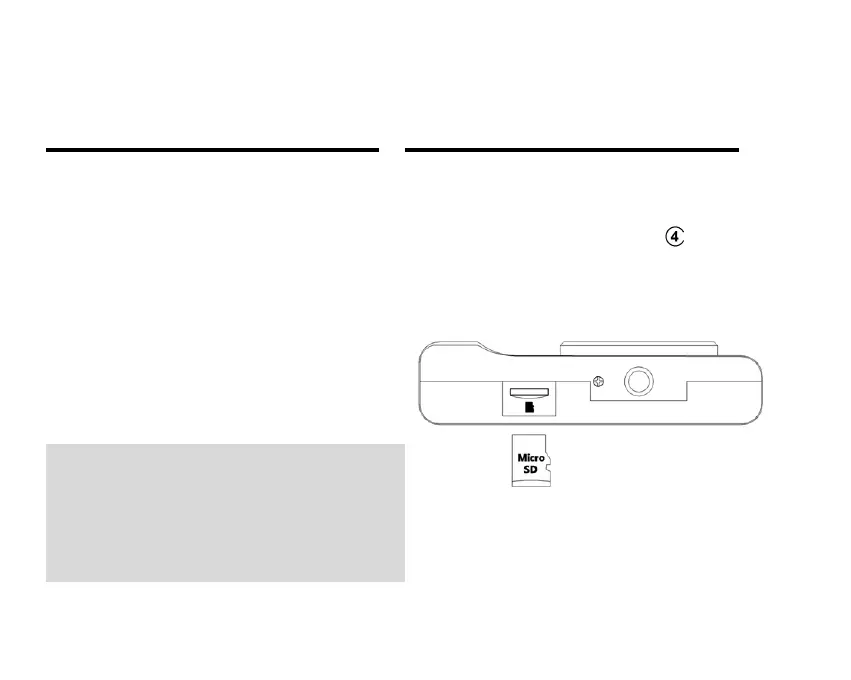
Micro
Micro
Micro
Micro SD
SD
SD
SD Memory
Memory
Memory
Memory card
card
card
card (up
(up
(up
(up to
to
to
to 64
64
64
64 GB)
GB)
GB)
GB)
needed
needed
needed
needed for
for
for
for normal
normal
normal
normal use.
use.
use.
use. IMPORTANT:
IMPORTANT:
IMPORTANT:
IMPORTANT:
You
You
You
You must
must
must
must use
use
use
use only
only
only
only a
a
a
a Class
Class
Class
Class 4
4
4
4 SD
SD
SD
SD card
card
card
card
or
or
or
or higher.
higher.
higher.
higher.
Note:
Note:
Note:
Note:
If
If
If
If the
the
the
the product
product
product
product is
is
is
is not
not
not
not used
used
used
used for
for
for
for more
more
more
more than
than
than
than
three
three
three
three months,
months,
months,
months, please
please
please
please charge
charge
charge
charge it.
it.
it.
it.
Remember:
Remember:
Remember:
Remember:
In
In
In
In general,
general,
general,
general, the
the
the
the camera
camera
camera
camera
freezes
freezes
freezes
freezes .
.
.
. Press
Press
Press
Press the
the
the
the reset
reset
reset
reset button
button
button
button and
and
and
and the
the
the
the
camera
camera
camera
camera will
will
will
will turn
turn
turn
turn off,
off,
off,
off, then
then
then
then press
press
press
press the
the
the
the
power
power
power
power button
button
button
button to
to
to
to restart
restart
restart
restart the
the
the
the camera.
camera.
camera.
camera.

Related product manuals