VIVOTEK
266 - User's Manual
© 2020 VIVOTEK INC. All Right Reserved
127
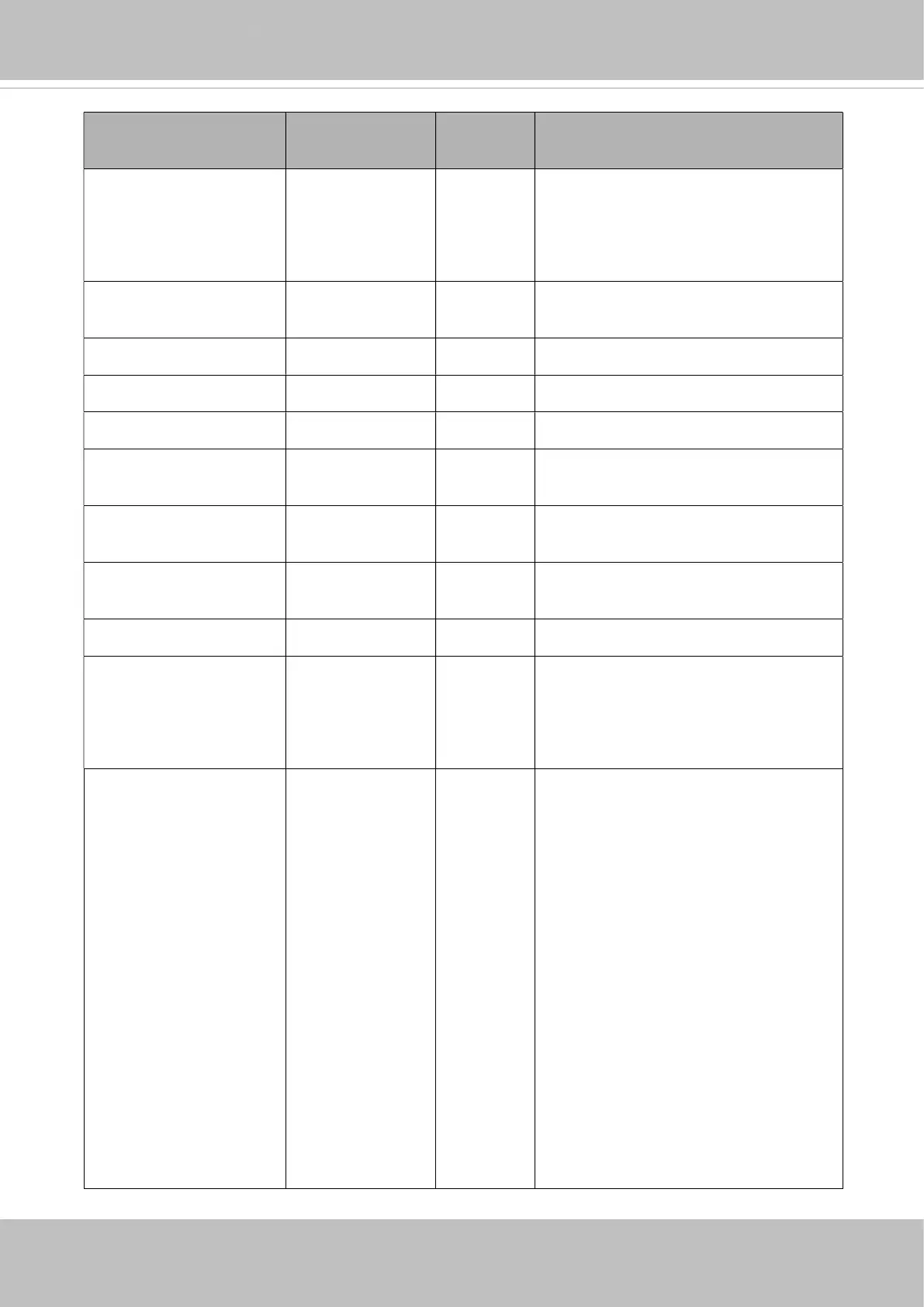
NAME VALUE SECURITY
(get/set)
DESCRIPTION
custombutton_manualtr
igger_show
<boolean> 1/6 Show or hide manual trigger (VI)
button in homepage
0 -> Hidden
1 -> Visible
theme_option 1~4 1/6 1~3: One of the default themes.
4: Custom definition.
theme_color_font string[7] 1/6 Font color
theme_color_configfont
string[7] 1/6 Font color of configuration area.
theme_color_titlefont string[7] 1/6 Font color of video title.
theme_color_controlba
ckground
string[7] 1/6 Background color of control area.
theme_color_configbac
kground
string[7] 1/6 Background color of configuration
area.
theme_color_videoback
ground
string[7] 1/6 Background color of video area.
theme_color_case string[7] 1/6 Frame color
defaultpassword_specia
lcharacter
!%-.@^_~ 6/7 Allowed special characters
* We support this parameter when
the version number (httpversion) is
equal or greater than 0314b.
defaultpassword_type <positive
integer>
6/7 Required character type for password.
An 32-bit integer, each bit can be set
separately as follows:
Bit 0 => Require English alphabet
letter (uppercase or lowercase)
Bit 1 => Require special character
Bit 2 => Require digit number
Bit 3 => Require lowercase letter
Bit 4 => Require uppercase letter
Bit 5 => Allow checking username and
password; if "bit=1" means
username=password is allowed,
otherwise is not allowed.
* We support this parameter when
the version number (httpversion) is














 To Next Page