VIZIO P42 HDTV User Manual
Version 1/18/2006 35
www.VIZIOCE.com
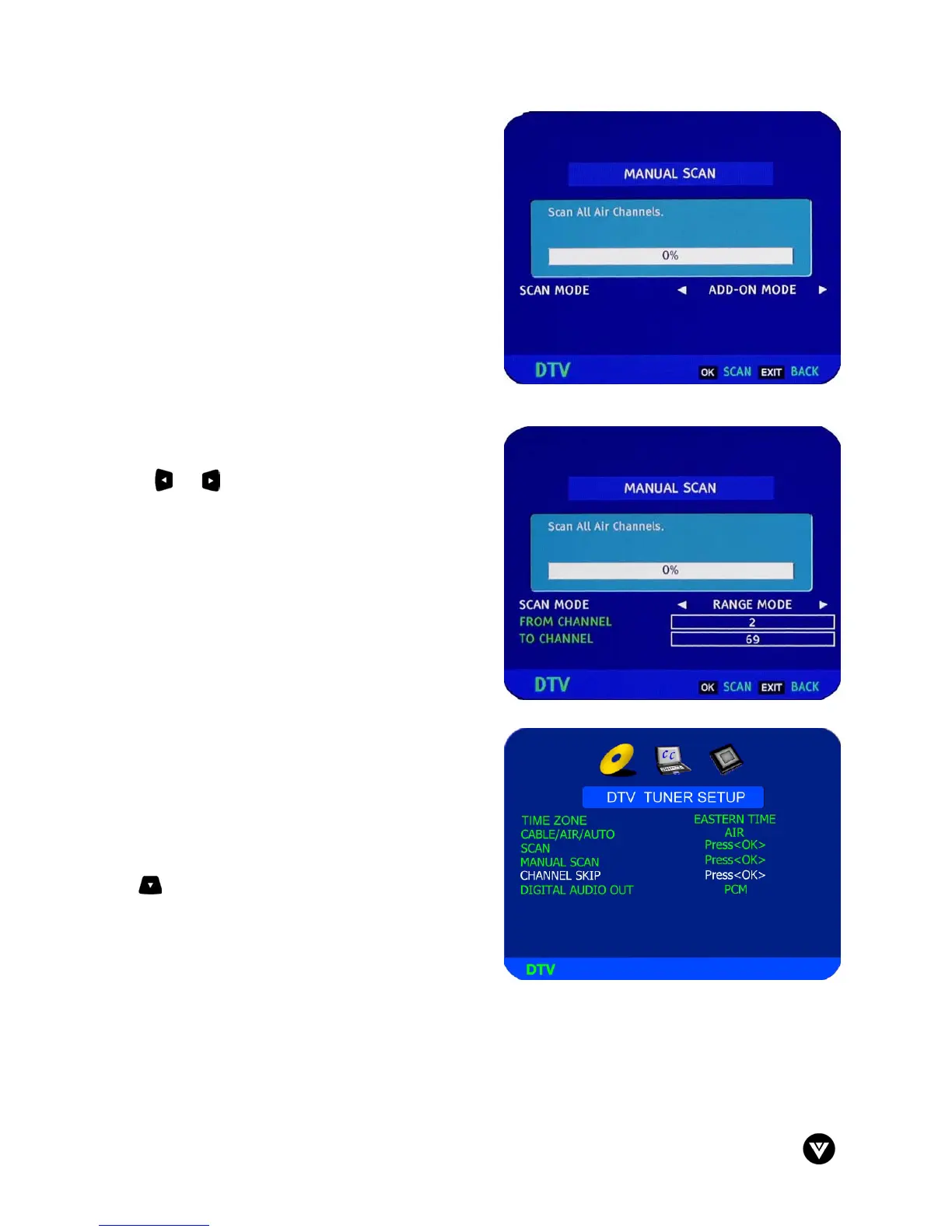
The MANUAL SCAN screen now appears and this can
be used in two ways. The screen defaults to Add-On
Mode and pressing the OK button at this stage makes
the TV scan the whole channel range again. Press
EXIT to navigate away from this screen.
Note: If the OK button is pressed, then the automatic
scanning will start again.
If the or button is pressed first, then the Range
Mode is activated so that you can specify a smaller
range of channels to be scanned again. Press EXIT to
navigate away from this screen.
Channel Skip – Gives you the option to skip channels
when using the Channel+ or Channel- buttons.
If you did not EXIT from the MANUAL SCAN, press
the button again to highlight Channel Skip. Press
the OK button.



 To Next Page