English - 22
71-S3621N-TYPB3
116.5mm
38mm
Part No.: 10612000248
Serial No.: SHCOWGAS0100001
条码、内容均为示例,须按实际打印!
Model/UPC/Material#...
序列号编码规则:
71-S3621N-TYPB4
116.5mm
38mm
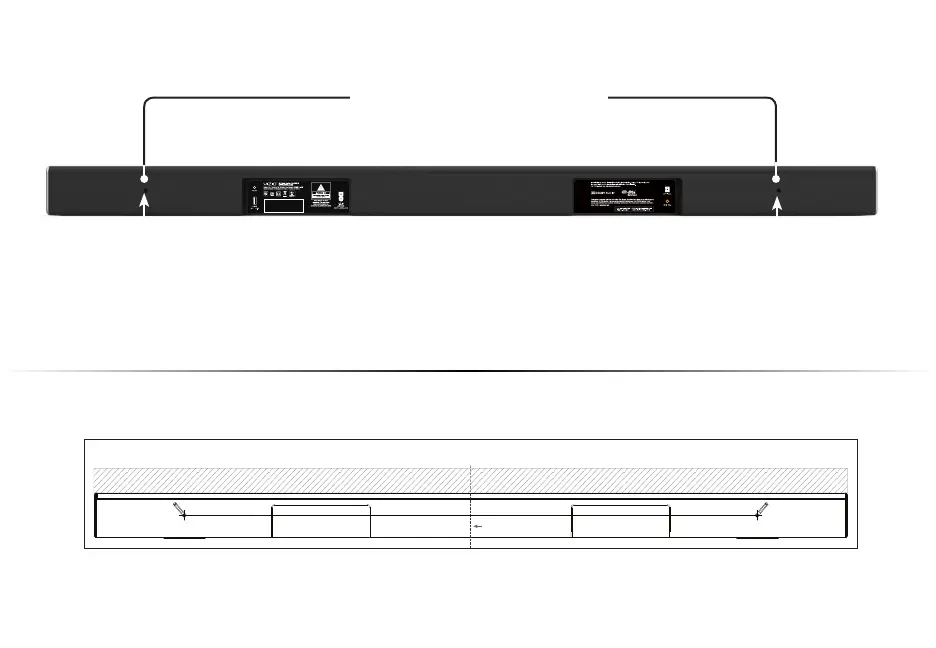
WALL-MOUNTING THE SOUND BAR
Insert the two wall-mount screws into the wall-mount screw holes, and then
tighten them with a Phillips screwdriver.
1
2
Place the included wall mounting template against the wall under your TV. Mark the two
bracket holes using a pencil.
LEAVE THIS SPACE BETWEEN THE SOUND BAR AND YOUR TV / LAISSEZ CET ESPACE ENTRE LA BARRE DE SON ET VOTRE TÉLÉVISEUR / DEJE ESTE ESPACIO ENTRE LA BARRA DE SONIDO Y EL TELEVISOR
Center Line / Ligne Centrale / Línea Central
27.36"/ 69,50 cm
WALL MOUNTING TEMPLATE / MODÈLE DE SUPPORT MURAL / PLANTILLA PARA MONTAJE EN LA PARED
MARK HERE
APPOSEZ UNE MARQUE ICI
MARQUE AQUÍ
MARK HERE
APPOSEZ UNE MARQUE ICI
MARQUE AQUÍ
Back of Sound Bar
Wall-Mount Screw Holes



 To Next Page