VIZIO VBR231 User Manual
Version 6/4/2010 9
www.VIZIO.com
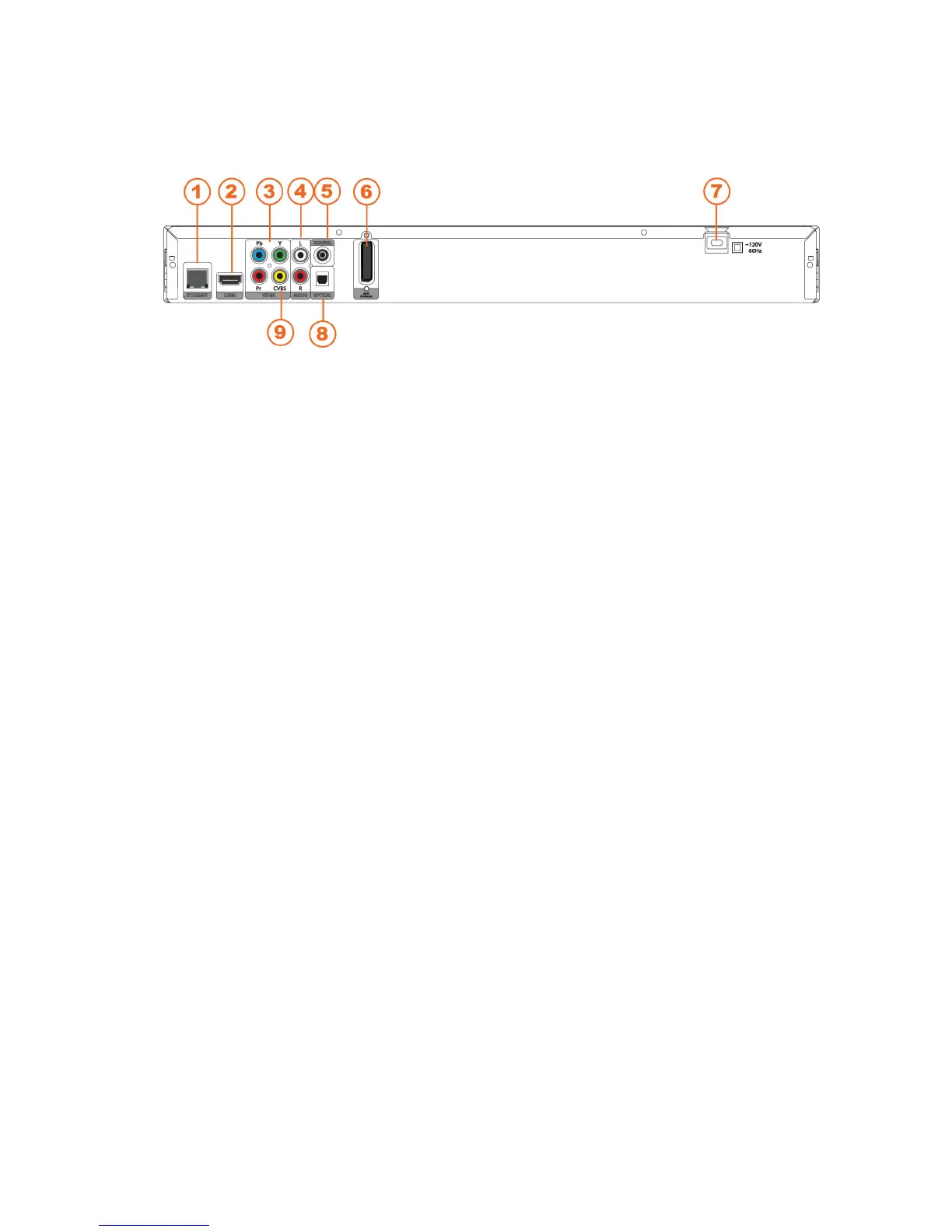
Rear Panel Connections
1. ETHERNET—Connect an Ethernet cable (not included) to access services such as Netflix
streaming, BD-Live, and software updates. Your player also has 802.11n wireless, so you
can connect your player to the Internet through your wireless home network instead of using
this connector. See Connecting to your home network on page 19 for detailed information on
setting up your Internet connection.
2. HDMI—Connect a digital video and audio device, such as TV, to this all digital connector. No
additional audio connection is needed. Only HDMI is capable of delivering 1080p video and
the highest quality Dolby and DTS soundtracks.
3. COMPONENT (Y/CbPb/CrPr)—Connect a component video device, such as a TV. For
component TVs, you will also need to connect the red and white audio jacks (see #2 above)
to the Analog L/R Audio Out jacks. Component video is limited to 1080i.
4. L/R AUDIO OUT—Connect the audio for the TV you connected to the VIDEO OUT or
COMPONENT jack to these audio jacks. You can connect the audio for a component TV to a
sound system instead of to the TV.
5. COAXIAL DIGITAL AUDIO OUT— If you are not using an HDMI-capable audio receiver,
connect to a sound system that has a coaxial audio jack.
6. WIFI ANTENNA—Sends and receives signals from your wireless home network operating at
both 5GHz and 2.4 GHz. See Connecting to your home network on page 19 for detailed
information on setting up your Internet connection.
7. POWER—Connect this cord into a power outlet.
8. OPTICAL DIGITAL AUDIO OUT—If you are not using an HDMI-capable audio receiver,
connect to a sound system that has an optical audio jack.
9. VIDEO OUT—Connect a standard AV TV. For composite TVs, you will also need to connect
the red and white audio jacks (see #4 above) to the Analog L/R Audio Out jacks.



 To Next Page