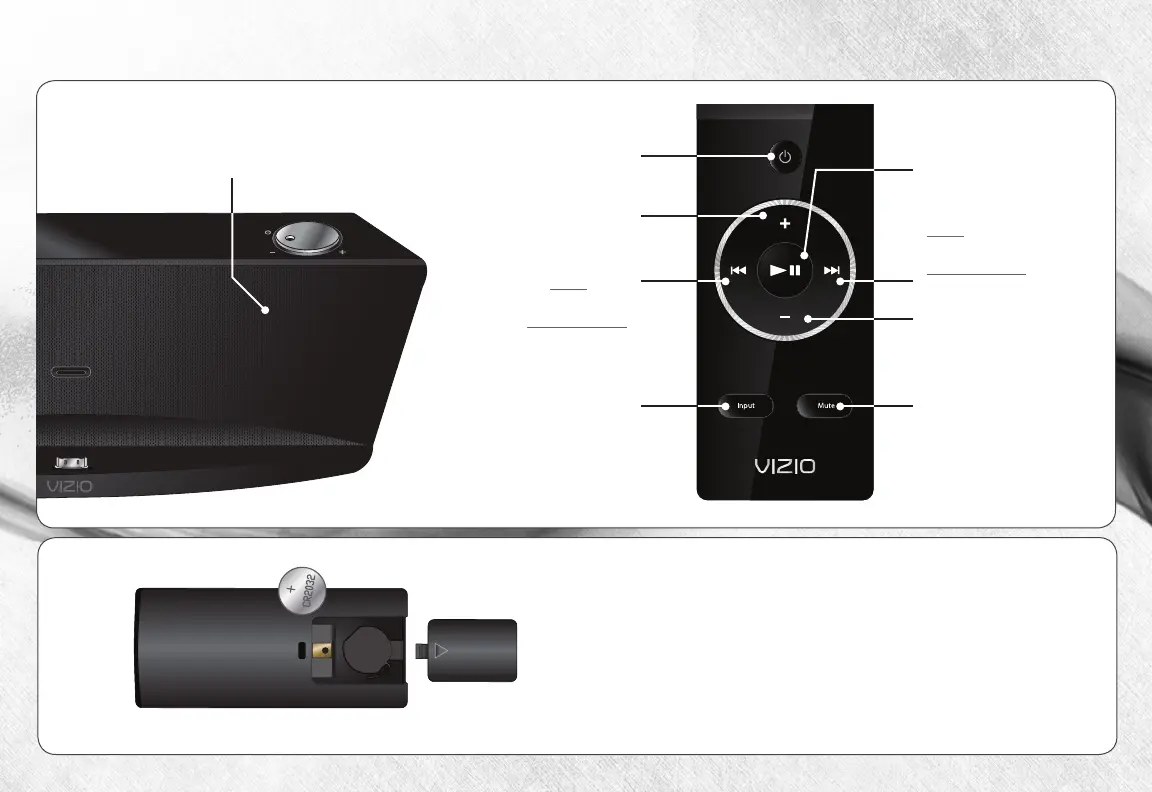
USING THE REMOTE
Mute
Turn sound off or on.
Power
Turn Dock on or off.
Volume Up
Increase Dock
loudness.
Previous / Rewind
Press to go
to last track.
Press and hold
to reind.
Input
Toggle audio
source (pple Dock
Connector
Volume Down
Decrease Dock
loudness.
Next / Fast Forward
Press to go
to next track.
Press and hold
to fast forard.
If your remote stops responding, you may need to
replace the battery.
To replace the battery, remove the cover from the
back of the remote as shon, then replace the old
battery ith a ne CR2032. Be sure that the
+
sign on the battery is facing up.
Play / Pause
Press to play or pause.
For the best results,
point the remote at
the sensor here.


 To Next Page