VoroMotors Advance Settings
The advance settings (also known as performance or p-settings) allow you to customize
the display and configuration of the device.
1. To access the P-settings, start with the display on.
2. Double-click the mode button to access the main menu.
3. Scroll through the features using the directional buttons until you find Advance
setting.
4. Press the mode button to select Advance setting.
5. A password interface will pop-up. You must enter a 4-digit password to continue.
a. The default password is 2112.
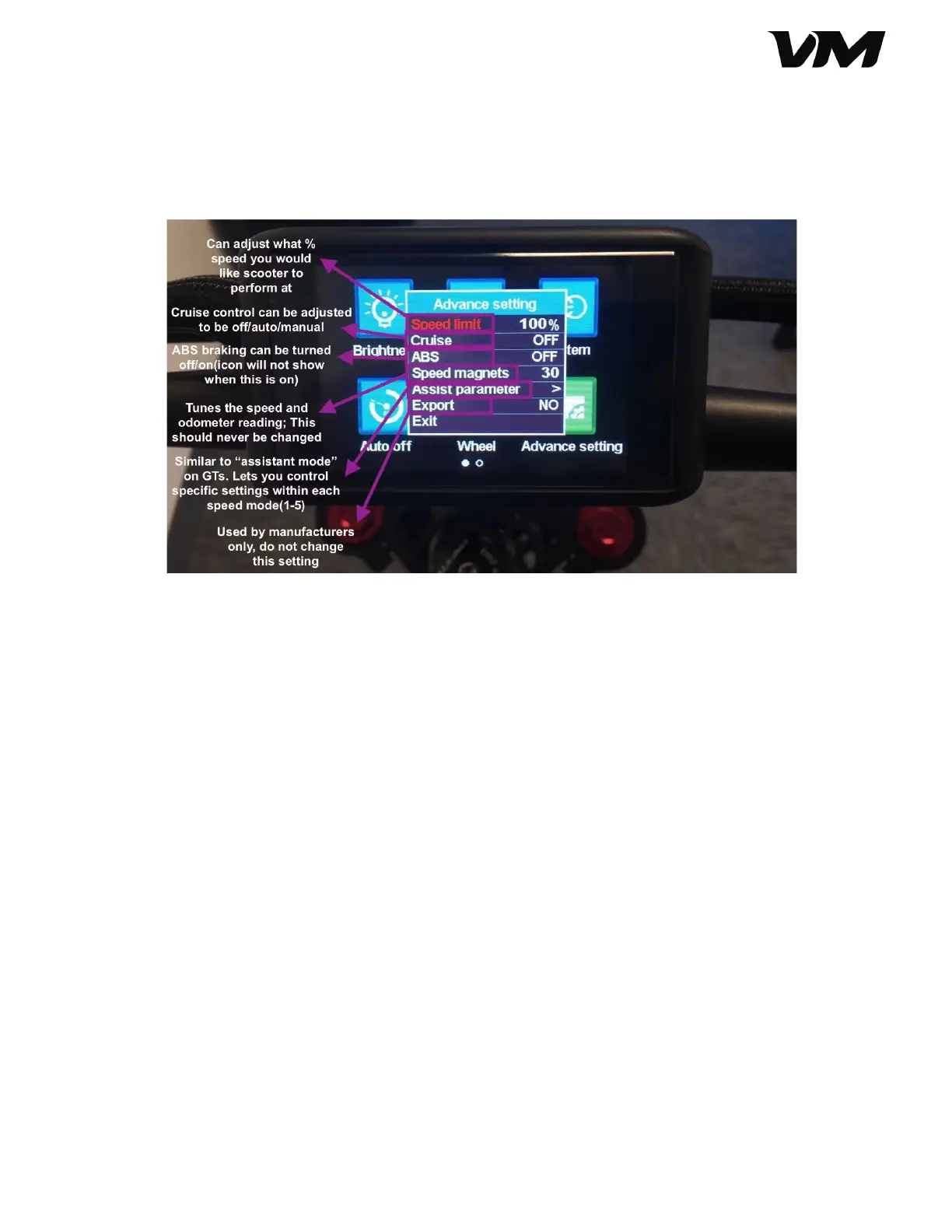
6. In the Advance setting, you can access the following:
a. Speed limit (0-100%, default 100%)
b. Cruise control (On/Off)
c. Anti-lock braking ABS (On/Off)
d. Speed magnets (30, do not change)
e. Assist parameter (Riding Profile settings)
f. Export
7. To toggle between settings, use the directional buttons. Use mode to select the
Advance setting, directional buttons to adjust the value, and mode to save and
exit.
Distributed by and property of VoroMotors 10


 To Next Page
 Loading...