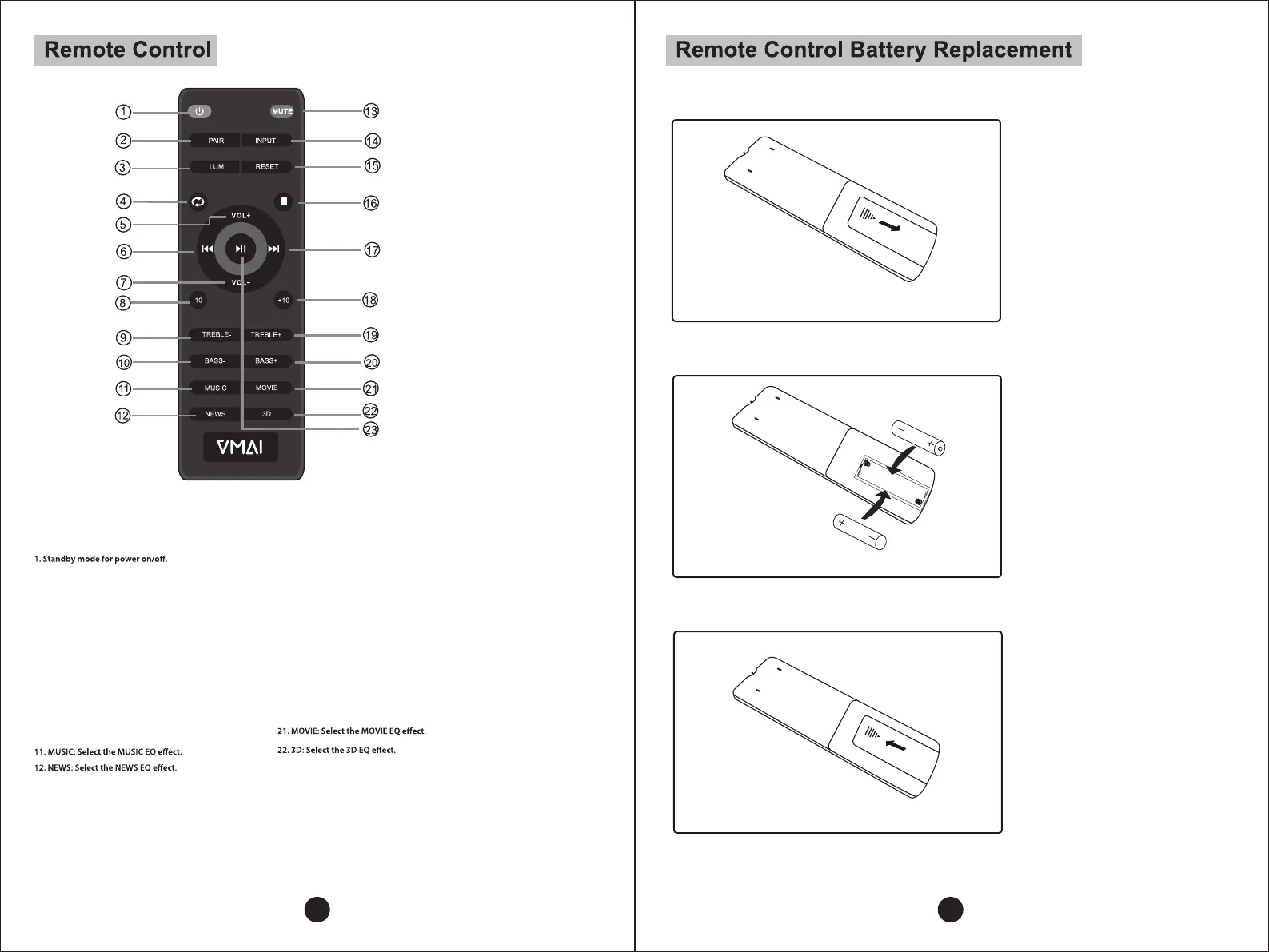
2. PAIR: Connect or disconnect to the pairing device.
(Press the button more than 2 seconds).
3. LUM: Brightness control. This button can’t work under
standby status.
4. Loop playback (Only work under USB mode).
5. Volume +
6. Pre button: Previous song (Only work under USB & BT mode)
7. Volume -
8. -10: Backwards ten songs (Only work under USB mode).
9. Treble -
10. Bass -
13. MUTE mode.
14. INPUT: AUX/OPT/USB/BT/HDMI selection
15. RESET: Reset all sound bar volume levels and switch
EQ back to music setting. Press and hold button for 2 seconds.
16. Stop button: Press to stop. (Only work under USB mode).
17. Next button: Next song. (Only work under USB & BT mode).
18. +10: Forwards ten songs. (Only work under USB mode).
19. Treble +
20. Bass +
23. Play/Pause (Only work under USB and BT mode).
B. Insert 2 AAA batteries
according to the marking
inside compartment.
C. Close the compartment.
A. Remove the battery
compartment cover.
7 8


 To Next Page