Sample scenario:
How to save a location, pass the location on and navigate to it.
There is a tree to be removed from a location, requiring a crew and chainsaw. Both the initial crew
and the chainsaw crew have VMS GPS units. The initial crew needs to record the location of the
fallen tree and pass this location to the chainsaw crew. Then the chainsaw crew needs to add this
location to their GPS and navigate to it.
Using the stylus is recommended for this exercise. The stylus is stored in the back of the unit. It can
be found by turning the gps over and looking carefully in one of the corners of the unit. For the T700
HDsII units the stylus is stored in the cradle.
How to record a location (or create a waypoint):
The easiest way to do this is to be located at the tree then change the GPS so that it displays the
"Waypoint" page. Simply tap the top right hand corner of the screen until this screen appears:
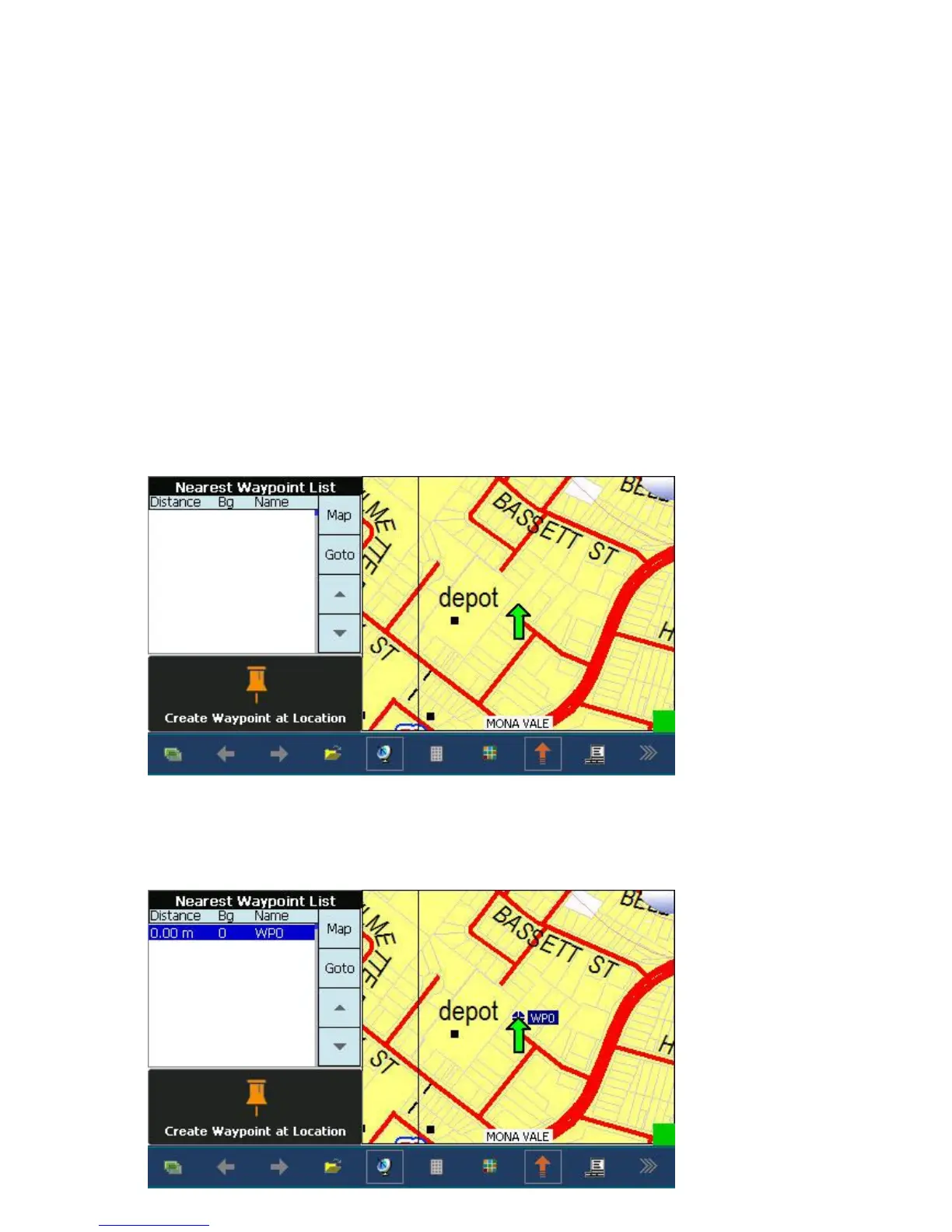
Make sure the GPS status is green - ie the GPS knows where you are, then tap the "Create Waypoint
at Location Page" section of the screen.
A waypoint will be created, automatically named (WP0) and will appear on the map:


 To Next Page
 Loading...