EN
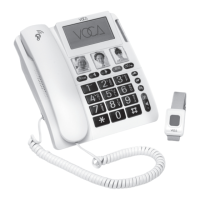
Left Soft Key: For commands displayed on lower
left corner of display, like / OK.
Left: Shortcut for Contacts or move left in menu.
Right: Shortcut for Message or move right in menu.
SOS: Long press 3 secs for trigger/cancel of
energency service.
Right Soft Key: For commands displayed on lower
right corner of display, like call log and back.
Photo keys x 3: Speed dial
Up / Down keys: Adjust volume in home screen/ in
a call. Scoll up / down in menu mode.
Power On/off: Long press for power on/off. Short
press for mute/ unmute/ back to homescreen.
Handset volume boost key
Speakerphone key
SOS Dongle: Press to trigger emergency service.
3.5mm earphone Jack
Number 2-9: Short press for digit/ character, long
press for speed dial.
#: Long press for phone silence mode, short press
to switch input method.
Backup battery compartment: CP140 has battery
and can allow disconnect from main power supply
for a short time.
1.
2.
3.
4.
5.
6.
7.
8.
9.
10.
11.
12.
13.
14.
15.
Product Layout
P.5


 To Next Page