USING YOUR VS-PPA
Bluetooth Connection
You can use your VS-PPA as an external speaker for
your Bluetooth-enabled smartphone or tablet.
1.
Press Mode to enter Bluetooth pairing mode.
2.
Choose “VS-PPA” to connect.
3.
Once successfully connected, audio will stream
from your Bluetooth device to this speaker.
USB Connection
With your VS-PPA, you can enjoy music that is stored on a
USB storage device such as an MP3 player.
Plug your USB storage device into the USB port of your VS-
PAA. The music will play automatically. If not, please check
if the USB device contains playable audio contents.
Recording
Insert a TF Card or USB memory stick and press “REC”
button to start recording.
To stop recording press “REC” button again to stop
recording.
AUX INPUT Connection
Note:
– To play music on your device through this speaker,
make sure that no Bluetooth connection, USB
device, or AUX connection is available.
Connect a pair of RCA audio cables to:
•
the RCA audio output sockets (red/white) on the
device (TV, DVD player, etc);
•
the INPUT (AUX) connectors on the speaker.
TWS FUNCTION
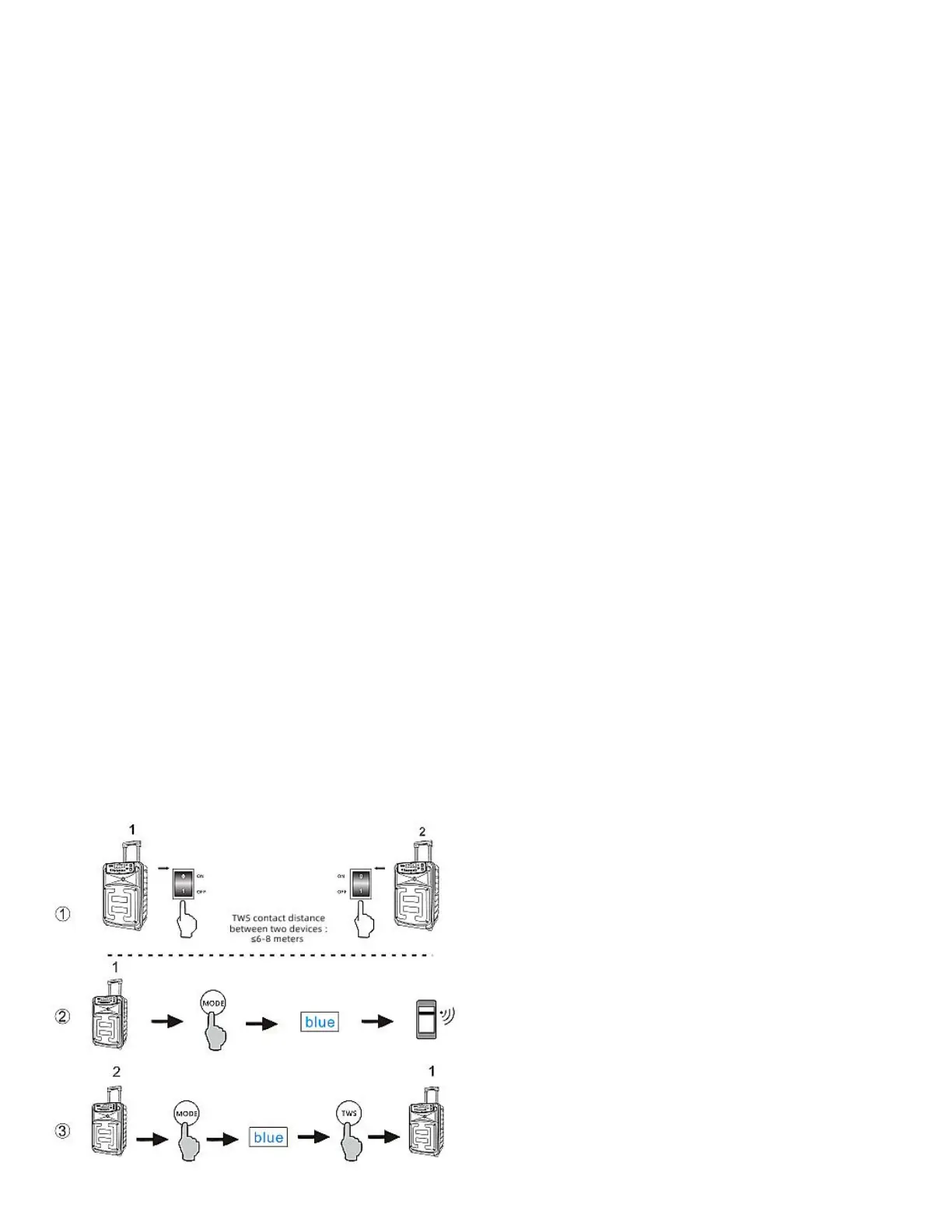
Detailed operation of serial Bluetooth TWS
*Must have two devices of the same model
1. When the first device is switched to "BLUE* mode, when
the Bluetooth connection to the mobile phone hears two
beeps, it means the connection is successful, and the
device defaults to the host.
2. The second device switches to the "BLUE" mode, press
and hold the "TWS" button for 2 seconds, after hearing the
prompt, TWS succeeds with the host, and the device
defaults to the slave.
Exit Bluetooth TWS
*In the BLUE" state,press and hold the master or slave
"TWS" button for 2 seconds to exit Bluetooth TWS.
TROUBLESHOOTING
Caution:
– Never try to repair the product by yourself. If you
have any problems while using this product,
check the following points before you request
service.
System
The unit will not turn on.
•
Check if the power cord is plugged into the outlet and to
the device.
•
For “VS-PPA” make sure the speaker is fully charged, if
not use the power cord to turn on your speaker.
Sound
No sound from the device.
•
Make sure that the device is powered on.
•
Make sure that the volume level is turned to an audible
level.
•
Make sure that it is connected to a music source.
Bluetooth
A device cannot connect with the VS-PPA.
•
Check if you enable the Bluetooth function of the device.
•
The device is already connected to another Bluetooth
device.
Poor audio quality from the connected Bluetooth device.
•
The Bluetooth reception is poor. Move the device closer to
the VS-PPA, or remove any obstacle between the device
and the speaker.
•
Bluetooth keeps dropping out or poor audio quality –
likely the speaker battery is low. Please fully charge
the speaker.
•
For more advice please contact Vocal-Star
www.vocal-star.com / Tel: 01202 670929


 To Previous Page
 Loading...