Need help?
Do you have a question about the VocoPro Digital-32-Ultra and is the answer not in the manual?
Explains FCC requirements, modification risks, and how to mitigate interference.
Covers safe placement, ventilation, power handling, and voltage selection.
Includes health warnings and advice on water exposure.
Advises on setting safe volume levels to prevent hearing damage.
Lists common decibel ranges and identifies dangerous noise levels.
Explains the meaning of graphical symbols like lightning flash and exclamation points.
Covers reading instructions, retaining info, attachments, water, carts, ventilation, and heat.
Details power sources, cord protection, cleaning, non-use, damage, and servicing.
Introduces VocoPro and provides contact information for customer service and tech support.
Section for recording model and serial numbers for easy reference.
Lists all items included in the Digital-32-Ultra package.
Explains when the re-sync procedure for microphones and receiver is needed.
Provides step-by-step instructions for syncing handheld microphones to the receiver via IR.
Details the process for syncing body-pack transmitters to the receiver using IR.
Explains how to connect the receiver to a mixer using balanced XLR and unbalanced 1/4" outputs.
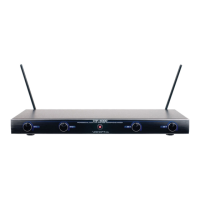
Identifies and explains the controls and indicators on the receiver's front panel.
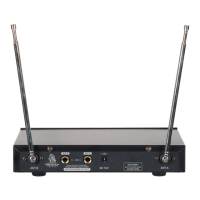
Details the ports and connectors on the rear of the receiver.
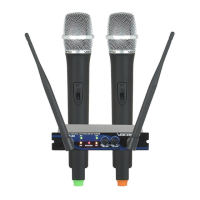
Explains the parts of the handheld microphone, including the mic head, switch, and battery compartment.
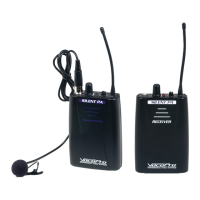
Details the parts of the body-pack transmitter, including antenna, LED, switch, and battery compartment.
Lists the main features of the Digital-32-Ultra system, such as channel count and technology.
Solves problems like no power, cutting microphones, and interference.
Addresses thumping noise, flashing lights, and suggests checking power supply.
Provides important guidelines for battery insertion and storage to avoid leakage.
The VocoPro Digital-32-Ultra is a professional vocal system designed for karaoke entertainment and other vocal applications, offering a comprehensive wireless microphone solution. This system is built to provide clear, professional-quality audio with minimal interference, making it suitable for various environments from home use to clubs, churches, and mobile setups.
At its core, the Digital-32-Ultra is a dual-channel digital wireless receiver that supports two independent wireless microphones or bodypack transmitters simultaneously. The receiver features a front panel with individual power ON/OFF switches for each channel, allowing users to control the power status of their microphones. Each channel also includes an infrared (IR) sensor, which is a crucial component for syncing the wireless microphones or bodypack transmitters to the receiver. This "one-touch" IR sync feature simplifies the setup process, enabling quick and efficient pairing of transmitters with the receiver.
The front panel of the receiver also includes a display for each channel, showing the current frequency channel setting. This allows users to easily monitor and adjust the operating frequencies. An RF LED indicator for each channel illuminates when a microphone is successfully connected and receiving a signal, providing visual confirmation of a stable connection. A "CH" button is present for each channel, which, when pressed, allows users to change the frequency channel. This is particularly useful when multiple systems are used together or when experiencing interference, as it enables custom selection of individual frequencies from the nine available factory preset channels. Each channel also has a volume knob, allowing users to adjust the overall microphone volume independently. Turning the knob clockwise increases the volume, while turning it counter-clockwise decreases it.
The rear panel of the receiver offers various connectivity options. It includes built-in receptacles for antennas, which are essential for catching the RF signal from the wireless transmitters. For audio output, the receiver provides two balanced XLR outputs, one for each channel, allowing users to connect the microphone signals directly to a mixer or amplifier using XLR cables. Additionally, there is an unbalanced 1/4" output, which can be used to send a mixed microphone signal to a mixer or amplifier via a 1/4" cable. The receiver is powered via a DC 12-18V power input, where the power adapter is connected.
The system comes with two types of wireless transmitters: handheld microphones and bodypack transmitters. The handheld microphones are designed for vocal performance and feature a mic head for picking up vocals. Each handheld microphone has an ON/OFF/MUTE switch. Holding this button powers the microphone on or off, indicated by a green LED. A quick press of the button mutes the microphone element while keeping the unit powered on, indicated by a red LED. An LED on the microphone indicates its operational status (ON/MUTE/OFF). Power for the handheld microphone is supplied by two AA batteries, which are inserted into a battery compartment accessed by twisting the bottom counter-clockwise.
The bodypack transmitters offer versatility, allowing users to connect headset microphones or instrument cables. Similar to the handheld microphones, the bodypack transmitter has an antenna for frequency transmission and an LED that indicates its operational status (ON/MUTE/OFF). An ON/OFF/MUTE switch functions similarly to the handheld microphone's switch, with a green LED for power on and a red LED for mute. The bodypack features a mini XLR (TA3F male) input for connecting accessories like headset microphones or instrument cables. It is also powered by two AA batteries, housed in a compartment that opens by pinching tabs inward and lowering the door forward. A crucial feature of the bodypack is its IR sensor, used for syncing with the receiver to a new frequency.
Setting up the system involves syncing the microphones to the receiver. For handheld microphones, users power on the microphone, remove the battery cover to expose the IR sensor, aim the microphone's IR sensor within 6 inches of the receiver's IR sensor, and then press and hold the "CH" button on the receiver. The receiver's RF LED and the microphone's LED will blink during the syncing process. A solid RF LED on the receiver indicates a successful connection to the newly set RF channel. The process for syncing bodypack transmitters is similar: power on the bodypack, open the battery compartment to access the sync LED, aim the sync LED within 6 inches of the receiver's IR sensor, and press and hold the "CH" button on the receiver. Again, a solid RF LED on the receiver confirms a successful connection.
When connecting the Digital-32-Ultra to a mixer, users have two main options. For balanced XLR connections, XLR cables (not included) are connected from the receiver's balanced outputs to individual microphone input jacks on the mixer. For unbalanced 1/4" connections, a 1/4" cable (included) is connected from the receiver's unbalanced output to a microphone input channel on the mixer.
Maintenance features focus on ensuring optimal performance and longevity. Users are advised to install the unit in a cool, dry, and clean place, away from heat sources, windows, and excessive vibration, dust, moisture, or cold. Proper air circulation is important to prevent internal temperature rise. The unit should never be operated upside-down, and the cabinet should not be opened by unauthorized personnel. Cleaning should be done with a clean, dry cloth, avoiding chemical solvents. For extended non-use periods, unplugging the power cord is recommended to save electricity and prevent fire hazards. In case of lightning, the power cord and antenna cable should be removed.
Battery management is critical for the wireless transmitters. Users are reminded to insert batteries correctly, follow manufacturer instructions, and avoid mixing old and new batteries, or different types of batteries (alkaline, standard, rechargeable). Exhausted or dead batteries should always be removed promptly, and batteries should be removed if the unit is stored for long periods to prevent leakage.
Troubleshooting tips are provided for common issues. If there's no power, users should check the power cord connection, ensure power strips are on, and follow the recommended power-on sequence for the receiver. For microphones cutting in and out, users should verify antenna attachment, keep the receiver away from fluorescent lights, ensure microphones are within operational range, and check battery levels. Thumping noises from speakers often indicate low batteries or, less commonly, an issue with the power supply. If receiver lights flash continuously, users should check the power supply, inspect the cable for damage, and ensure the correct power supply is used.
The Digital-32-Ultra is designed for ease of use and reliability, providing a robust wireless solution for vocal performances with features that cater to both beginners and more experienced users.
 General
| Number of Channels | 32 |
|---|---|
| Audio Frequency Response | 50Hz-15KHz |
| Dynamic Range | >100dB |
| Microphone Type | Handheld |
| Type | Wireless |
| Battery | AA |

 To Next Page