1
2
3
4
5
6
Telephone set
ADSL splitter
Telephone socket
Computer (PC/laptop)
Power socket
Vodafone DSL Router
Wi-Fi button:
Press to activate/deactivate Wi-Fi
Telephone socket
Telephone set
ADSL filter
Installation steps to activate
the Internet access service
Internet products from Vodafone.
For these products, fixed telephony is offered via a third
provider:
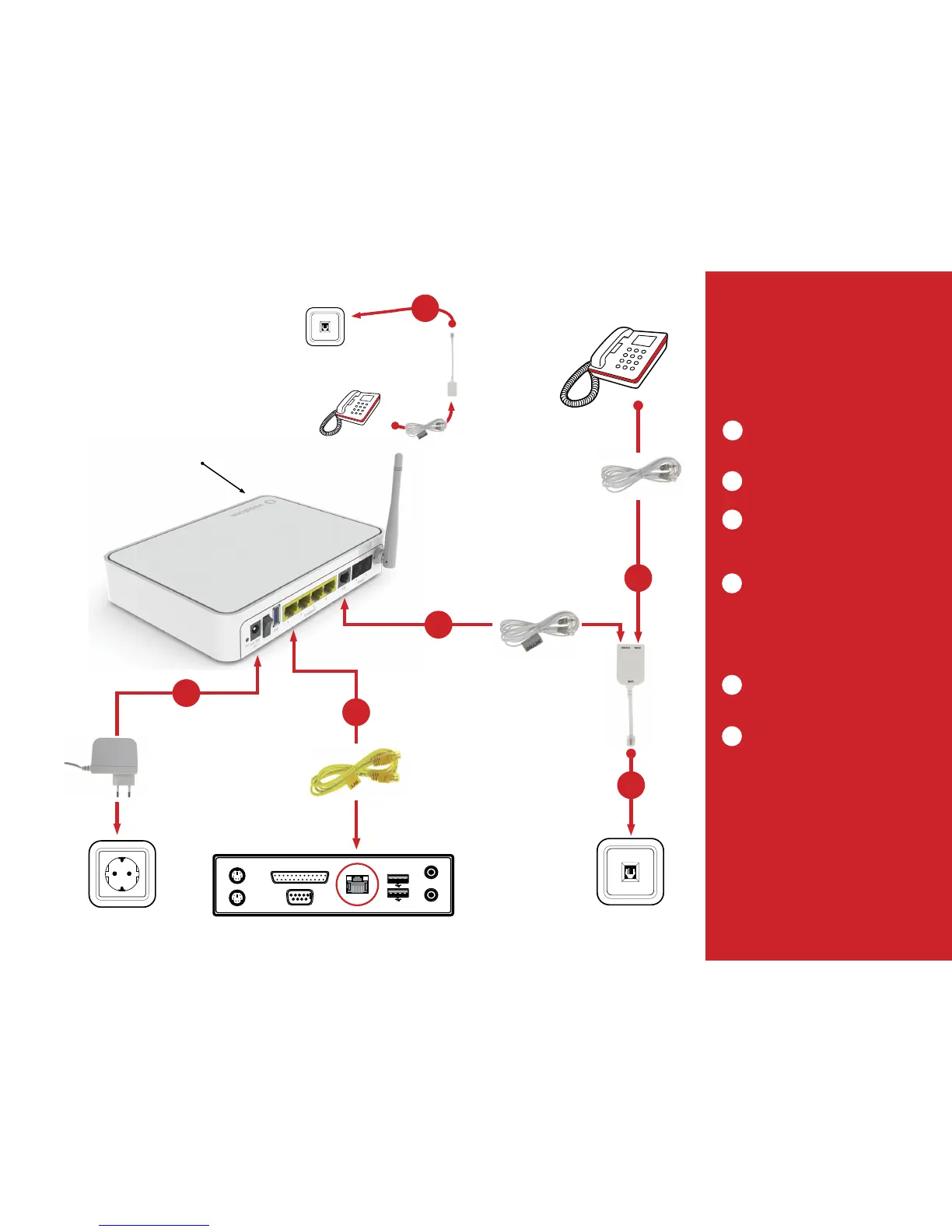
Disconnect the landline cable from the power
socket on the wall. Insert the telephone cable into
the PHONE port of the ADSL splitter.
Connect the ADSL splitter to the telephone
socket on the wall.
Insert the grey DSL/LINE cable into the grey DSL
port of the Vodafone DSL Router. Insert the other
end of the cable into the DSL (or Modem) port of
the ADSL splitter.
If you want to set up a wired connection to your
computer (laptop or PC), insert one end of the
yellow LAN/Ethernet cable into one of the
corresponding (yellow) ports on the back of the
Vodafone DSL Router. Insert the other end of
the cable into the Ethernet/LAN port of your
computer.
Insert the power adapter into a power socket and
the other end of the cable into the appropriate
port on the back of the device.
6. If you are using more than one telephone
sets on the same line, you will need to insert an
ADSL filter between the telephone set and the
corresponding telephone socket. We suggest that
you do not use more than 2 telephone sets.
1
2
3
4
5
6



 To Next Page