EasyManua.ls Logo

Vodafone Smart Prime 6. - Email Sync and New Email Problems; Network Password Change Impact; Updating Account Password; Email Sync Option Check

Vodafone Smart Prime 6.
4 pages
Print Icon
To Next Page IconTo Next Page
To Previous Page IconTo Previous Page
Loading...
GENERAL TROUBLESHOOTING
VODAFONE SMART PRIME 6
Page 2 of 2
My emails have stopped syncing / I’m not getting any new emails.
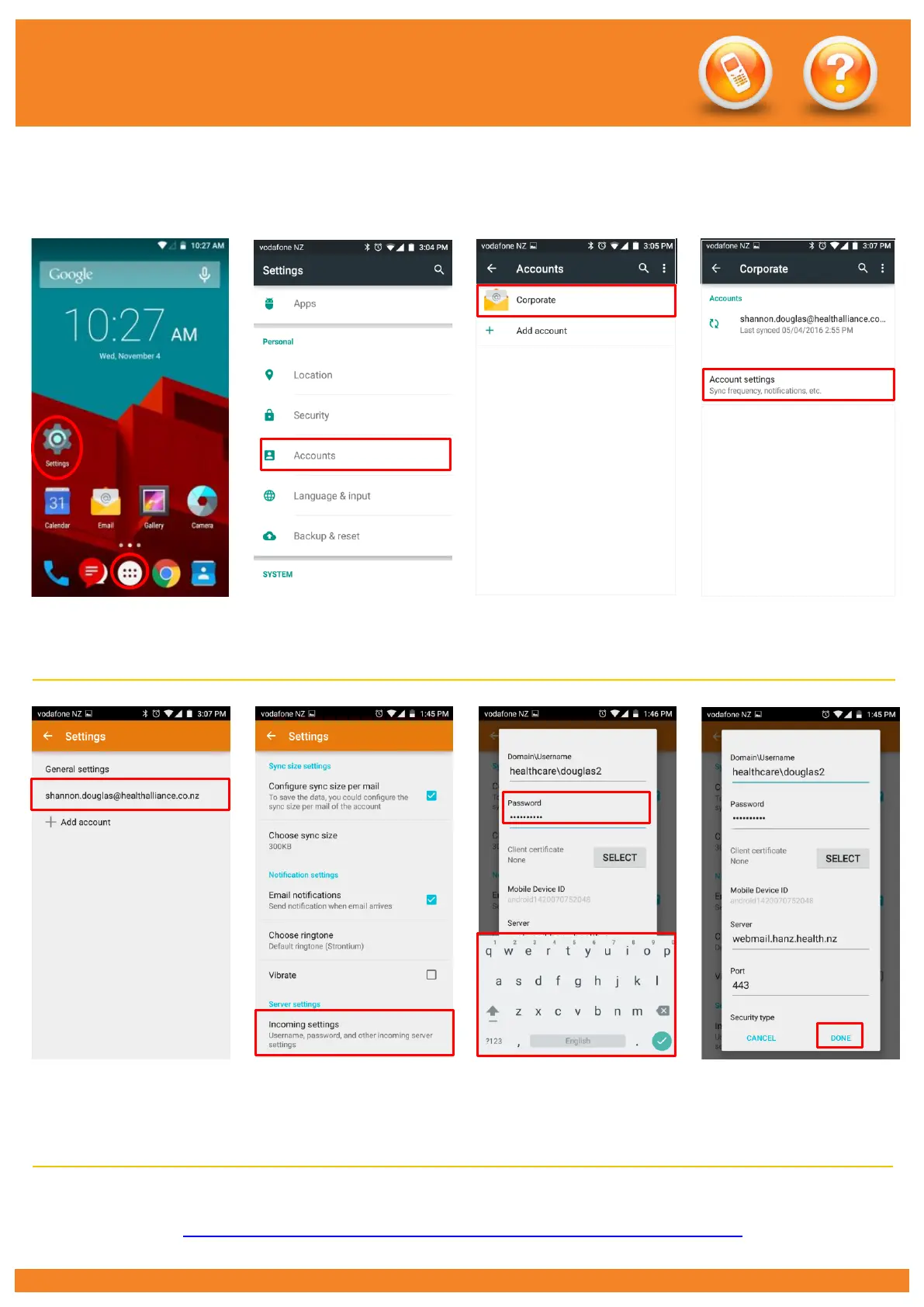
1. Have you changed your network password? If so you will need to change it on your phone.
1. Go to Settings. (This may
be in your Apps)
2. Scroll down and touch
Accounts.
3. Touch Corporate.
4. Touch Account settings.
5. Touch your email
address.
6. Scroll down to the very
bottom and touch Incoming
Settings.
7. Touch and delete your old
password and type in your
new network password.
8. Touch Done.
2. Check the Sync Email option is enabled. See ‘Setting the Email Sync Period Vodafone Smart Prime 6
How To guide: http://pulse/OurServices/InformationTechnology/MobileServices/HowToGuides.aspx