EasyManua.ls Logo

Vodafone Smart V8 - Page 24

Vodafone Smart V8
106 pages
Print Icon
To Next Page IconTo Next Page
To Previous Page IconTo Previous Page
Loading...
24
Knowing the basics
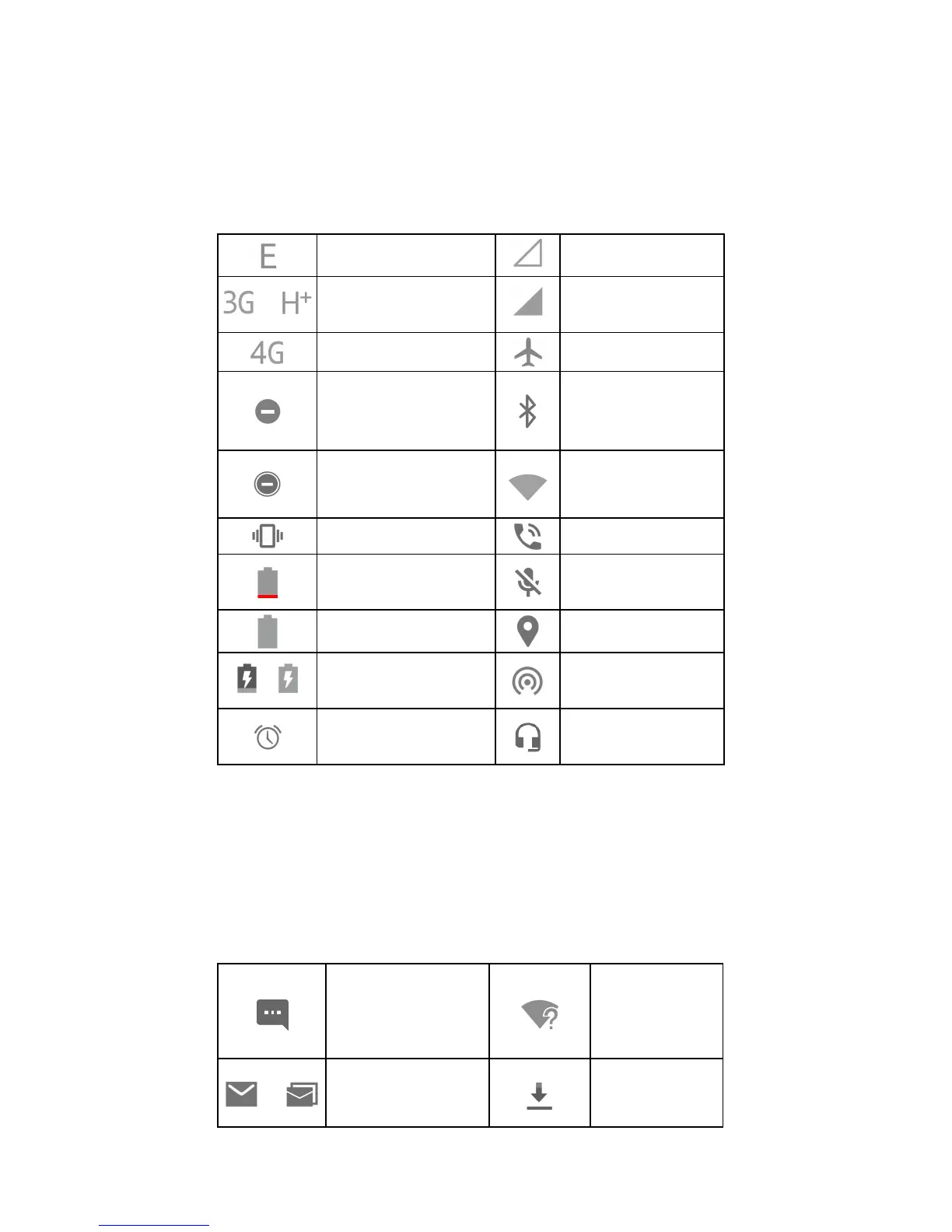
Monitoring the phone status
The status bar at the top of the home screen provides phone
and service status icons on the right side. Below are some of the
icons you may see.
EDGE connected
No signal
/
3G/HSPA+
connected
Signal strength
4G connected
Flight mode
Do not disturb mode
on (Alarms only or
Priority only)
Bluetooth
®
on
Do not disturb mode
on (Total silence)
Connected to a
Wi-Fi
®
network
Vibration on
Speaker on
Battery low
Phone microphone
off
Battery full
GPS on
/
Battery charging
Portable Wi-Fi
hotspot on
Alarm set
Wired headset
connected
Managing notifications
Notification icons
The status bar at the top of the home screen provides
notification icons on the left. Below are some of the icons you
may see.
New SMS/MMS
New Wi-Fi
network
detected
/
New message(s)
from the Email app
Downloading
data

Related product manuals