33
Managing notifications
Notification icons
The status bar at the top of the home screen provides
notification icons on the left. Below are some of the icons you
may see. Applications may present their own notification
icons.
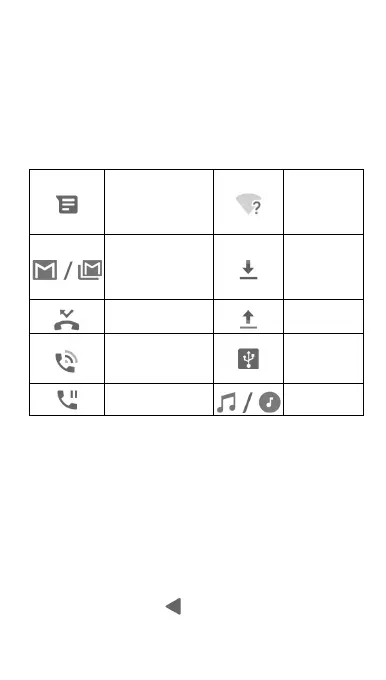
New SMS/MMS
New Wi-Fi
network
detected
New message(s)
from the Gmail™
app
Downloading
data
Missed call
Sending data
Call in progress
USB
tethering on
Call on hold
Song playing
Open/close the notification panel
Notifications report the arrival of new messages, calendar
events, and alarms, as well as ongoing events, such as when
you are playing music. You can open the notification panel to
view the details of notifications.
To open the notification panel, swipe your finger down
from the top of the screen.
To close the notification panel, swipe your finger up on
the screen or touch
.



 To Next Page