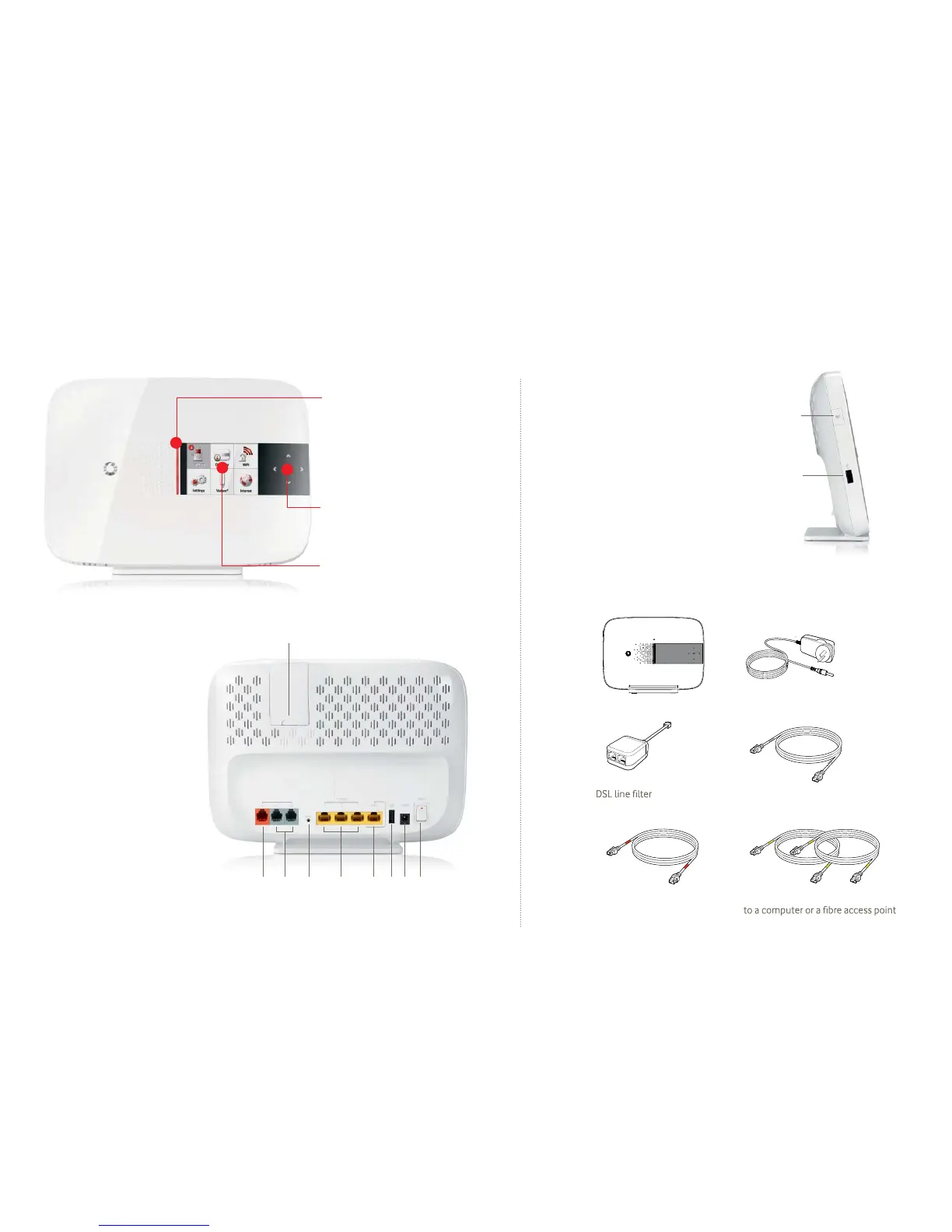
1.2 Your Vodafone Station
Indicator
Light on
Vodafone Station is powered on.
Intermittent/fl ashing
Indicates you have an incoming
call, missed call, fi rmware
upgrade or any other notifi cation
that requires your attention.
Arrow keys
To move around the menus or to
go back a screen, and press OK to
select the highlighted item.
LCD Screen
Colour display with quick
access to all key features
The screen will light up every time
you turn on your modem
1 2 3 4 4a 5 6 7
ADSL port
Phone ports
Reset button
Ethernet ports 10/100
GIGA Ethernet port
USB port
Power supply port
On/Off switch
USB port that supports 3G Vodems®
1
2
3
4
4a
5
6
7
8
WiFi On/Off button
Switches your WiFi option on or off.
You can also turn the WiFi on and off
directly from display. For more details
about the WiFi button, see
2.3 Connecting a computer to your
Vodafone Station using a wireless
connection (WiFi)
Second USB Port
Connects a USB storage device,
such as a USB disk, a printer etc.
1.3 What’s in the box
connecting to a phone
Cable (red tags) for
connecting to a phone jack
2 cables (yellow tags) for connecting
Cable (gray tags) for
Power supplyVodafone Station
8
9
9
10
10


 To Next Page
 Loading...