
 Need help?
Do you have a question about the Vogons AWE64 Legacy Ultimate and is the answer not in the manual?
ISA Specification version 1.0a compliant.
32-voice polyphony, 16 parts multi-timbral, 1MB ROM General MIDI samples, 32MB DRAM.
CQM stereo music synth, Yamaha YMF262 OPL3, SB/Adlib compatibility, DIP Switch.
Full duplex, 16/8-bit digitizing, programmable sampling rates, High/Low DMA, dynamic filtering.
Mixes digitized voice, MIDI, CD Audio, Line-In, Mic, PC Speaker sources.
Software control for Master, Digitized Voice, inputs, PC Speaker, levels, Treble/Bass, panning.
Increased depth/breadth, enhances mono/stereo, independent of speakers.
Built-in MIDI interface, HardMPU controller, Wave Blaster connector, DIP Switches.
Pentium 90MHz CPU, VGA/SVGA, 8MB RAM, 20MB disk space, 4x CD-ROM, Win95/Win3.1x with DOS 5.0 & PnP.
Connects an internal audio source, such as TV Tuner, FM Radio or MPEG card.
Connect a CD-ROM drive using a CD audio cable.
Sony/Philips Digital Interface format connector for outputting digital signal from EMU8000.
Connects your motherboard's speaker connector.
Routes Line-Out and Mic-In interfaces to the front panel of your PC's case.
Connect your MIDI daughterboard here (e.g., Yamaha DB50XG or Dreamblaster X2).
Connects external devices (cassette, DAT, Minidisc player) for playback or recording.
Connect AC or headphones for analogue stereo sound output.
Connects an external digital device that uses an S/PDIF connector.
Connects a joystick or an external MIDI device (e.g., Roland MT-32 or MIDI-keyboard).
Allows switching between built-in Creative MPU-401 MIDI and HardMPU MIDI host controllers.
Sets MIDI Feedback Enable function ON or OFF. Must be disabled for AWE64 MPU-401 to function.
'ON' disables OPL3, 'OFF (1)' routes OPL3 to port 388h.
Sets the IRQ for HardMPU MIDI host controller. Default is 2/9.
Sets the port for HardMPU MIDI host controller. Default is 330h.
Step-by-step guide for installing the sound card into a PC's ISA slot and connecting peripherals.
Procedure for installing device drivers for the audio card components in Windows 95/98.
Instructions for installing audio software using the provided CD-ROM or ISO image.
Manual installation of the MPU-401 component via Windows 95/98 'Add New Hardware' wizard.
Procedure for installing software using Creative Tools or UNISOUND utility in DOS/Windows 3.1x.
Information about UNISOUND, a Freeware DOS tool for ISA PnP sound card configuration.
Example configuration for the BLASTER environment variable in AUTOEXEC.BAT for AWE64 Legacy.
How to run UNISOUND.EXE and its default mixer volume settings.
Using BAT files to configure CQM and OPL3 settings with UNISOUND.
Explanation of I/O addresses and a table of default assigned ranges.
Explanation of IRQ lines and an example assignment.
Explanation of DMA channels and a table of possible assignments.
Specifies the directory location of the audio card's drivers and applications.
Specifies base I/O address, IRQ line, and DMA channels of the audio interface.
Specifies MIDI file format and data routing (synthesizer or MIDI port).
Statements added to AUTOEXEC.BAT for environment variables and utility execution.
Statements added to CONFIG.SYS for low-level DOS device drivers.
Instructions to reroute CQM to another port and enable OPL3 on port 388h using switches and ctpnp.cfg.
Steps to configure HardMPU for GamePort or Wave Blaster header using switches.
Steps to configure the default Creative AWE64 MPU-401 for GamePort using switches.
Steps to configure AWE64 MPU-401 for Wave Blaster header using switches.
Notes on using Roland MT32 or compatible synthesizers with AWE64 Legacy in DOS games.
S/PDIF out is only for EMU8000/CQM music output, not digitized sound or OPL3/daughterboard.
Inner TTL output for routing EMU8000/CQM digital signal to another sound card.
RCA connector for routing digital EMU8000/CQM signal to an external audio receiver.
Procedure for attaching a MIDI daughterboard to the 26-pin connector marked X7.
Choosing between HardMPU or Creative MPU-401 mode for handling daughterboards.
Steps to resolve conflicts using Device Manager and its automatic settings feature.
Procedure for resolving conflicts using Plug and Play configuration utility.
Instructions on how to test the card's 32MB RAM using the Creative Diagnose utility.
 General
| Interface | ISA |
|---|---|
| DAC | 16-bit |
| Wave Blaster Header | Yes |
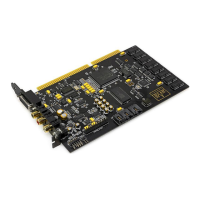
| Model | AWE64 Legacy Ultimate |
| Type | Sound Card |
| Channels | 64 |
| Sample Rate | 44.1 kHz |
| MIDI Support | Yes |
| DOS Compatibility | Yes |

 To Next Page