Reset Your Phone
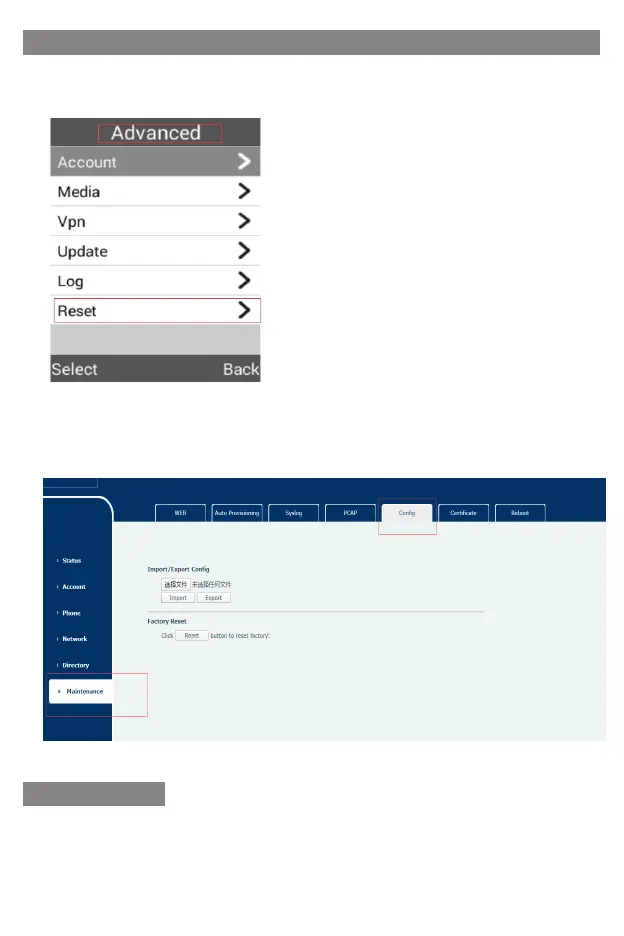
1) Press the Menu soft key when the phone is idle, select Advanced Reset to reset
your phone.
2) In the dial-up interface, press * #000000# to reset the phone.
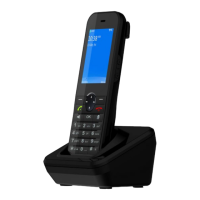
3) Login web background select MaintenanceConfig click Reset to reset factory
HEALTH AND SAFET
Declaration of Conformity
We hereby declare that (all essential radio test suites have been carried out and
that) the above named product is in conformity to all tile essential requirements
or Directive (RED) 2014/53/EU.


 To Next Page