EasyManua.ls Logo

Voice Systems eclipse sub - Mode; Phase; Output

Voice Systems eclipse sub
13 pages
Print Icon
To Next Page IconTo Next Page
To Previous Page IconTo Previous Page
Loading...
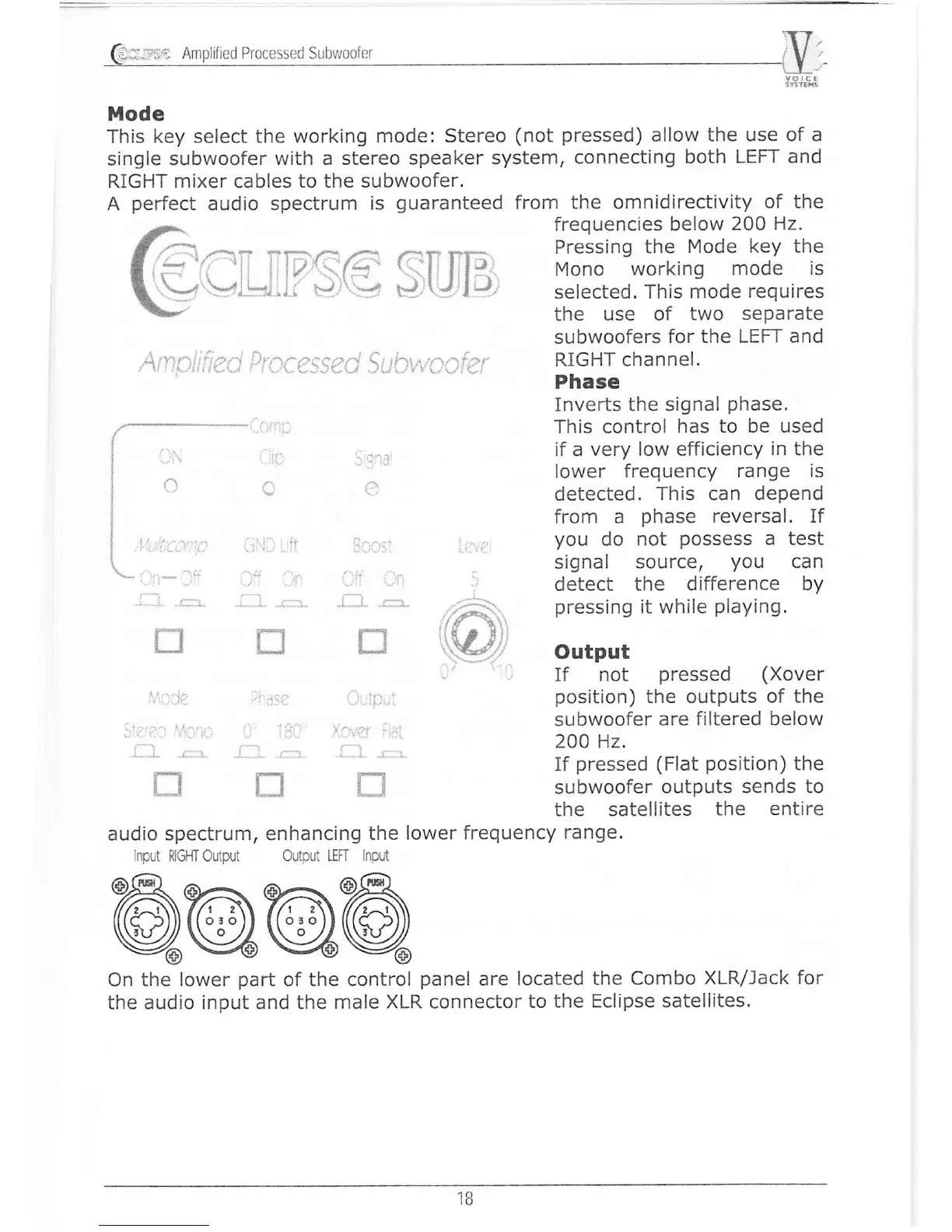
Mode
ïhis key select the
working mode:
Stereo
(not
pressed)
allow
the use of a
single subwoofer
with a stereo
speaker system,
connecting
both
LEFT and
RIGHT mixer cables to the subwoofer.
A
perfect
audio spectrum
is
guaranteed
l-: 1:^ t-r--
{..§ll-}
U
ïJ
J-"t
from
the omnidirectivity
of the
frequencies
below
2OO Hz.
Pressing
the
Mode key the
Mono
working
mode is
selected.
This mode
requires
the use
of two
separate
subwoofers
for the
LEFT and
RIGHT channel.
Phase
Inverts the signal
phase.
This control
has to be used
if a
very low efficiency
in the
lower frequency
range is
detected.
This
can
depend
from a
phase
reversal.
If
you
do
not
possess
a test
signal
source,
you
can
detect
the difference
by
pressing
it while
playing.
Output
If
not
pressed (Xover
position)
the outputs
of the
subwoofer
are
filtered below
2OO l1z.
If
pressed (Flat position)
the
subwoofer
outputs
sends to
the satellites
the
entire
LJ
..r .... i.. .
i:::.:
È*t
**Í
l/'
.:
n.:
$_..i
L...i
[- *9
audio spectrum, enhancing
the lower
frequency
range.
Input
RIGHT output
output LEFI lnpirt
@e@@
On the lower
part
of the control
panel
are
located the
Combo
XLR/Jack for
the
audio input and the
male XLR connector
to
the Eclipse satellites.
'18