Page 4 of 16
STEP 1: ATTACHING MONITOR BASE TO SEAT BASE
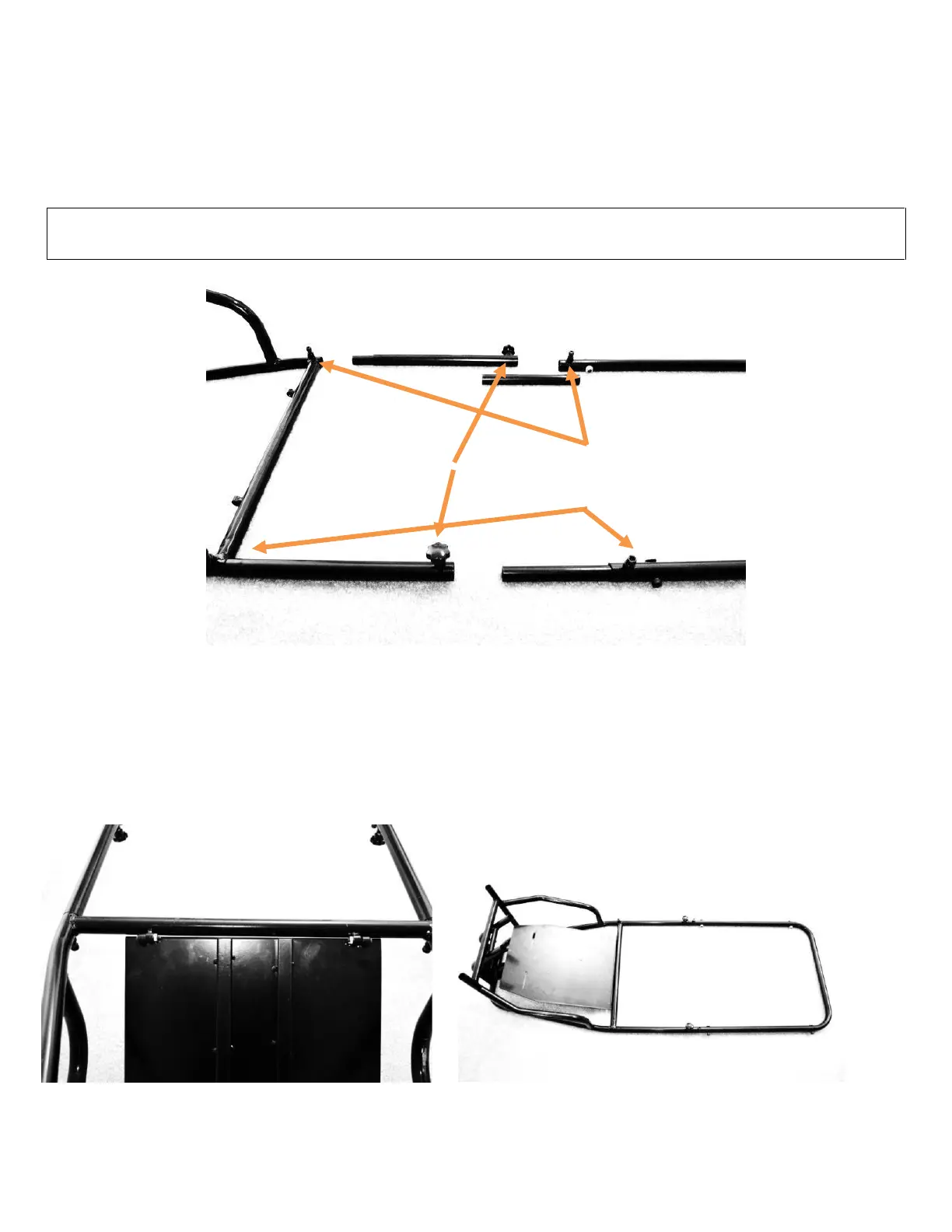
Begin assembly by attaching the monitor base to the seat base using the adjustment tubular connectors as shown in
FIGURE 1 below. The inner adjustment tubes allow you to vary the distance between the seat base and the monitor
base. Use four (4) M8*16mm Socket Cap Machine Screws (No. 3) and two (2) M8x16mm Machine Screws with Knob (No.
5). You can adjust the optimum seat distance later.
TIP: APPLYING A THIN LAYER OF SILICON GREASE (NO. 17) ONTO THE INNER ADJUSTMENT TUBES WILL FACILITATE
INSTALLATION AND FURTHER ADJUSTMENTS
FIGURE 1: ATTACHING MONITOR BASE TO SEAT BASE
STEP 2: PEDAL TRAY
Flip the monitor base and seat base over and attach the pedal tray using two (2) M6*30mm Button Head Machine
Screws (No. 2) and two (2) M6 Self-Locking Nuts (No. 4). See FIGURES 2A and 2B below:
FIGURE 2A: ATTACHING PEDAL TRAY TO MONITOR BASE


 To Next Page