Need help?
Do you have a question about the volkano Cobalt Series and is the answer not in the manual?
Key features of the wireless keyboard, including keycaps, shortcut keys, and wireless range.
Key features of the wireless mouse, including usage, DPI settings, and wireless operation.
Detailed technical specifications for the wireless mouse, including sensor, connectivity, and size.
Detailed technical specifications for the wireless keyboard, including key system, compatibility, and size.
Step-by-step instructions for connecting and setting up the wireless keyboard and mouse combo.
Explanation of how to adjust the mouse sensitivity settings using the DPI switch.
Information regarding the low power indicator light on the keyboard and battery replacement.
Important safety guidelines and precautions for using the wireless keyboard and mouse combo.
Guidelines on how to clean and care for the wireless keyboard and mouse.
Instructions for proper and environmentally friendly disposal of the product.
Legal disclaimer regarding product and company trademarks and usage.
Information about the standard 12-month limited warranty against manufacturing defects.
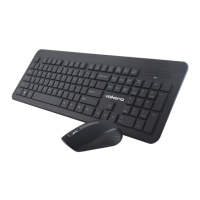
The Volkano Cobalt Series Wireless Mouse & Keyboard Combo is a versatile input solution designed for a wide range of computing environments. This combo offers a seamless wireless experience, making it suitable for use with Windows, macOS, Linux, and Android operating systems. Its plug-and-play functionality ensures ease of setup, as no additional drivers are required for operation.
The core function of this device is to provide wireless input for computers and other compatible devices through a keyboard and a mouse. The keyboard is designed for efficient typing and includes a variety of shortcut keys to enhance productivity and multimedia control. The mouse offers precise cursor control with adjustable sensitivity, catering to different user preferences and application needs. Both components communicate wirelessly with the host device via a single Nano USB receiver, simplifying connectivity and reducing cable clutter.
The keyboard features chocolate block style keycaps, which provide a comfortable and responsive typing experience. It is equipped with both multimedia and Windows shortcut keys, allowing users to quickly access functions such as media playback control (play, pause, stop, previous, next), volume adjustment (up, down, mute), and system shortcuts (opening media player, email, "This PC," and browser homepage/bookmarks). These shortcut keys are activated by pressing the "Fn" key in combination with the corresponding "F" key (F1-F12), offering quick access to frequently used functions without needing to navigate through software menus. The wireless operation extends up to 8 meters (26 feet), providing flexibility in positioning and use, whether at a desk or from a distance, such as when connected to a smart TV or media center. The keyboard is powered by an AAA battery, and a low power alert system, indicated by a flickering red light, notifies the user when the battery needs replacement, ensuring uninterrupted use.
The mouse is designed for both left and right-handed users, offering ergonomic flexibility. It features adjustable DPI (Dots Per Inch) settings, allowing users to switch between 800, 1200, and 1600 DPI. This adjustability is crucial for tailoring cursor sensitivity to specific tasks, such as precise graphic design work (lower DPI) or rapid navigation across multiple screens (higher DPI). The DPI can be easily toggled by pressing and holding both the Left Mouse Button and the Right Mouse Button simultaneously for three seconds. The default DPI setting is 800. Like the keyboard, the mouse operates wirelessly up to 8 meters (26 feet), providing ample range for various setups. It is powered by an AA battery. The mouse also includes a scroll wheel with a button, enhancing navigation through documents and web pages. The Nano USB receiver, which facilitates the wireless connection for both the mouse and keyboard, is conveniently stored within the mouse's battery compartment, making it easy to transport and preventing loss. A power switch on the mouse allows users to conserve battery life when the device is not in use.
The Volkano Cobalt Series Wireless Combo is designed for straightforward setup. Users simply need to open the battery compartment of the mouse to retrieve the Nano USB receiver, insert the AA battery into the mouse and the AAA battery into the keyboard, and then plug the Nano USB receiver into an available USB port on their computer. Sliding the power switch on the mouse to the "On" position initiates the connection, and the computer will automatically install the necessary device drivers within a few seconds, making the combo ready for immediate use. This integrated approach ensures that both input devices work seamlessly together through a single receiver, freeing up additional USB ports.
Maintaining the Volkano Cobalt Series Wireless Combo is simple and designed to prolong its lifespan.
It is essential to ensure that the Cobalt Series Wireless Set is not plugged into any device before cleaning or performing maintenance. Additionally, users should remove the batteries from both the keyboard and the mouse prior to cleaning to prevent accidental activation or potential damage.
For general cleaning, the surface of the Cobalt Series Wireless Set can be wiped down using a soft, slightly damp cloth. This method is effective for removing dust and light smudges without damaging the finish.
Users are advised to avoid using any harsh or abrasive cleaning chemicals or materials on the Cobalt Series Wireless Set. Such substances can damage or scratch the surface finish, affecting the aesthetic and tactile quality of the devices. To ensure optimal performance and longevity, the combo should not be exposed to high temperatures for extended periods. Specifically, it should not be stored in temperatures exceeding 140°F (60°C). Extreme temperatures can negatively impact the internal components and battery life.
The keyboard includes a low power alert feature: a red low power light will flicker repeatedly to indicate that the AAA battery is depleted. Users should replace the battery promptly to continue using the keyboard without interruption. Similarly, the mouse requires an AA battery, and while not explicitly detailed for a low power indicator, regular battery replacement is part of routine maintenance.
When not in use, especially during transport, the Nano USB receiver can be stored securely within the mouse's battery compartment, preventing it from being lost. Turning off the mouse via its power switch when not in use helps conserve battery life.
In line with environmental responsibility, electrical appliances like this combo should not be disposed of as unsorted municipal waste. Instead, users are encouraged to utilize separate collection facilities. Local government resources can provide information regarding available collection systems. Proper disposal prevents hazardous substances from leaking into groundwater and entering the food chain, thereby protecting health and well-being.
The Volkano Cobalt Series Wireless Mouse & Keyboard Combo is a user-friendly, efficient, and durable input solution, designed with both functionality and ease of maintenance in mind.
 General
| Product Type | Gaming Mouse |
|---|---|
| Connectivity | Wired |
| Interface | USB |
| Buttons | 6 |
| Cable Length | 1.5 m |
| DPI | Up to 3200 |

 To Next Page