Need help?
Do you have a question about the volkano Core Series and is the answer not in the manual?
Key features of the Volkano fitness watch, including heart rate monitor and pedometer.
Lists the items included in the product package, such as the watch and charging cable.
Details on screen type, Bluetooth version, battery capacity, and charge time.
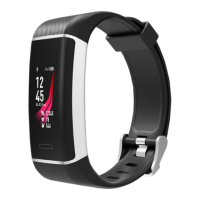
Identifies the main parts of the watch: Screen, Virtual Key, Heart Rate Sensor, and Charging Pins.
Guide on how to connect the watch to a power source for charging.
Instructions on how to turn off the Volkano Active watch.
Steps to download and install the companion application via website or QR code.
Steps to connect the watch to a smartphone via Bluetooth and the Volkano Active App.
Instructions for finding the Bluetooth settings on iPhone and Android devices.
How the watch automatically connects to previously paired Bluetooth devices.
Explanation of how to use the 'Virtual Key' for navigation and power.
Steps to disconnect the watch from a smartphone and its Bluetooth settings.
How to change the watch's dashboard display using the Virtual Key.
Details on how the watch records and displays daily activity like steps and distance.
Overview of the nine available multi-sport modes and how to select them.
Instructions on how to stop and save sport activity data.
How to use the watch to monitor heart rate and view data on the app.
Explanation of automatic sleep tracking and sleep report details.
How to set and check alarms on the Volkano Active App.
How to view incoming calls, SMS, and social media notifications.
Setting up sedentary reminders and movement thresholds.
How to use the watch to make your connected smartphone ring.
Information on checking Bluetooth Mac Address, Device name, and Firmware Version.
Instructions on how to turn off the Volkano Active watch.
Description of performance indicators displayed in the app dashboard.
Option to share your fitness progress via social media.
Allows users to input current and ideal weight.
Features for viewing recorded activities and setting reminders.
Allows changing profile information and setting goals for steps, distance, calories, and sleep.
Managing app notifications and customizing advanced settings like movement and gestures.
Features to locate the watch and sync data with Google Fit.
Choosing a watch to connect and instructions for firmware updates.
Clearing performance data and viewing app version information.
Important safety guidelines for using the Volkano Active watch, especially concerning children.
Guidelines for cleaning the device and avoiding damage from heat or chemicals.
Instructions on how to dispose of the electrical appliance responsibly.
Information regarding trademarks and limitations of the heart rate monitor technology.
Details about the 12-month limited warranty and exclusions.
The Volkano Active Tech Core Series Smart Watch, model VK-5065-BK, is a splash-resistant fitness watch designed to help users track their fitness activities and stay connected. It comes with a heart rate monitor, pedometer, and offers message and call notifications. The watch boasts a 3-day battery life, ensuring it can keep up with your daily routine without constant recharging.
The Volkano Active Tech Core Series Smart Watch serves as a comprehensive fitness tracker and a convenient notification hub. Its primary functions include:
Heart Rate Monitoring: The watch is equipped with a built-in heart rate sensor that allows users to monitor their heart rate. By long pressing the "Virtual Key" when the heart rate monitor is selected, users can initiate the monitoring process. Another long press will exit the heart rate monitor. After synchronizing with the Volkano Active App, users can view their heart rate data on their smartphone, gaining insights into their cardiovascular health during various activities.
Pedometer: The watch automatically records daily activity, including steps taken, calories burned, and distance covered. This data is synchronized with the Volkano Active App, providing a detailed overview of the user's daily movement and helping them track their fitness goals.
Multi-Sport Modes: For more specific activity tracking, the watch offers nine multi-sport modes: Walking, Running, Biking, Run Indoor, Basketball, Swimming, Table Tennis, Badminton, and Climbing. Users can select their desired mode by long pressing the "Virtual Key" once the multi-sports function is chosen. The watch will record data specific to the selected sport, which can then be sent to the Volkano Active App for analysis. To exit a sport function, users long press the "Virtual Key" and select the stop option to save their movement. It's important to note that sport data will not be saved if the activity duration is less than one minute.
Sleep Monitoring: The Volkano Active automatically monitors sleep patterns. Once sleep ends, the watch displays a sleep report detailing total sleep, light sleep, and deep sleep times. A more detailed sleep report can be viewed on the smartphone after synchronizing with the Volkano Active App, offering valuable insights into sleep quality.
Message & Call Notifications: The watch keeps users connected by providing notifications for incoming calls, SMS, QQ, Wechat, Whatsapp, Facebook, and Twitter messages. Users can long press the "Virtual Key" to view the content of these notifications directly on the watch screen.
Alarm Clock: Users can set alarms via the Volkano Active App. When an alarm is active, its icon will be animated on the watch, and the watch will vibrate to alert the user.
Sedentary Reminder: To encourage movement, the watch includes a sedentary reminder function. Users can enter the "Movement" settings menu by long pressing the "Virtual Key." Here, they can switch the mode "On" or "Off" with a short press. Long pressing the "Virtual Key" exits the menu. More detailed conditions, such as start and end periods, time intervals (minutes), threshold values (steps), and repeat settings (weeks), can be configured in the App. The device will vibrate to remind the wearer to move once the set conditions are met.
Find Phone: This feature helps users locate their smartphone. After the watch is connected to the Volkano Active App, long pressing the "Virtual Key" will make the smartphone ring. For iPhone users, the Volkano Active App must be actively displayed on the screen for this function to work.
About Information: Users can access information about their Volkano Active, including the Bluetooth Mac Address, Device name, and Firmware Version, by long pressing the "Virtual Key" when the "About" option is selected.
The Volkano Active Tech Core Series Smart Watch is designed for intuitive and user-friendly operation, primarily through its "Virtual Key" and the accompanying Volkano Active App.
Charging: To charge the watch, remove it from its strap and connect the charge cable. Plug the USB charging cable into a powered AC adapter or a computer USB port. The watch will display a charging indicator.
Power On/Off: To power off the watch, long press the "Virtual Key" when the "Off" option is selected from the "More" menu. To power on the watch from a powered-off state, long hold the "Virtual Key."
Navigation: The "Virtual Key" is central to navigating the watch's interface. A short press switches between main menu interfaces, allowing users to browse through different functions like heart rate, pedometer, and multi-sport modes. A long press of the "Virtual Key" is used to "Confirm" selections or enter specific functions.
Connecting with a Mobile Phone:
Connecting with Paired Devices: Once the Volkano Active is turned on, it will automatically attempt to connect with the last paired Bluetooth device that is within range. If automatic connection fails, users can manually open the Bluetooth menu on their device and select "VK-5065" from the Bluetooth device list.
Unbinding from a Mobile Phone: To unbind the Volkano Active from a smartphone:
Volkano Active App Dashboard: The App's dashboard provides a summary of daily performance indicators, including weight, sleep, and heart rate.
Share Function: The App allows users to share their progress through social media.
Entry Weight: This page in the App enables users to enter their current weight, set an ideal weight, and specify a target date to reach that ideal weight.
Calendar: The App includes a calendar display.
Activity Log: This page displays a log of all activities recorded while wearing the Volkano Active.
Reminder Settings: Users can toggle and set various reminders within the App.
My Profile: This section in the App's settings allows users to change their profile information.
Goals: Users can set and modify goals for steps, distance, calories, and sleep. After making changes, they must tap the save button.
Notifications: This setting allows users to control which application notifications appear on the Volkano Active.
Advanced Settings: This section provides toggles for settings related to weather, movement, heart rate, drinking water, do not disturb mode, and gesture control.
Find the Smart Watch: Tapping this option in the App will make the Volkano Active vibrate, assisting users in locating it.
Google Fit Integration: Toggling this setting "On" allows the Volkano Active App to send performance data to Google Fit.
Theme Customization: The theme of the App can be changed from this page.
Firmware Update: The App allows for firmware updates of the Volkano Active. It is crucial to keep the App running and maintain a stable internet connection during updates. Users should also be aware that data charges may apply from their cellular service provider.
Reset: Tapping this option in the App clears all stored performance data.
Proper care and maintenance are essential to ensure the longevity and optimal performance of the Volkano Active Tech Core Series Smart Watch.
Before Cleaning: Always ensure the Volkano Active is unplugged from any device before cleaning or performing maintenance. It should also be switched off.
Cleaning: To clean the watch, wipe its surface with a soft, slightly damp cloth. Avoid using harsh or abrasive cleaning chemicals or materials, as these can damage or scratch the surface finish.
Temperature Exposure: Do not expose the Volkano Active to high temperatures for extended periods. Similarly, avoid storing the device in temperatures exceeding 60 °C.
Safety Precautions:
Environmentally Friendly Disposal: Electrical appliances should not be disposed of as unsorted municipal waste. Instead, use separate collection facilities. Contact your local government for information on available collection systems. Improper disposal of electrical appliances in landfills or dumps can lead to hazardous substances leaking into groundwater and the food chain, potentially harming health and well-being.
Disclaimer on Heart Rate Monitor: While the heart rate monitor technology is advanced and medically tested, certain limitations may cause inaccuracies in readings under specific circumstances, such as user physical characteristics, device fit, and user activity intensity. The heart rate monitor is NOT intended for medical purposes, diagnosis, treatment, cure, or prevention of any disease or condition. Users should not rely on device information as an alternative to medical advice and should consult a doctor or healthcare provider for any medical concerns or conditions. Immediate medical attention should be sought if suffering from a medical condition, and medical advice should never be delayed or disregarded based on information from this device.
 General
| Connectivity | Bluetooth |
|---|---|
| Water Resistance | IP67 |
| Features | Heart rate monitoring, sleep tracking |
| Compatibility | iOS and Android |
| Activity Tracking | Steps, distance, calories burned |
| Battery Life | Up to 7 days |

 To Next Page