EasyManua.ls Logo

volkano VX Gaming PRECISION Series - User Manual

volkano VX Gaming PRECISION Series
9 pages
Print Icon
To Next Page IconTo Next Page
Loading...
INSTRUCTION MANUAL
Please read these instructions carefully and
retain for future reference.
VX-133-BK
TA-2020/5027
APPROVED
PRECISION
SERIES
WIRELESS XBOX X, XBOX S
& XBOX ONE CONTROLLER
Question and Answer IconNeed help?

Do you have a question about the volkano VX Gaming PRECISION Series and is the answer not in the manual?

Summary

Package Contents and Features

Package Contents

Lists all items included in the wireless controller package.

Features

Highlights key functionalities and design aspects of the controller.

Specifications

Details technical attributes like connectivity, compatibility, and battery.

Controller Parts and Functions

Description of Parts

Identifies and labels all buttons, joysticks, and ports on the controller.

Functions

Explains how to use features like Turbo Fire and Vibration.

Controller Connectivity and Usage

Charging the Controller

Provides instructions on how to charge the controller via USB.

Pairing with Your Xbox

Guides on how to wirelessly connect the controller to an Xbox console.

Pairing with Your PS3

Instructions for connecting the controller to a PlayStation 3.

Pairing with Your Computer

Steps to establish a wireless connection with a PC, including driver setup.

Safety, Disposal, and Warranty

Safety Precautions

Details important safety warnings to prevent hazards and damage.

Environmentally Friendly Disposal

Information on proper disposal of the product according to WEEE directive.

Disclaimer

States terms regarding trademarks and affiliations.

Warranty

Outlines the standard 12-month warranty terms and conditions.

Overview

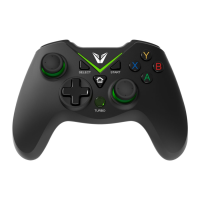
The VX Gaming Precision Series Wireless Controller, model VX-133-BK, is a versatile game controller designed for use with Xbox™ X, Xbox™ S, Xbox™ One, PS3™, and PC platforms. It features a 2.4 GHz wireless connection via a USB receiver, offering a cable-free gaming experience.

Function Description:

This controller provides a comprehensive set of controls for immersive gameplay. It includes two precision analog joysticks for 360-degree control, a D-Pad for directional input, and 12 buttons with a turbo function. The new Impulse Triggers are designed to deliver precise fingertip feedback, enhancing realism in games. The streamlined thumb sticks, D-Pad, and contours are engineered for improved speed, precision, accuracy, and comfort, and the controller is designed to fit a wider range of hand sizes comfortably.

Important Technical Specifications:

  • Connectivity: 2.4 GHz Wireless Connection via USB Receiver.
  • Compatibility: Xbox™ X, Xbox™ S, Xbox™ One, PS3™, PC (Windows™ 10 / 8 / 7 / Vista / 2000 / XP / Me / 98).
  • Battery: Built-In 600 mAh Polymer Battery.
  • Playtime: Up to 5 Hours.
  • Charging Cable: Micro USB, 1m length.
  • Controls: 2 Precision Analog Joysticks, D-Pad, 12 Buttons with Turbo Function (including A, B, X, Y buttons, Select, Start, Mode, Turbo, R1, R2, L1, L2 buttons).
  • Vibration: Built-in vibration function (automatic on PS3, Xbox One, Xbox X, Xbox S; driver-dependent on PC, can be switched ON/OFF in game software).

Usage Features:

Charging the Controller:

To use the controller wirelessly, it must first be charged.

  • Charging via Xbox One: Turn on your Xbox One system. Connect the Micro USB end of the supplied charging cable to the controller's USB port and the other end to one of the USB ports on your Xbox One.
  • Charging via Powered USB Port: Connect the Micro USB charging cable to the controller's charging slot and the other end to a wall charger or an available USB port on a compatible device.
  • Charging Indicator: When connected, the LED light will flash continuously during charging. Once fully charged, the LED light will remain solid. If disconnected, all four LEDs will flash continuously during charging and remain solid when charging is complete.

Pairing with Xbox™:

  • Ensure your Xbox™ system is turned on.
  • Connect the USB receiver to one of the active USB ports on your Xbox™.
  • Pairing will begin automatically, and the “LED2” light will turn on, indicating successful pairing. Up to eight controllers can be connected simultaneously.

Pairing with PS3:

  • Ensure your PS3 is turned on.
  • Connect the USB receiver to one of the active USB ports on your PS3.
  • Pairing will begin automatically, and the LED corresponding to your assigned controller number will light up. Up to four controllers can be connected simultaneously.

Pairing with Computer:

  • Visit https://volkano.com/product/precision-series-xbox-one/ to download and install necessary drivers for PC compatibility (vibration driver and X-input driver). X-input can be installed automatically on Windows 7/8/10, or use the provided driver.
  • Connect the USB receiver to one of the active USB ports on your computer.
  • Red and Green flashing LEDs indicate the controller is searching for gamepad status. A solid green LED indicates a successful connection.
  • Gamepad Mode Status: Adjust the gamepad mode to support the PC platform. Press and hold the Home button to switch between PC Direct Input, PC X Input, and Xbox One Modes.
  • In PC Direct Input Mode, the default setting is Digital. To switch to Analogue, short press the Home button; LED1 and LED2 will turn on simultaneously to indicate PC Direct Input Analogue Mode.

Turbo Function:

  • To turn on Turbo Fire: Press and hold the Turbo Button while simultaneously pressing the desired Fire button(s) to be programmed.
  • To turn off Turbo Fire: Press and hold the Turbo Button while simultaneously pressing the Fire button(s) previously programmed.

Maintenance Features:

  • Safety Precautions:

    • Do not expose the equipment to rain, moisture, or any liquids to reduce the risk of fire or electric shock.
    • Use and store the device only in locations not exposed to dripping or splashing liquids, and do not place liquid containers on top of the equipment.
    • This product is intended for household use only, not commercial use.
    • Not intended for use by small children or persons with diminished mental capabilities without supervision.
    • Do not remove panel covers or attempt user-serviceable repairs; refer servicing to qualified personnel.
    • Keep optional accessories, small parts, and packaging out of reach of babies and small children to prevent choking hazards.
    • Do not disassemble the battery or dispose of it in fire. Prevent battery leakage from contacting eyes, skin, or clothing. In case of contact, flush the area with clean water and seek medical attention immediately.
  • Environmentally Friendly Disposal:

    • At the end of its working life, the product must not be disposed of as urban waste.
    • It should be taken to a special local authority differentiated waste collection center or to a dealer providing this service.
    • Separate disposal helps avoid negative environmental and health consequences and allows for the recovery of constituent materials, saving energy and resources.
    • The product is marked with a crossed-out wheeled dustbin symbol, indicating that it should not be disposed of with ordinary solid wastes due to toxic substances.
    • Always dispose of used electronics in accordance with prevailing community regulations for electronics disposal. If no local regulations exist, dispose of the device in a waste bin for electronic devices.

Warranty:

The VX Gaming Precision Series Wireless Controller includes a standard limited 12-month warranty against manufacturing defects and faults from the date of purchase. Retain your proof of purchase and packaging. The warranty does not cover failure due to excessive wear and tear, misuse, neglect, accidental damage, force majeure (including fire and flooding), or use contrary to instructions. For warranty claims or assistance, contact the store of purchase.

volkano VX Gaming PRECISION Series Specifications

General IconGeneral
Brandvolkano
ModelVX Gaming PRECISION Series
CategoryVideo Game Controller
LanguageEnglish

Related product manuals