1
Your Volla Phone 22
First steps
PACKAGE CONTENTS:
• Volla Phone 22
• USB-C charging cable
• Battery
INSERT SIM AND MEMORY CARD
You can insert two nano SIM cards and one microSD memory card
into the smartphone.
Use your fingernail to grip the notch
at the bottom left corner and pull the
back cover upward.
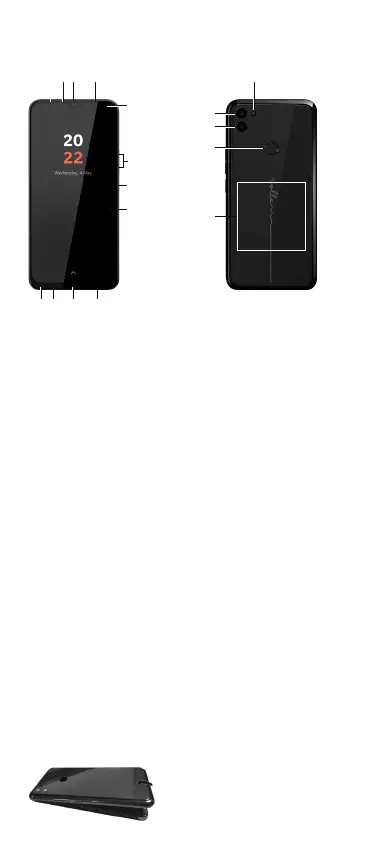
1. Sensor
2. Earpiece
3. Front camera
4. Message LED
Lights up: Device is
charging.
Flashing: Device is charging
and/or notification present.
O: Device is not charging
or is fully charged and no
notification is present.
5. Notification/status bar
Show notifications/
open quick settings: drag
downwards.
6. Volume +: press up
Volume -: press down
7. Power on/o
Long press: turn on and o
Short press during
operation: activate and
deactivate
8. Touchscreen (start screen)
9. Headset jack
10. Microphone
11. USB type C port
12. Loudspeaker
13. Flash
14. Wide-angle camera
15. Rear camera
16. Fingerprint sensor
17. Coil (internal) for NFC and
for charging the smartphone
via induction
9 10 11 12
1 2 3 4
5
7
8
6
13
14
15
16
17


 To Next Page