32
Press button to switch to the area for setting the standby power.
c) Setting the standby power
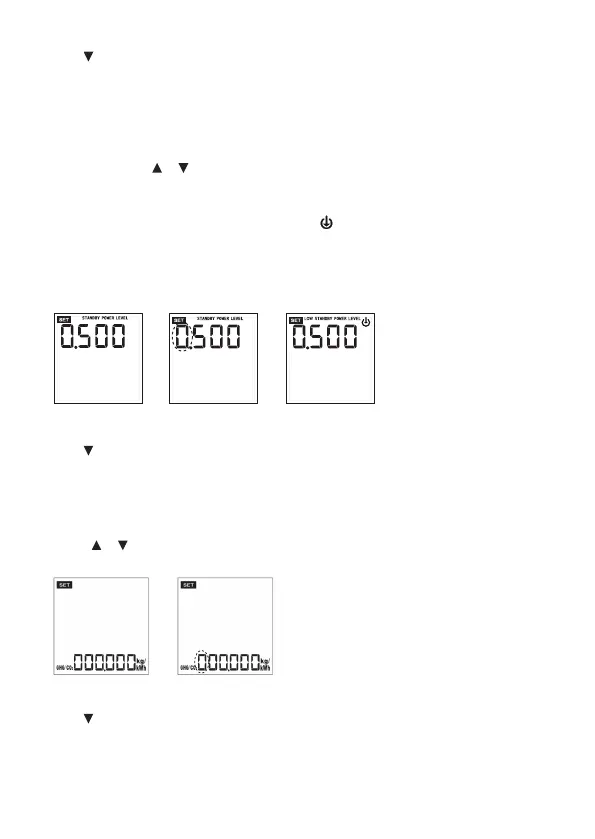
1. Press SET button once. The power value starts ashing (g. 20 + 21).
2. This function is used to set the standby power value, which is useful for the total energy
calculation. Use or buttons to set the value and press SET to conrm. Set each digit
separately. The setting range is 0.001 - 9.999W.
3. After setting the normal standby power the display will switch to the area for setting the
low-energy standby power. The display will show indicating the low-energy standby power
(g. 22).
4. Perform the setting following the same procedure as for normal standby power and press SET to
conrm your setting. The setting range is 0.001 - 9.999W.
g. 20 g. 21
g. 22
W
W
W
Press button to switch to the area for setting the GHG/CO2 alarm limit.
d) Setting the rate of GHG/CO2
1. Press SET button once. The “GHG” (greenhouse gas) / “CO2” value starts ashing (g. 24).
2. Use or buttons to set the value and press SET to conrm. Set each digit separately.
g. 24g. 23
Press button to switch to the area for setting the OVERLOAD limit.









 To Next Page