31
8. OPERATION
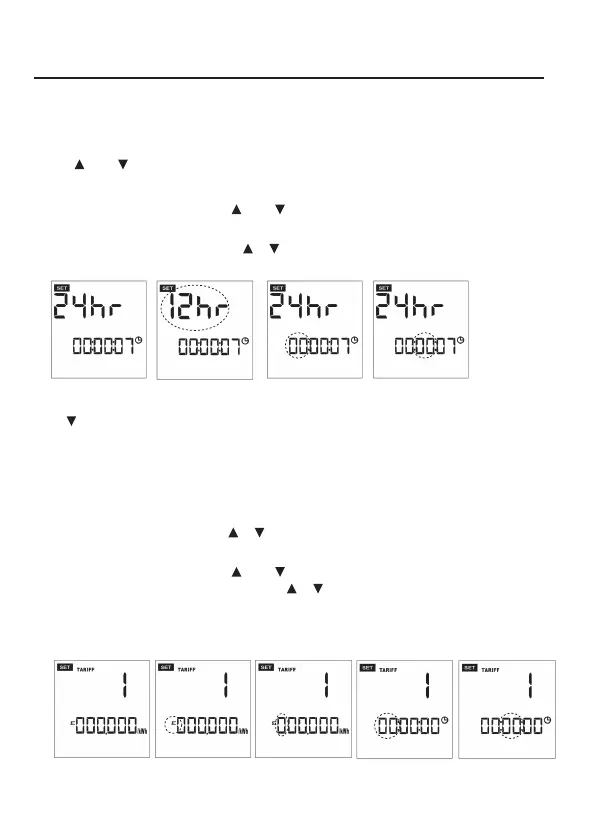
a) Setting the clock:
1. Press and hold SET button for approx. 3 seconds.
2. Press SET button once. The hour format indicator “24Hr” or “12Hr” starts ashing (g. 11 + 12).
3. Use (5) or (6) buttons to select “12Hr” or “24Hr”.
4. Press SET button to conrm your settings.
5. The hour value starts ashing. Use (5) or (6) buttons to set the hour and press SET to
conrm (g. 13).
6. The minute value starts ashing. Use or buttons to set the minutes and press SET to
conrm (g. 14).
g. 11 g. 14
g. 13
g. 12
Press button to switch to the area for entering the electricity rate.
b) Entering the electricity rate “costs/kWh”:
1. You can program 2 tariffs and 2 time settings within a period of 24 hours. Press SET button once.
The currency symbol starts ashing (g. 16).
2. You may select between the currencies “€“, “$”, “£“ or “CHF”. Press SET to conrm your choice.
3. The rate value starts ashing. Use or buttons to enter the rate and press SET to conrm
(g. 16, 17).
4. The hour value starts ashing. Use (5) or (6) buttons to set the hour and press SET to
conrm. The minute value starts ashing. Use or buttons to set the minutes and press SET
to conrm (g. 18, 19).
5. Press SET button to enter the second tariff. Follow steps 3. to 4. After conrming with SET button
the display will change to tariff 1.
g. 15
g. 19
g. 18
g. 17
g. 16









 To Next Page