Enabling the Docking Function
51315
51651
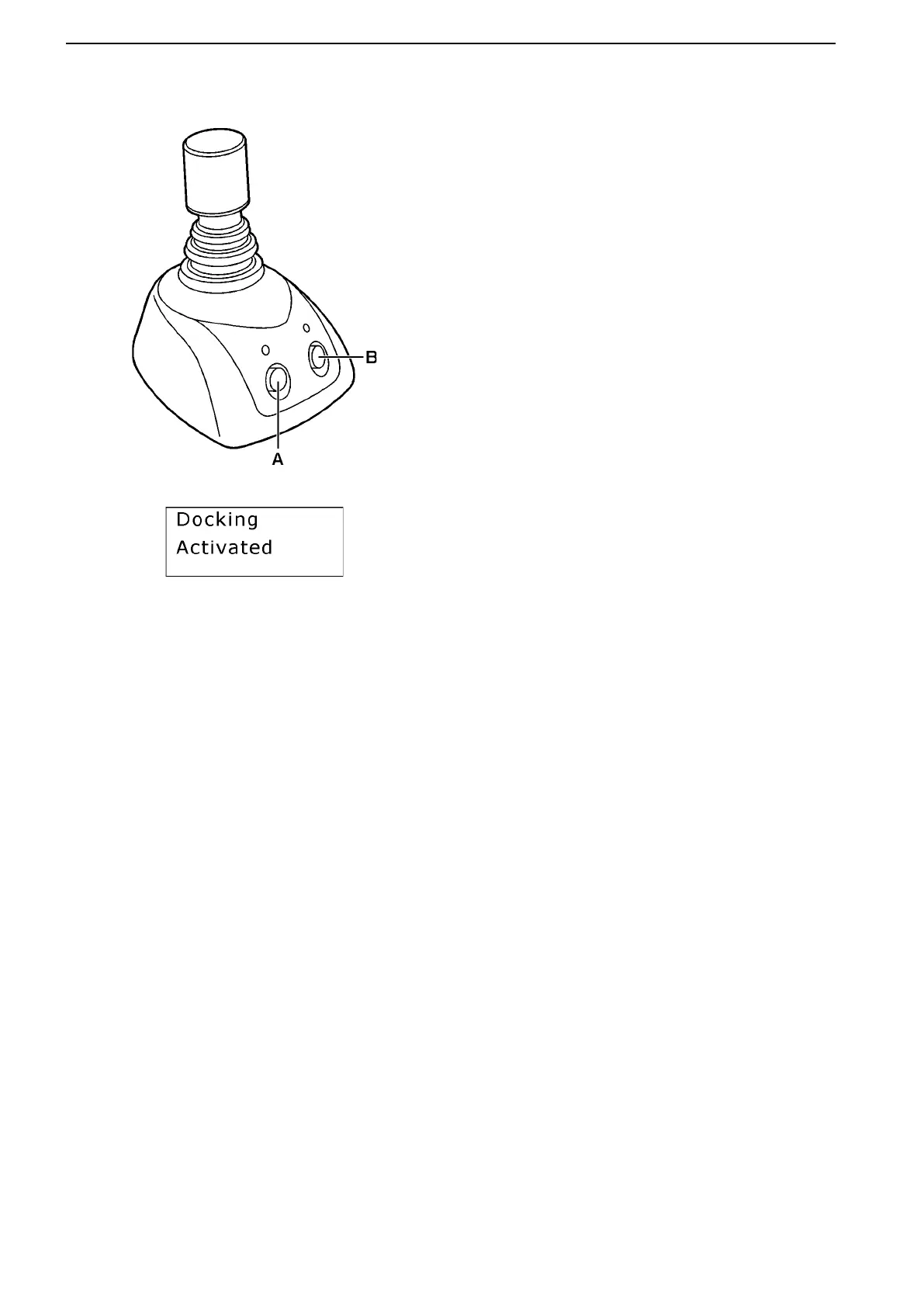
A. Docking button (ON/OFF)
B. Boost button (ON/OFF)
Always push the buttons firmly and hold for at
least one second.
Follow the instructions below when you wish to enable
the docking function on the main or flybridge station.
The docking function is automatically enabled on the
docking station when it is activated.
Before the docking function can be enabled:
● The engines must be running.
● The control levers must be in neutral.
● The joystick must be in the center position.
● The station from where you are going to dock
must be activated.
● Cruise control (if equipped) must be turned off.
1. Push the docking button A on the joystick.
A beep sounds and a message appears on the
display informing you that the docking function
has been activated. The LED above the docking
button lights up.
The drives will trim to 0° if they are below 5° tilt.
If they are above 5° tilt, they will remain tilted up
for shallow water docking.
2. The system is now in docking mode and the
boat can only be maneuvered with the joystick
(unless you move the throttle control levers).
NOTICE! The docking function should be used only
for docking (slow speed maneuvering). Engine speed
is restricted when in docking mode.
NOTICE! Before starting to use the joystick in a
crowded marina, learn to use it and its functions in a
safe and correct manner.
Instruments and Controls
56 47701898 12-2010



 To Next Page