05 Infotainment system
Quick start
05
226
* Option/accessory, for more information, see Introduction.
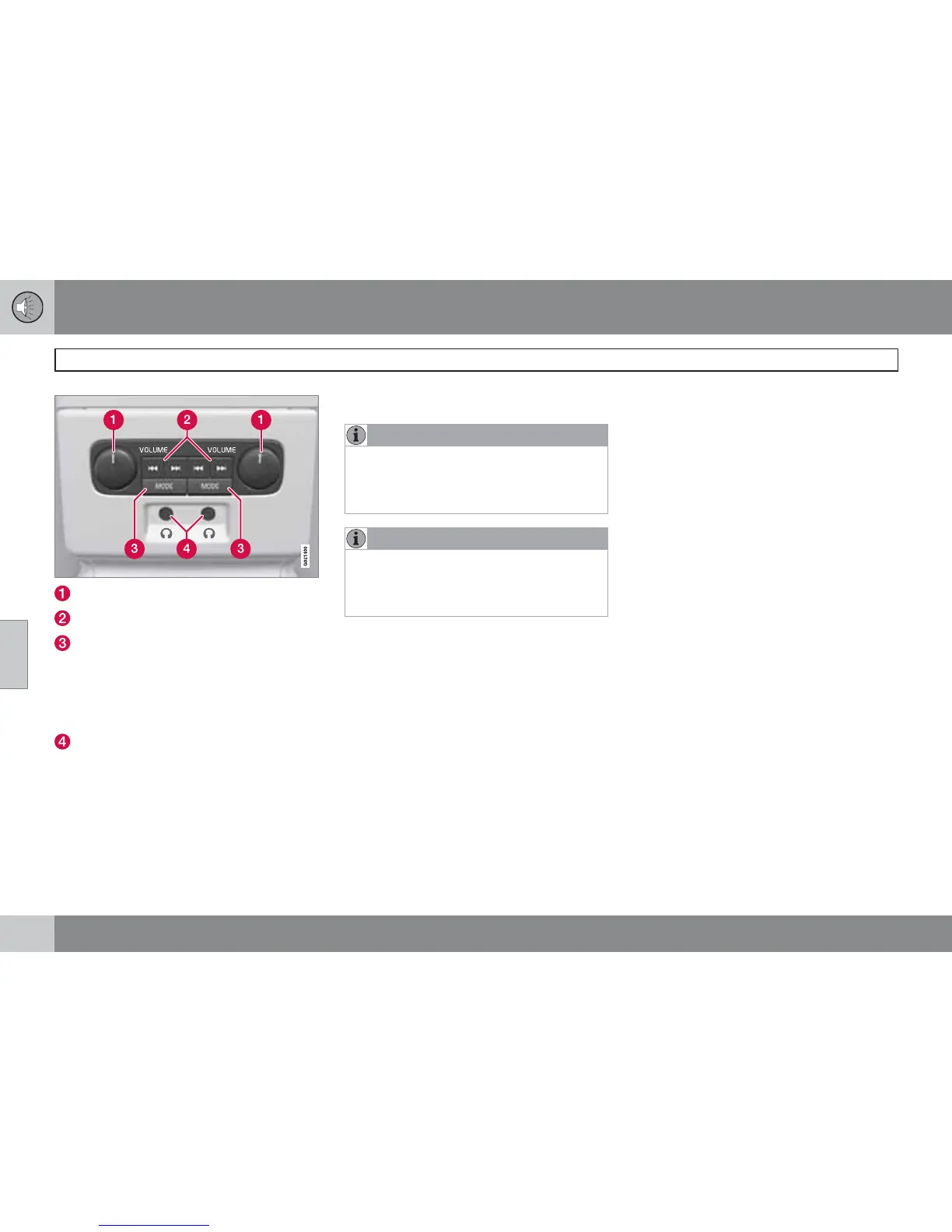
VOLUME – Volume, left and right.
Scroll/search forward and backward.
MODE - Select between AM, FM1, FM2,
DAB1*, DAB2*, Disc, USB*, iPod*,
Bluetooth*, AUX, TV* and On/Off. For
connection via USB* or AUX, see
page 241 or via Bluetooth
*, see
page 245.
Headphones sockets (3.5 mm).
Activate/deactivate
The control panel is activated with MODE.
Deactivation is possible via a long press on
MODE or when the engine is switched off.
Scroll/search forward and backward
Pressing (2) scrolls between disc tracks/audio
files or seeks the next available radio station.
Limitations
NOTE
The audio source (e.g. FM1, AM, Disc etc.)
being played back through the speakers
cannot be controlled from the rear control
panel.
NOTE
In order that an audio source can be
selected with MODE and listened to it is
required that the audio source is available
and connected in the car.



 To Next Page