04 Interior
Front seats
04
* Option/accessory, for more information, see Introduction.
103
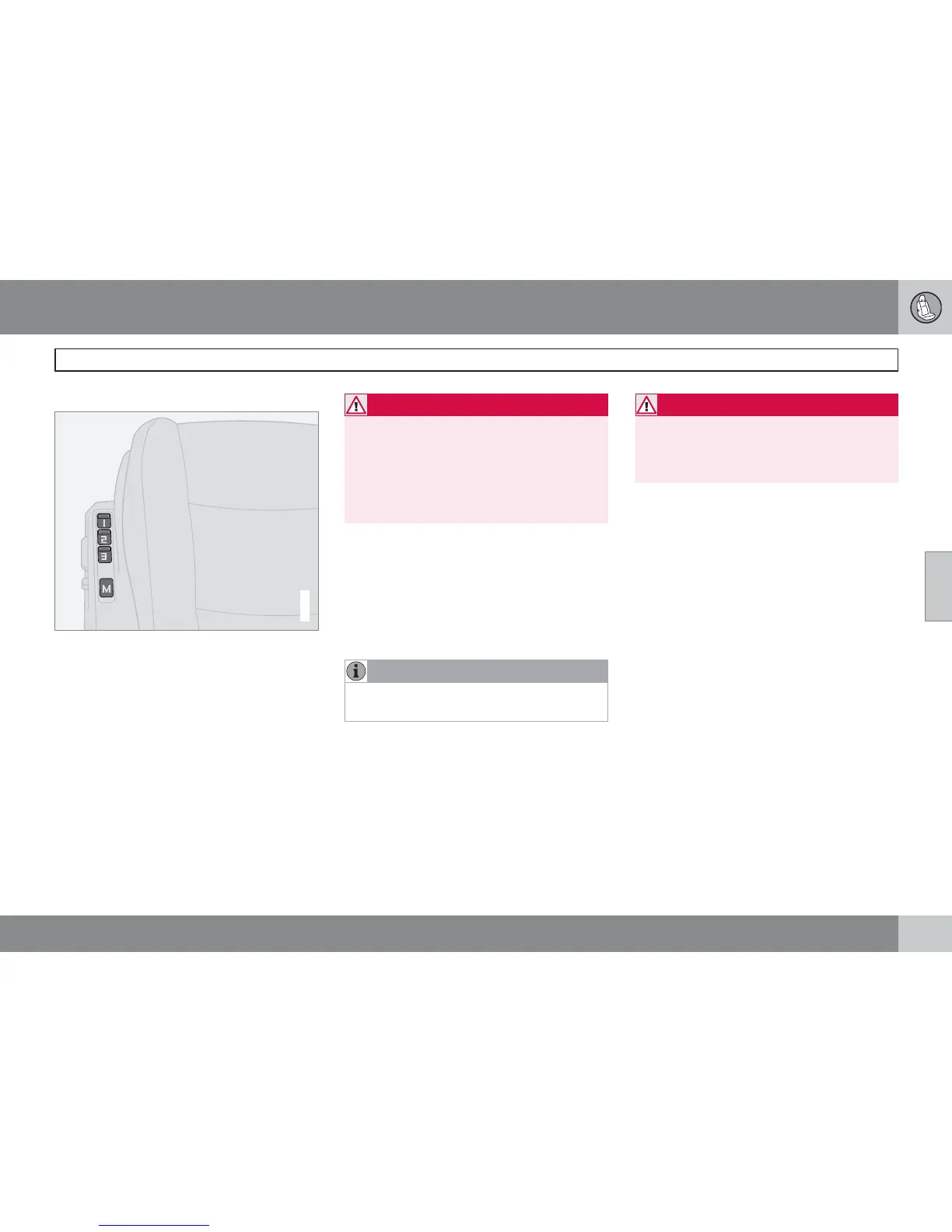
Memory function
G020200
Buttons for memory function.
Store setting
1. Adjust seat.
2.
Press and hold button M while pressing
button 1, 2 or 3 simultaneously.
Using a stored setting
Press one of the memory buttons 1–3 until the
seat stops. If you release the button then the
movement of the seat will stop.
Emergency stop
If the seat accidentally begins to move, press
any of the buttons to stop the function.
WARNING
Risk of crushing. Make sure that children do
not play with the controls.
Check that there are no objects in front of,
behind or under the seat during adjustment.
Ensure that none of the rear seat passen-
gers is in danger of becoming trapped.
Memory in remote control key
The settings for the driver's seat are stored in
the memory for the remote control key with
which the car is locked. When the car is
unlocked with the same remote control key the
driver's seat adopts the stored settings when
the driver's door is opened.
NOTE
The remote control key memory is inde-
pendent of seat memory.
Floor mats*
Volvo supplies floor carpets which are espe-
cially produced for your car.
WARNING
The floor mat at the driver's seat must be
firmly fitted and secured in the attachment
clips to prevent it from being trapped
around and under the pedals.



 To Next Page