LIGHTING
* Option/accessory.
149
WARNING
The car's lighting system is not able to deter-
mine when daylight is too weak or sufficiently
strong, e.g. in fog and rain, in all situations.
The driver is always responsible for ensuring
that the car is driven with a beam pattern suit-
able for the traffic situation and in accordance
with applicable traffic regulations.
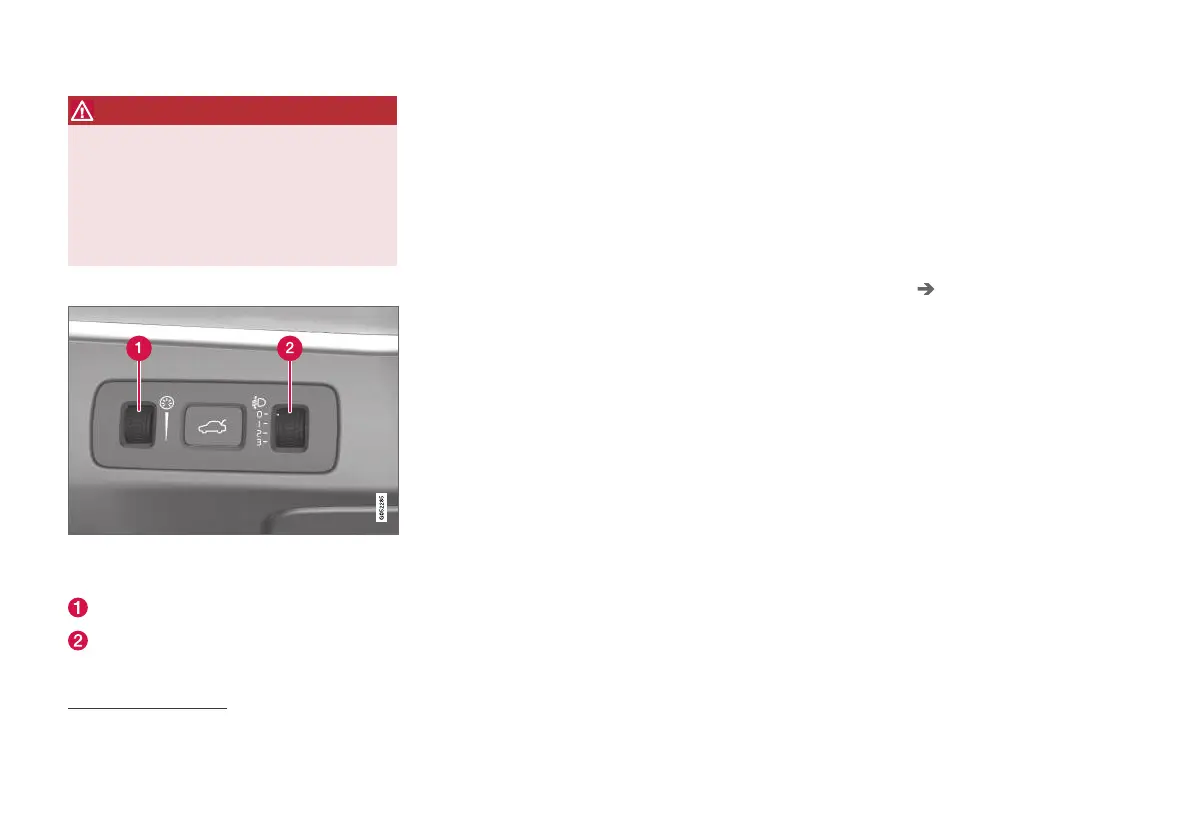
Thumbwheel in instrument panel
A car with LED
2
headlamps* has automatic headlamp
levelling and therefore does not have the thumbwheel
for headlamp levelling.
Thumbwheel for adjusting interior brightness
Thumbwheel for headlamp levelling
1
Related information
•
Adjusting light functions via the centre dis-
play (p. 149)
•
Interior lighting (p. 160)
•
Position lamps (p. 151)
•
Using direction indicators (p. 155)
•
Using main beam (p. 153)
•
Dipped beam (p. 152)
•
Front fog lamps/cornering lights* (p. 156)
•
Rear fog lamp (p. 157)
•
Active bending lights* (p. 156)
•
Brake lights (p. 158)
•
Emergency brake lights (p. 158)
•
Hazard warning flashers (p. 158)
Adjusting light functions via the
centre display
Several light functions can be adjusted and acti-
vated via the centre display. This applies to
active main beam, home safe lighting and
approach light, for example.
1.
Tap on
Settings in the centre display's top
view.
2. Press
My Car Lights and Lighting.
3.
Select
Exterior Lights or Interior Lighting
and then select the function that needs to be
adjusted.
Related information
•
Lighting control (p. 148)
•
Active main beam (p. 153)
•
Using home safe lighting (p. 159)
•
Approach light duration (p. 159)
•
Using direction indicators (p. 155)
•
Other settings in the centre display's top
view (p. 128)
•
Function view in centre display (p. 118)
2
LED (Light Emitting Diode)
1
Applies to vehicles with halogen headlamps.


 To Next Page