||
KEY, LOCKS AND ALARM
* Option/accessory.
260
Keyless unlocking
–
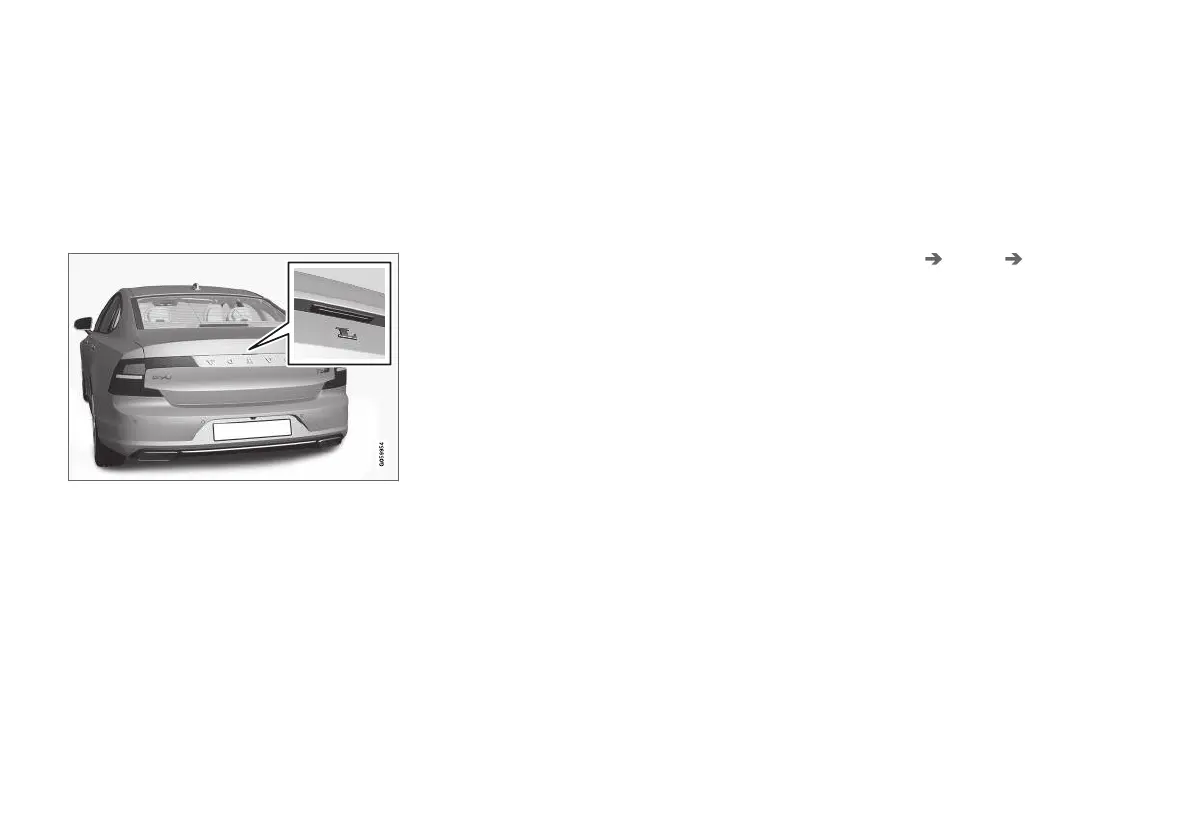
Grasp a door handle or gently press the rub-
berised pressure plate beneath the boot lid
handle to unlock the car.
> The lock indicator on the instrument panel
stops flashing to indicate that the car is
unlocked.
Rubberised pressure plate on the boot lid can only be
used for unlocking.
Automatic relocking
If none of the doors or the boot lid is opened
within 2 minutes of unlocking, they are locked
automatically. This function prevents the car from
being left unlocked unintentionally.
Related information
•
Settings for Keyless entry* (p. 260)
•
Keyless unlocking of the boot lid* (p. 261)
•
Keyless and touch-sensitive surfaces*
(p. 258)
Settings for Keyless entry*
It is possible to select different sequences for
Keyless entry.
To change setting:
1.
Tap on
Settings in the centre display's top
view.
2. Tap on
My Car Locking Keyless
Unlock
3. Select option:
•
All Doors - unlocks all doors simultane-
ously.
•
Single Door - unlocks selected door.
Related information
•
Keyless locking and unlocking* (p. 259)
•
Keyless and touch-sensitive surfaces*
(p. 258)


 To Next Page