||
STARTING AND DRIVING
* Option/accessory.
472
Related information
•
Changing drive mode (p. 472)
•
Economical driving (p. 480)
•
Energy distribution in hybrid drive using map
data* (p. 473)
•
Hybrid gauge (p. 82)
•
General information about Twin Engine
(p. 424)
Changing drive mode
Select the drive mode that best suits the current
driving conditions.
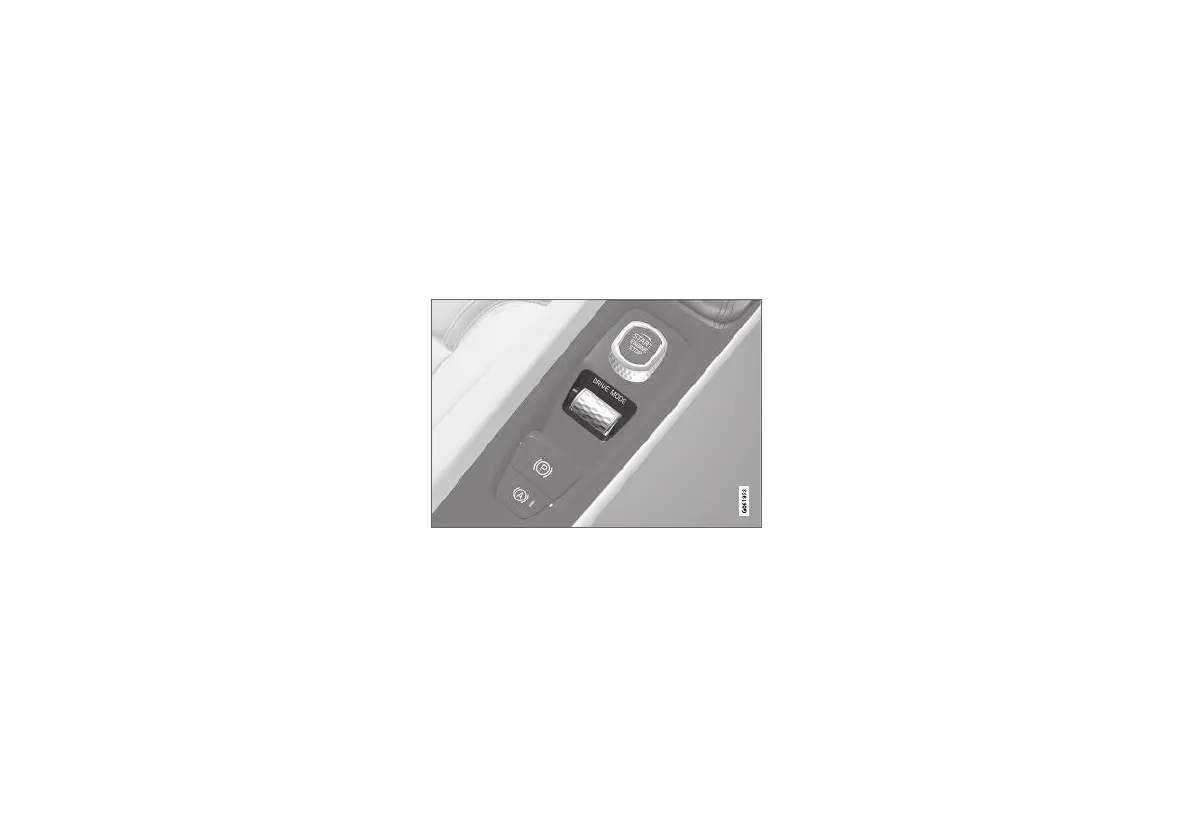
Change the drive mode using the control in the
centre console.
Remember that not all drive modes are available
in all situations.
To change drive mode:
1.
Press the drive mode control DRIVE MODE.
> A pop-up menu is opened in the centre
display.
2. Roll the wheel upward or downward until the
desired drive mode is highlighted.
3. Press the drive mode control or tap directly
on the touch screen to confirm the selection.
> The selected drive mode is indicated in
the driver display.
If a drive mode is greyed-out in the pop-up menu
then it cannot be selected.
Related information
•
Drive modes (p. 467)
•
Activating and deactivating low-speed driving
using a function button (p. 478)
•
Activating and deactivating hill descent con-
trol with the function button (p. 479)


 To Next Page