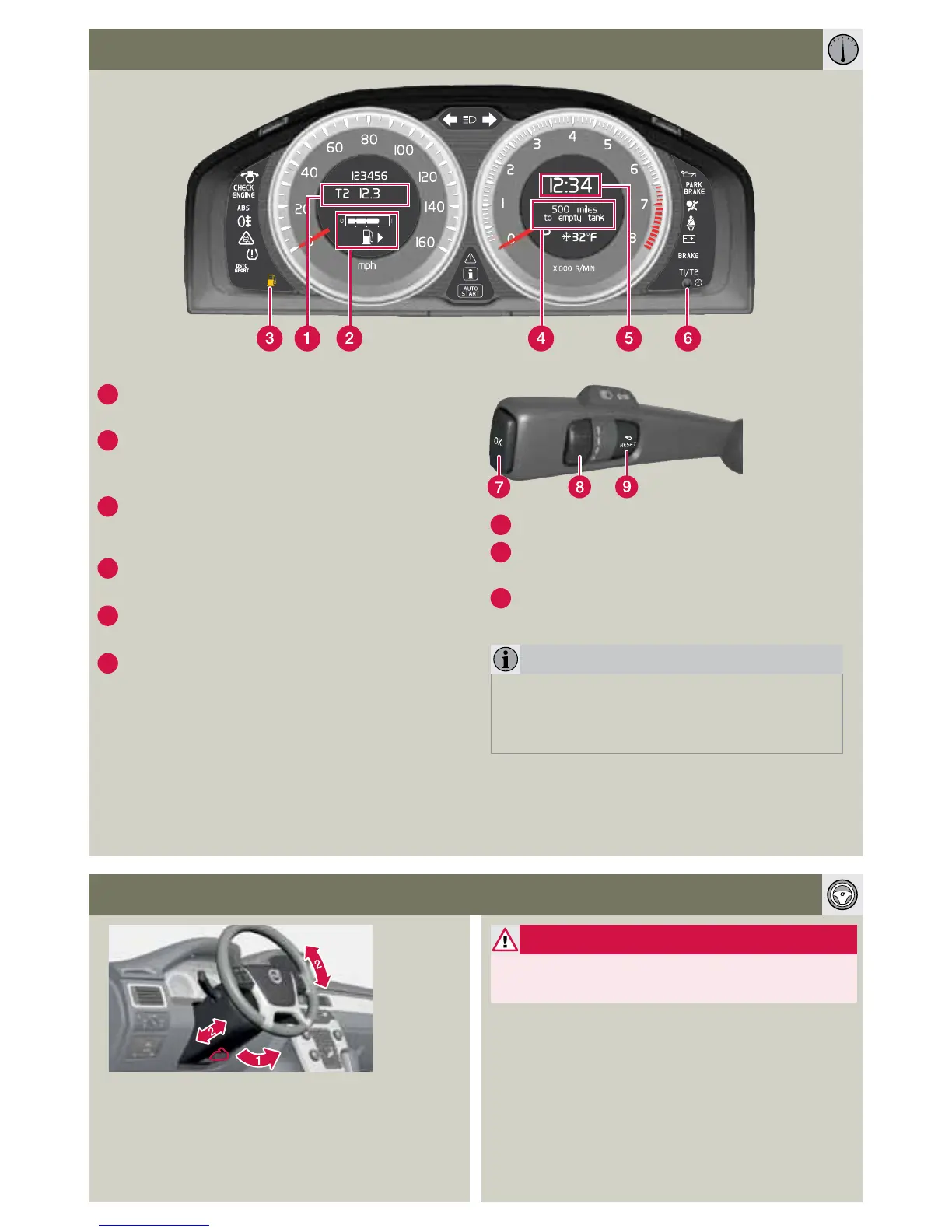
1
The display shows two separate trip odome-
ters, T1 & T2.
2
Fuel gauge
The fuel filler door is on the passenger’s side
of the car, as indicated by the arrow.
3
Low fuel level indicator
When the symbol illuminates, refuel as soon
as possible.
4
Trip computer display. Select function with
(8).
5
Clock: Adjust in the MY CAR menu system
or with control (6).
6
Multi-function control
Turn the control clockwise or counterclock-
wise to set the clock.
A short press toggles between T1 & T2.
A long press resets the displayed odometer.
Setting the clock: turn as far as possible and
continue turning until a click is audible.
ODOMETER AND TRIP COMPUTER
STEERING WHEEL ADJUSTMENT
WARNING
Never adjust the steering wheel while
driving.
7
Press to display or erase a message.
8
Turn to show trip computer information
alternatives.
9
A short press resets the current function.
A long press resets all functions.
NOTE
The display text Miles to empty tank is an
approximation, based on recent average fuel
consumption.
1. Release lock.
2. Adjust.



 To Next Page