EasyManua.ls Logo

Von Duprin DE5300 - User Manual

Von Duprin DE5300
16 pages
Print Icon
To Next Page IconTo Next Page
Loading...
*911031-00*
911031-00
© Allegion 2021
Printed in U.S.A.
911031-00 Rev. 04/21-e
General Information
The Von Duprin DE5300 is designed for controlled egress applications when used in conjunction with a magnetic lock. It meets both life
safety and security needs, as well as the requirements of NFPA101 for “Special Locking Arrangement” and IBC “Special Egress-Control
Devices”. All control inputs, auxiliary locking, local alarm and remote signaling outputs are self-contained in the DE5300 assembly.
Numerous eld congurable options allow the device to be customized for the specic code or application requirements. The standard
DE5300 sounds an alarm and keeps the door secured for 15 seconds following an exit attempt with immediate release upon re.
Parts Included
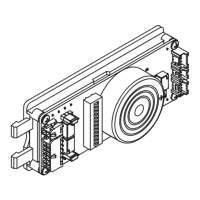
Module
Field Wiring Cable
Device Wiring Cable
Faceplate
#6-32 X 1/4” Mounting Bracket Screws (2)#6-32 X 3/8” Faceplate Screws (4)
Key SwitchMounting BracketControl Box
PUSH UNTIL ALARM SOUNDS
DOOR CAN BE OPENED
IN 15 SECONDS
Door Sign
Table of Contents
Basic Features........................................................................... 2
Installation Components ............................................................ 3
Electrical Specications ............................................................. 4
Typical Wiring Diagrams ............................................................ 4
Single Door ............................................................................ 4
Double Door .......................................................................... 5
Electrical Trim ........................................................................ 7
Retrot Wiring.............................................................................7
Installation ................................................................................. 8
Basic Functional Test ............................................................... 11
Module Setup .......................................................................... 11
Onboard Switch Settings Table ............................................... 12
Advanced Function Test .......................................................... 13
Onboard Indicators .................................................................. 14
Troubleshooting ....................................................................... 15
WARNING
Do not exceed rated specications.
The DE5300 must be installed in accordance with these instructions by a qualied electrician.
Wiring and applications must be in accordance with all local codes and regulations.
Wiring and Conguration
DE5300 Delayed
Egress System
Installation Instructions
Customer Service
1-877-671-7011 www.allegion.com/us

Other manuals for Von Duprin DE5300

Questions and Answers

  • B
    Brian SmithAug 1, 2025
    What to do if Von Duprin Control Unit maglock is NOT locked and the internal alarm is NOT sounding?
    • M
      Mary BrownAug 1, 2025
      If the maglock isn't locking and the internal alarm isn't sounding, here's what you can check: * Make sure the power supply is providing the correct voltage, both at the supply and at the DE5300. * Verify the power supply output voltage is 24VDC. * Ensure the power wiring has continuity from the power supply to the Module. * Confirm that the power supply has the correct polarity by verifying the proper color code is used.
  • G
    Gary TaylorAug 5, 2025
    What to do if Von Duprin Control Unit maglock remains unlocked when arming, and the internal alarm is pulsing fast after 2 seconds?
    • D
      Dr. Melissa AllenAug 5, 2025
      If the maglock remains unlocked and the internal alarm pulses fast after 2 seconds when arming, check the following: * Ensure the Device Wiring Cable (3 position plug) is properly connected. * Check for broken wiring from the Device Wiring Cable 3 position plug to the maglock and verify the correct connection. Also, check that the maglock is measuring 24VDC on its input. * Test the basic functions of the maglock to verify correct operation.
  • D
    Daniel AvilaAug 9, 2025
    What to do if Von Duprin Control Unit maglock is NOT locked and the internal alarm is ON?
    • A
      Andrew BrownAug 9, 2025
      If the maglock isn't locking but the internal alarm is on, here's what to investigate: * Verify the FA wiring has continuity from the FA contacts to the Module. * Ensure the FA contacts are closed when there is no fire alarm. * Check if the GNG wire is shorted to the power supply ground; if so, find and remove the short and insulate any unused GNG wire.
  • D
    David KellyAug 13, 2025
    What to do if Von Duprin Control Unit maglock remains unlocked when arming, and the internal DE5300 alarm is pulsing fast?
    • A
      Andrew JonesAug 14, 2025
      If the maglock remains unlocked and the internal DE5300 Alarm is pulsing fast when arming, check the following: * Close the door, if it's open. Verify the DPS contacts are closed when the door is closed. * With the door closed, verify the DPS wiring has continuity from the DPS contacts to the Module.
  • R
    Robert MaynardAug 17, 2025
    Why does the Von Duprin Control Unit release delay start immediately when arming, causing the maglock to lock and then release after 15 seconds, and the internal DE5300 alarm to turn ON?
    • R
      Ricky ShawAug 17, 2025
      If the release delay starts immediately when arming, the maglock locks and then releases after 15 seconds, and the internal DE5300 alarm is ON, the issue could be: * The push pad is not returning to the full extended position. Pull the push pad out fully to see if this fixes the problem. Also, check for dirt and rubbing around the push pad area. * The Device Wiring Cable (2 position plug) is disconnected. Plug in the Device Wiring Cable 2 position plug. * The REX wiring/connector is defective. Check for broken wiring from the Device Wiring Cable 2 position plug to the REX switch under the Push Pad. * The REX switch is defective. Check the REX switch is closed when the Push Pad is fully extended; if it's still open, replace the switch.
  • A
    Anthony LarsonAug 22, 2025
    What causes Von Duprin Control Unit trim to be locked when it should be unlocked, or unlocked when it should be locked?
    • J
      James SimpsonAug 22, 2025
      This can happen due to an incorrect trim switch setting or using the wrong trim type. Ensure the correct trim switch setting is selected to match the trim being used and that the correct trim type is installed.
  • P
    Philip WaltersAug 27, 2025
    What to do if Von Duprin Control Unit maglock remains unlocked after a power outage and power is restored?
    • A
      Anna CampbellAug 27, 2025
      If the maglock remains unlocked after a power outage and power is restored (with the Key Switch in the Armed position), it might be because the DE5300 is not self-arming after the outage. Check if DE5300 onboard switch #5 (Armed Power Up) is set to OFF.

Summary

Basic Features

Inputs & Outputs

Describes the various input signals and their functions.

Delays

Explains Release, Nuisance, Rearm, and DPS delays.

Typical Wiring Diagrams

Electric Trim Function

Retrofit Wiring

Installation

Basic Functional Test

Module Setup

Relay Jumper and Switch Settings

Explains setting relay jumpers and onboard switches.

Onboard Switch Settings Table

Advanced Function Test

Onboard Indicators

Troubleshooting

Overview

The Von Duprin DE5300 is a sophisticated delayed egress system designed for controlled egress applications, particularly when used in conjunction with a magnetic lock. This device is engineered to meet both life safety and security needs, adhering to the requirements of NFPA101 for "Special Locking Arrangement" and IBC "Special Egress-Control Devices." It offers a comprehensive suite of features, including control inputs, auxiliary locking, local alarm, and remote signaling outputs, all self-contained within the DE5300 assembly. Its numerous field-configurable options allow for customization to specific code or application requirements.

Function Description

The core function of the DE5300 is to provide a controlled egress solution, delaying door release for a set period after an exit attempt, while ensuring immediate release in fire emergencies. When armed, the standard DE5300 will sound an alarm and keep the door secured for 15 seconds following an exit attempt. Immediate release is provided upon a fire alarm.

Inputs & Outputs:

  • Fire Alarm Input: This input ensures immediate door release upon a fire alarm, allowing for immediate egress. The internal alarm can be silenced during a fire input via an onboard switch setting.
  • Inhibit Input (Access Control): This optional input facilitates authorized egress or entry when the device is armed, typically via an external card reader or key switch. It also enables remote resetting of the DE5300 in an alarmed state, with the option to disable alarm resets via this input through an onboard switch setting.
  • Door Position Switch Input: An optional Door Position Switch (DPS) enhances security by providing door position status to the DE5300. It ensures the door is closed and can trigger an alarm if the door is left open or forced open. The DPS can be integrated with the maglock or operate independently.
  • Gang Bus: This feature allows a DE5300 device to communicate with up to eight other DE5300 devices. When one device enters the Release Delay, it signals others on the bus to release simultaneously in an emergency, ensuring synchronized operation across multiple doors.
  • Alarm Relay Contacts: These contacts control a remote alarm (e.g., a horn or lamp) or signal an external monitor. They are configurable as Normally Open or Normally Closed and activate when the device enters an alarmed condition.
  • Secure Relay Contacts: These contacts signal an external monitor, configurable as Normally Open or Normally Closed. They become active when the opening is secure, as indicated by the DPS and Magnetic Bond Sensor (MBS). If the maglock is not properly bonding with its armature, the DE5300 will indicate that the door is not properly locked.

Delays:

  • Release Delay: Initiated after the Push Pad is pressed and the Nuisance Delay expires, the DE5300 enters Release Delay with an alarm. During this period, the internal alarm sounds, the Alarm Relay activates, and the maglock remains locked for 15 seconds (minus any elapsed Nuisance Delay time). Once started, the Release Delay sequence completes, and the maglock unlocks.
  • Nuisance Delay: This brief delay prevents false releases when the Push Pad is accidentally pushed in public areas. If set to 0 seconds, Release Delay begins immediately. If set to 1, 2, or 3 seconds, the Push Pad must be pressed for that duration before Release Delay begins. If Nuisance Audio is enabled, the internal alarm pulses during this delay. Releasing the Push Pad before the Nuisance Delay expires keeps the DE5300 armed.
  • Rearm Delay: This is the time after the Key Switch or Inhibit Input deactivates before the device rearms, allowing someone to pass through the door. Rearm time is adjustable from 0 to 28 seconds in 2-second increments. If a DPS is used and the door closes during Rearm Delay, the DE5300 rearms after 2 seconds. If the door remains open, it rearms after 30 seconds. Without a DPS, the DE5300 always rearms in 30 seconds.
  • DPS Delay: If the DPS detects the door closed during Rearm Delay, the DE5300 ends Rearm Delay and provides 2 seconds for the latch to clear before rearming.

Interface:

  • Key Switch: This switch arms, disarms, or resets the DE5300. Turning it clockwise initiates Rearm Delay, while turning it counter-clockwise disarms/resets the device. The key can be removed in either position. Fail-safe and fail-secure trims remain secure regardless of key switch position.
  • Status Indicator: A red LED displays the DE5300's status: slow flash when armed, fast flash when alarmed, off when inhibited, and solid during Rearm Delay.
  • Internal Alarm: The internal alarm provides audible status indications. It sounds continuously during and after a fire alarm or Release Delay, pulses fast during Nuisance Delay or tamper, and pulses slowly during Disarmed Powerup mode.

Usage Features

The DE5300 offers extensive configurability to adapt to various application needs:

  • Armed Powerup: When set to OFF, a power disruption and subsequent power return will place the DE5300 in a disarmed, unlocked alarm mode.
  • Trim Fail Safe / Fail Secure (FS/FSE): The trim input power can be configured as Fail Safe (locked when energized, unlocked when de-energized during power failure or fire alarm) or Fail Secure (unlocked when energized, locked when de-energized or during power failure). This setting must match the physical function of the trim.
  • Inhibit (Access Control) Reset: This setting determines whether all alarms can be reset by the key switch only (manual reset at the door) or by both the key switch and the inhibit input (allowing remote reset).
  • Nuisance Time: Adjustable from 0 to 3 seconds, this setting controls the duration the Push Pad can be pressed without triggering the release sequence, preventing accidental alarms.
  • Audio High/Low: Allows selection between high and low audio levels for the internal alarm.
  • Nuisance Audio: Configures whether the internal alarm is ON or OFF during the Nuisance Delay.
  • FA Audio: Configures whether the internal alarm is ON or OFF during a fire alarm.

Maintenance Features

The DE5300 includes several features to aid in installation, troubleshooting, and ongoing maintenance:

  • Onboard Indicators: A series of LEDs on the module provide visual feedback on the status of various inputs and outputs, including Power, Key Switch, Gang, Fire Alarm, Door Position Switch, Inhibit, Secure Relay, Alarm Relay, Blocking, Request-to-Exit, Request-to-Enter, and overall Status. These indicators are crucial for diagnosing issues.
  • Troubleshooting Guide: The manual provides a comprehensive troubleshooting section that outlines common symptoms, possible causes, and solutions. This includes scenarios such as the maglock not locking, internal alarm not sounding, immediate release delay, and trim not operating correctly.
  • Functional Test: A detailed basic functional test procedure is provided to verify that the DE5300 operates as described with default settings. This involves testing power-up, delayed egress, and various modes like Armed, Disarmed/Reset, Rearm Delay, Release Delay, and Released.
  • Advanced Function Test: This section outlines tests for access control and fire alarm functions, ensuring the DE5300 responds correctly to inhibit inputs and fire alarm signals.
  • Wiring Diagrams: Clear and detailed wiring diagrams are provided for single and double door applications, including point-to-point and riser diagrams. These diagrams facilitate correct installation and connection of all components, including power supplies, maglocks, exit devices, card readers, and trims.
  • Retrofit Wiring Information: Specific guidance is given for retrofitting from discontinued DE5101 devices to the new DE5300, highlighting changes in wiring connections for Door Position Switch, Card Reader, and Fire Alarm contacts. A caution is included regarding the incompatibility of ganging discontinued and new devices.
  • Modular Design: The system is designed with a control box, mounting bracket, and module, allowing for organized installation and easy access for wiring connections.
  • Cylinder Compatibility: Instructions for using specific mortise cylinders with compression rings are provided, ensuring proper fit and function with the key switch assembly.
  • Wire Management: Recommendations for packing wires and keeping them clear of moving parts like the key cylinder cam are included to prevent damage and ensure smooth operation.

Von Duprin DE5300 Specifications

General IconGeneral
ModelDE5300
Max Input Current1.5A
Humidity0-95% non-condensing
MountingSurface mount
Battery TypeLithium
Number of Batteries1
Current1.5 A
MaterialMetal
ComplianceUL