ENGLISH
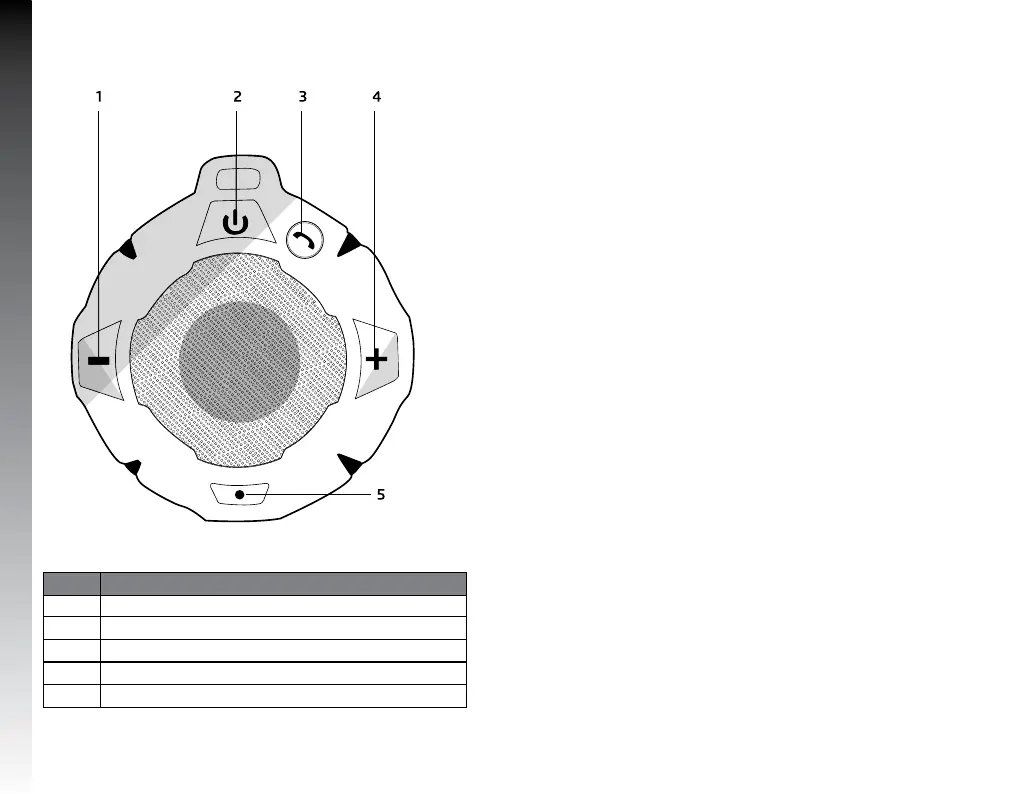
KNOW YOUR DEVICE
Number Function
1 Volume - / Next song
2
Turn on / off
3
Answer call
4
Volume + / Next song
5
LED indicators
HOW TO USE
Before you start using the device, you must fully charge it and
connect it with a compatible phone or device.
Battery charge
This device has a built-in rechargeable internal battery. Do
not attempt to remove the battery from the device, as it may
damage the device.
The speaker will emit an intermittent beep and red flash
indicator when the battery is low and requires recharging.
Connect your Micro USB charging cable to the charging port of
your speaker.
Connect the other end of the USB cable to a charger.
The red indicator light turns on indicating that the device is
charging.
The red indicator light goes out when the horn is properly
charged (approximately 1-2 hours).


 To Next Page