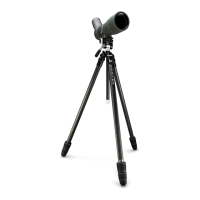
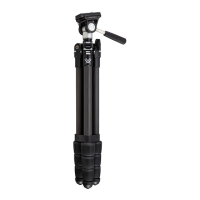
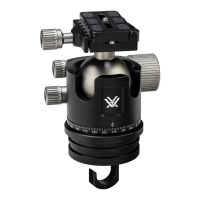
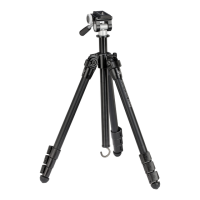
The Vortex High Country II is an aluminum tripod with a pan head, designed to provide a stable platform for optics and cameras. This product manual outlines its specifications, basic adjustments, and attachment procedures, along with Vortex's VIP Warranty.
Function Description
The High Country II tripod serves as a stable base for various optical devices such as binoculars, spotting scopes, and cameras. Its pan head allows for smooth horizontal (panning) and vertical (tilting) adjustments, enabling users to track subjects or compose shots with precision. The tripod's design focuses on versatility and ease of use, featuring adjustable leg sections and angles to accommodate different terrains and viewing heights. A detachable counterweight hook enhances stability, particularly in windy conditions or when using heavier equipment.
Important Technical Specifications
- Leg Material: Aluminum
- Maximum Operating Height: 62.5 inches (158.7 cm)
- Minimum Operating Height: 11.3 inches (28.6 cm)
- Maximum Center Column Extension: 12 inches (30.5 cm)
- Folded Dimensions (HxW): 24.3 inches x 4.0 inches (61.7 cm x 10.2 cm)
- Weight: 4.0 lbs. (1.8 kg)
- Number of Leg Sections: 3 Sections
- Maximum Load: 22 lbs. (10 kg)
- Leg Lock Type: Flip Lever
Usage Features
Pan Head Adjustments:
- Tilt/Panning Locking Handle: To unlock the tripod head for free movement, twist the handle counter-clockwise. Adjust to the desired position, then twist the handle clockwise to lock. For panning only, twist the handle clockwise until the desired resistance is felt, allowing the head to pan freely while maintaining tension.
- Quick-Release Locking Knob: This knob secures the quick-release plate to the pan head. Twist counter-clockwise to remove the plate and clockwise to lock it securely in place.
- Quick-Release Plate: The pan head utilizes an Arca-Swiss style quick-release plate for easy attachment and detachment of optics or cameras. The plate attaches to the optic/camera via a mount bolt, which should be tightened from the bottom side of the plate, with the D-ring flipped flat.
Leg Adjustments:
- 3-Angle Leg Pivot Locks: Each of the three tripod legs can be adjusted to three distinct angles: 70°, 49°, or 25°. To adjust, pull the Leg Angle Pivot Lock out to the unlocked position, set the leg to the desired angle, and then return the lock to the locked position, pulling the leg out to the nearest angle stop.
- Flip Lever Leg Locks: These locks are used to extend or retract the leg sections, allowing for height adjustment. Flip the lever up to unlock and adjust the leg length, then close the lever to fix the leg at the desired length.
Center Column Adjustments:
- Center Column Height Adjustment Knob: This knob allows for fine-tuning the height of the tripod head. Loosen the knob to adjust the center column, then tighten to secure it.
- Alternate Center Column Height Adjustment Knob: Similar to the main center column knob, this provides an additional point of adjustment for the center column's height.
- Detachable Counterweight Hook: Located at the bottom of the center column, this hook allows users to hang a weight (e.g., a backpack) to increase the tripod's stability, especially in windy conditions.
- Center Column Removal: For specific applications or to reduce the tripod's height further, the center column can be removed by rotating its lower portion clockwise (when looking down on the tripod).
Attaching Optics:
- Mounting Procedure:
- Twist the Quick-Release Locking Knob counter-clockwise to remove the Quick-Release Plate.
- Attach the plate to your optic or camera, ensuring the Mount Bolt is tightened from the bottom side and the D-ring lies flat.
- Place the Quick-Release Plate back into the tripod head and turn the Quick-Release Locking Knob clockwise to securely lock the plate.
- Binocular Adapter: For mounting binoculars, a separate binocular adapter is required (purchased from local Vortex dealers).
- Arca-Swiss Compatibility: Some optics are designed to be Arca-Swiss compatible and can be mounted directly to the tripod head without needing a plate.
- Additional Quick-Release Plates: Purchasing extra quick-release plates is recommended for users with multiple optics to facilitate quick equipment changes.
Maintenance Features
The manual does not explicitly detail maintenance features but implies general care through its design and the VIP Warranty. The robust aluminum construction suggests durability, and the flip lever leg locks are generally easy to clean and maintain.
VIP Warranty
Vortex offers an unconditional, unlimited, lifetime VIP Warranty. This warranty covers repairs or replacements of the product free of charge. It does not cover loss, theft, deliberate damage, or cosmetic damage that does not affect product performance. For service or additional manuals, customers can contact service@VortexOptics.com or call 1-800-4VORTEX.

 Need help?
 General

 To Next Page