VIPER
®
HD
7
6
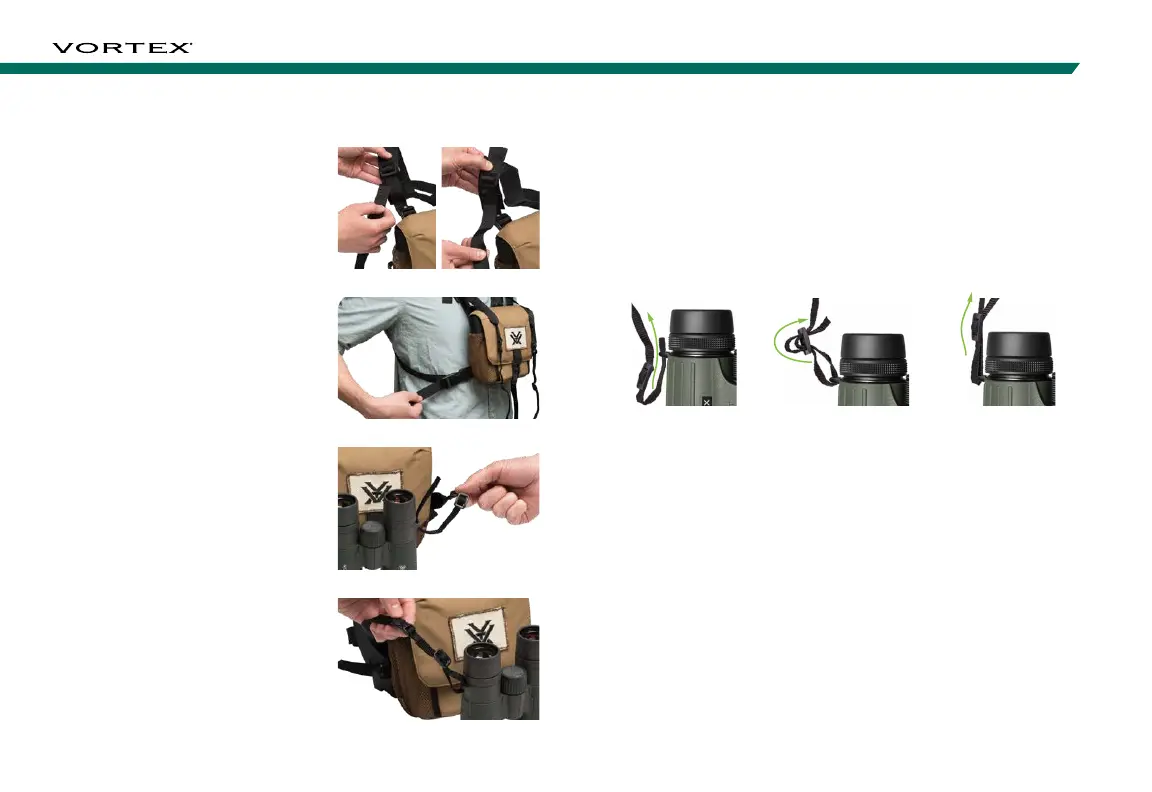
Follow these steps to attach the binocular tether straps.
1. Thread the wide end of the
binocular tether straps through
the harness strap buckles.
2. Size to fit by adjusting the one-
size-fits-all harness strap.
3. Thread the binocular tether
straps through the strap
attachments on binocular.
4. Thread the binocular tether
straps back through the tether
strap buckles to secure.
Lens Covers
The Viper
®
HD comes with a rainguard for the ocular lenses and
tethered objective lens covers. Use these covers to protect the
lenses whenever you are not viewing.
Neckstrap
Securely attach your binocular to the binocular strap:
Note: Please do not thread a metal ring directly onto the strap attachment
loop when attaching rings or clips for other after-market equipment. Instead,
use nylon zip ties according to the manufacturer’s instructions.
5. Push a few inches of
the strap through the
strap attachment on
the binocular.
6. Hold the buckle
and thread the end
of the strap through
the buckle.
7. Adjust the overall
length, then pull
tight until strap
is secured within
the buckle.



 To Next Page