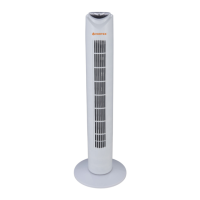
Tower Fan VO4229
5
ADJUSTMENT
Speed control
The speed is adjusted by repeatedly pressing the Speed buon on the remote control or on the control pan-
el. The appropriate LED indicator on the top of the fan will illuminate.
oscillaon control
To start and stop oscillaon of the fan body, push the OSC buon on the remote control or on the control
panel.
The appropriate LED indicator on the top of the fan will illuminate.
Timer control
To start and stop the mer, press the TIMER buon on the remote control or control panel to cycle through
the mer (from 0.5 hour to 7.5 hours, in 0.5 hour increments) sengs.
The appropriate LED indicator on the front of the fan will illuminate.
Natural / Sleep breeze control
For a natural breeze movement, press the MODE buon once. This will automacally vary the fan speeds
faster and slower.
Press the MODE buon again to acvate the sleep control. This funcon slows the fan speed down Push the
MODE buon a 3d me to switch o the natural and sleep funcons.
The appropriate LED indicator on the top of the fan will illuminate
7. Maintenance / Cleaning
Follow these instrucons to correctly and safely care for your fan. Please remember:
• Always unplug the fan before cleaning or assembly.
• Do not allow water to drip on or into the fan motor housing.
• Be sure to use a so cloth, moistened with a mild soap soluon.
• Do not use any of the following as a cleaner, petrol, thinner or benzine.
Features:
Advance design, fashion and
durable
Excellent eecve motor, low noise,
strong wind
Separate base
3 Speed control
7,5 h mer
Oscillaon movement
Remote control
Basic specicaons:
Voltage: 220V~/50Hz
Power: 45W
Noise level (dB(A)): ≤60
Speed: 900-1300 (±50) rpm
Maximum temperature: <90°C
Height: 81.5 cm
Power cord length: 1.5m
Protecon class: II
GW/NW (kg): 2.6/2.2
Measurement (mm): 175x170x815
Made in China


 To Next Page
 Loading...