12 45022| 08 | 2020 | V 1
INSTRUCTION MANUAL VOSS.SONIC 2000
Operation
Important notice
If the batteries are insuciently charged, the LED light starts ashing red. In this case connect the device to a USB port
(computer, laptop, mobile phone charger, etc.) using the provided cable. Once the batteries are fully charged, the red LED
will glow continuously.
To maximise the battery capacity, we recommend for the rst 3 times to wait until the batteries are completely discharged,
before charging them again. This way the memory eect is avoided. The battery memory eect is a reduction in the longevity
of a rechargeable battery‘s charge, due to incomplete discharge in previous uses. Some types of batteries, such as nickel-
cadmium and nickel-metal hydride, can develop a memory eect when only partially discharged before recharging.
Due to the dierent transport, storage and shipping times until the rst use, it may be necessary to charge the batteries. This
is not unusual. When the device is switched on. the red LED light in the upper half of the ash window lights up for approx.
5 seconds.
After a further 25 seconds the unit is ready for operation. Now the motion detector can be triggered. After a short, audible
start click, the device emits ultrasonic sounds for approx. 9 seconds. As a visible function monitoring, the light behind the
motion detector also lights up red. The VOSS.sonic 2000 starts working as soon as the motion detector is triggered. The
device is now ready for operation.
Frequencies
You have the choice of 5 dierent ultrasonic frequencies. Level 5 emits a frequency mix from all levels.
Settings
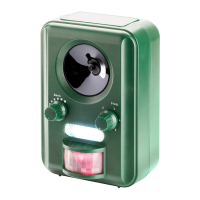
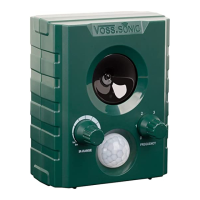
The „Sens.“ dial (left) controls the setting of sensitivity and distance. By turning the dial clockwise you increase the range and
coverage.
To frighten small animals, turn the „Sens.“ dial all the way to the right.
The „Freq.“ dial (right) controls the frequency. By turning the dial clockwise, you increase/change the emitted frequency.
0 : OFF
1 : Scares animals like dogs, cats, raccoons, ...
2 : Scares animals like foxes, wild boars, deer, ...
3 : Scares little rodents, rats, martens, badgers, otters, rabbits, hares ...
4 : Flash adds to the deterrent eect, especially frightens birds
5 : Functions 1-4 are activated (switching between frequency modes 1, 2 and 3) together with the ash.
This is the best setting as all functions of the unit are used.
Important
To change a setting, you must always start from the OFF position (0) and then select the desired setting. For example, if you
change directly from setting 3 to 1 without having turned the dial to the OFF position (0), the device will still be in the setting
3.
Important tip
The ash increases the deterrent eect, especially in the darkness. If you plan to use the ash for longer intervals, we
recommend charging the device regularly via the USB charging cable.
Caution
Make sure to turn o the ash on the unit if a person with epilepsy is in the operating area. Remember to switch o the unit
when you are in the operating area for a prolonged period of time.
Explanation of the product labels
Symbol Meaning
Disposal of electrical goods
Compliance of the product with the EU directives
Caution
For people with sensitive hearing, certain ultrasound frequencies can lead to health problems such as headaches. This must
be taken into account when installing the device.


 To Next Page
 Loading...