4
OPERATION MANUAL
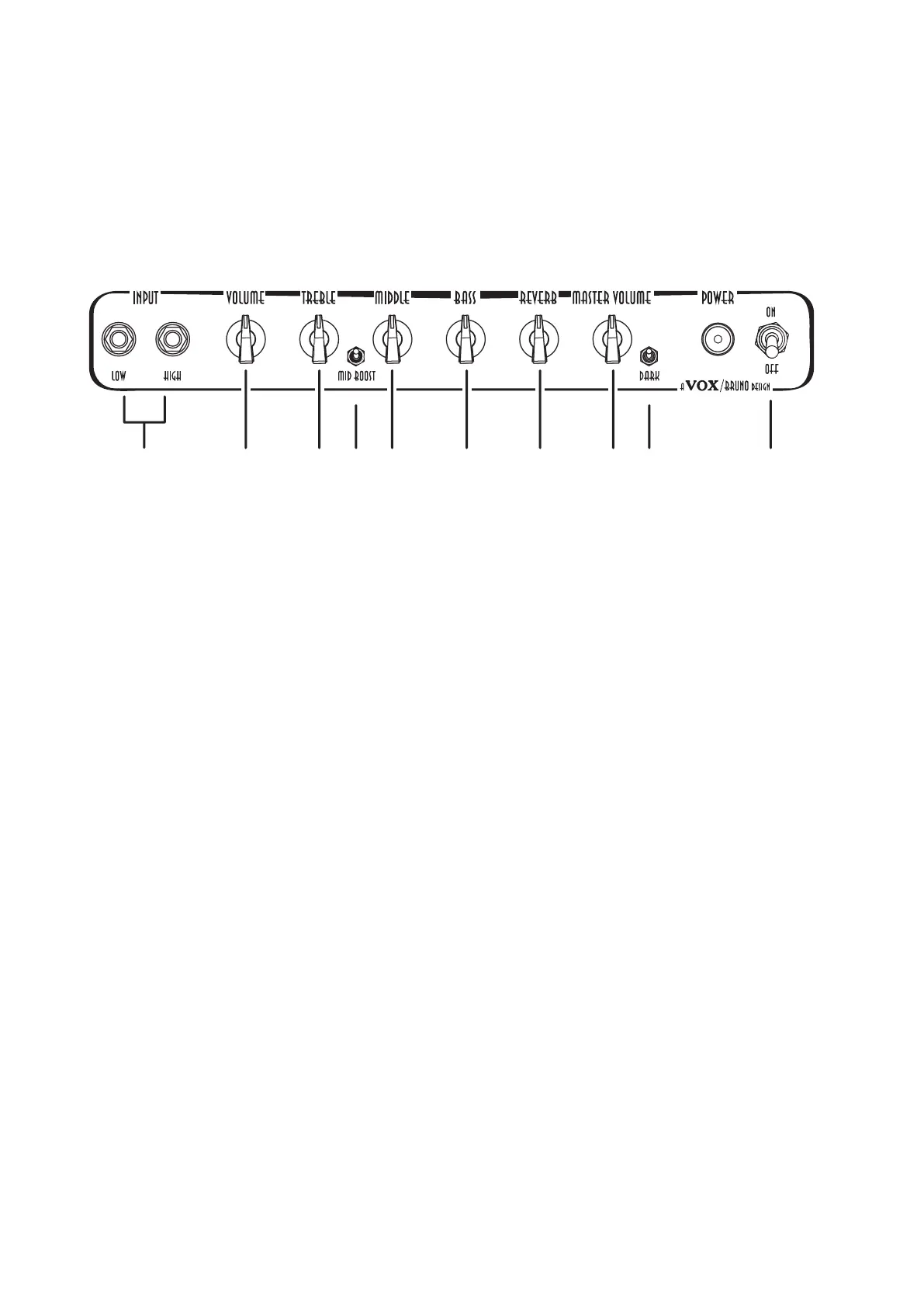
Front Panel
9
103 42 5 6 7 8
1
1. Input Jack Sockets
PlugyourguitarintotheHIGHorLOWinput.The‘HIGH’inputwillgiveyoumoregainandout-
putvolumeandthe‘LOW’inputwillbequieterandhavemorecleanheadroom.
2. Volume Control
Thiscontrolsthepreampvolume/gain.Itcanbeusedinconjunctionwiththe‘MasterVolume’
controltocreatetheperfectbalancebetweenpre/powerampdistortionandoveralloutputlevel.
Turnclockwiseformoregain.
3. Treble Control
Thiscontrolsthehighfrequenciesinyoursound—fromsoftandsmoothwhenturneddown
(counterclockwise)tobrightandcuttingwhencranked(clockwise)andallpointsin-between.
4. Mid Boost Switch
TheMidboostswitchisamid/gainboost.Thisspeciallyvoicedmodisidealforplayerswanting
toboosttheirsolosorleads.Youcanalsoleavethisswitchpermanentlyactivateddramatically
changingthesoundofyourampandallowingyoutotakeyoursearchfortoneevenfurther!
5. Mid Control
Thiscontrolsthemidfrequenciesinyoursound.Turnanticlockwiseforascoopedspacious
soundorturnclockwiseforamorefocusedandfullbodiedtone.
6. Bass Control
Thiscontrolsthelowfrequenciesinyoursound—fromthinandlightwhenturneddown(counter
clockwise)towarmandheavywhenturnedupfull(clockwise)andallpointsin-between.
7. Reverb Control
Thisallowsyoutocontrolthelevelofthereverbfromasubtleshimmertoluscious‘surf’style
wavesofsound.Thiscontrolisverysensitiveandwasdesignedthiswaysoanyamountof
reverbcanbeobtainedwithouthavingtopushthepreamphard.


 To Next Page