

EasyManua.ls Logo

Voyage PA-1003 - User Manual

Voyage PA-1003
9 pages
Print Icon
To Next Page IconTo Next Page
Loading...
Made in China
C001-CA-V1.0
17
INSTRUCTION BOOKLET
WARNING: Never leave product charging unattended for extended periods of
time. Always disconnect the battery from charger immediately after the battery
is fully charged. Please refer to enclosed safety instructions.
PACKAGE CONTAINS:
Colors and styles may vary slightly .
Instruction
Manual
Spare Parts
Battery
PA-1003
USB Charger 2.4G Wireless
Controller
ON BOARD
HD VIDEO
ON BOARD
HD CAMERA
1280 x 720 pixel
25 frames per second
Phone Holder
CHOKING HAZARD
-
Small parts.
Not suitable for children under 3 years.
WARNING!
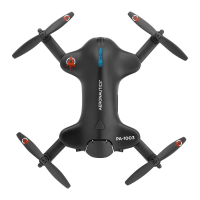
HD STREAMING VIDEO DRONE
PA-1003
Conforms to safety requirements of
FCC.
Voyage Aeronuatics™ is the registered trademark of AMAX Industrial Group LTD.
AMAX Group USA Address: 12645 Memorial Dr Suite F1 #388 Houston, TX 77024
© 2020 All Rights Reserved. Visit us at www.amaxbrands.com
Requires Speed Class 6 or higher microSD or
microSDHC card(not included)
microSDHC Logo is a trademark of SD-3C, LLC.
FCC Part 15 C Notice
CAUTION: Changes or modifications not expressly approved by the party responsible for compliance could
void the user’s authority to operate the equipment.
NOTE: This equipment has been tested and found to comply with the limits for a Class B digital device,
pursuant to Part 15 of the FCC Rules. These limits are designed to provide reasonable protection against
harmful interference in a residential installation. This equipment generates, uses and can radiate radio
frequency energy and, if not installed and used in accordance with the instructions, may cause harmful
interference to radio communications. However, there is no guarantee that interference will not occur in a
particular installation. If this equipment does cause harmful interference to radio or television reception,
which can be determined by turning the equipment off and on, the user is encouraged to try to correct
the interference by one or more of the following measures:
s 2EORIENTORRELOCATETHERECEIVINGANTENNA
s )NCREASETHESEPARATIONBETWEENTHEEQUIPMENTANDRECEIVER
s #ONNECTTHEEQUIPMENTINTOANOUTLETONACIRCUITDIFFERENTFROMTHATTOWHICHTHERECEIVERIS
connected.
s #ONSULTTHEDEALEROREXPERIENCEDRADIO46TECHNICIANFORHELP
This device complies with Part 15 of the FCC Rules. Operation is subject to the following two conditions :
(1) This device may not cause harmful interference, and
(2) this device must accept any interference received, including interference that may cause undesired
operation.
Question and Answer IconNeed help?

Do you have a question about the Voyage PA-1003 and is the answer not in the manual?

Summary

FCC Compliance Notice

Key Product Features

Remote Battery Installation

Instructions for installing batteries into the remote control unit for operation.

Charging the Li-Poly Battery

Guidance on connecting the USB charger to the battery and power source for charging.

Installing the Drone Battery

Steps to insert the charged battery into the drone's compartment.

Expanding and Folding Drone Arms

Instructions on safely unfolding and folding the drone's arms before and after flight.

Drone and Controller Diagrams

Controller Diagram Details

Visual identification of all buttons and controls on the drone's remote controller.

Flight Preparation and Controller Syncing

Foul Weather Flying Warning

Important safety advisory against flying the drone in adverse weather conditions.

Syncing the Controller

Procedure to pair the drone with its remote controller for wireless communication.

Preparing for Flight

Drone Identification and Flight Controls

Identifying drone orientation, basic flight controls, and practice maneuvers.

Flight Modes and Speed Settings

Using speed settings and activating training mode with obstacle avoidance.

Starting, Stopping, and Landing Procedures

Methods for starting rotors, automatic take-off, and landing the drone.

Flight Trim Adjustment

Forward;Backward Trim Adjustment

Correcting automatic forward or backward drift of the drone.

Banking Left;Right Trim Adjustment

Correcting automatic banking to the left or right.

PA-1003 Drone Calibration

Drone Recalibration Steps

Steps to recalibrate the drone after crashes to restore stable flight.

Executing 360° Stunt Rolls

Executing 360° Stunt Rolls

Instructions on how to perform barrel rolls using the controller.

PA-1003 WiFi App Installation Guide

WiFi App Installation Steps

Connecting your mobile device to the drone's Wi-Fi network for app control.

App Quick Start Guide

Initial App Operation

Launching the app, starting motors, and basic camera controls.

Mobile App Interface Overview

Mobile App Interface Overview

Visual guide to the home page and control stick interface of the mobile app.

Troubleshooting PA-1003 Drone

No Power Troubleshooting

Solutions for when the drone does not power on.

Aircraft Unresponsive Issues

Troubleshooting steps if the drone or remote control is unresponsive.

Aircraft Lift-off Failures

Identifying causes and solutions for the drone failing to take off.

Aircraft Spin or Trim Instability

Addressing issues where the aircraft spins or cannot be trimmed.

Altitude Hold Instability

Resolving problems with unstable altitude hold.

Propeller Blade Replacement

Propeller Blade Identification and Replacement

Guide to identifying and replacing damaged propeller blades correctly.

Propeller Guard Installation

Installing Safety Propeller Guards

Instructions for attaching the propeller guards for beginner safety.

PA-1003 Warnings, Care, and Maintenance

General Operation Warnings

Safety precautions regarding rotor blades, power, and charger usage.

Battery Safety Guidelines

Specific safety guidelines for Li-Poly and controller batteries.

Controller Battery Recommendations

Recommendations for using AAA batteries in the remote control.

Drone Care and Maintenance

Tips for cleaning and maintaining the drone and remote control.

90-Day Limited Warranty Information

Product Repair and Replacement Process

Process for obtaining warranty service for defective products.

Warranty Return Preparation

Instructions for packaging and shipping products for warranty claims.

MicroSD Card and Video Features

Camera Setup and Recording

Setting up the camera, formatting card, installing, and capturing photos/videos.

MicroSD Card Management

Removing, downloading, and clearing files from the microSD card.

Live Video Streaming Setup

Attaching the phone holder to the controller for mobile device mounting.
Voyage PA-1003 Specifications

General IconGeneral
BrandVoyage
ModelPA-1003
CategoryDrones
LanguageEnglish