------------- Content-------------
Overview- - - - - - - - - - - - - - - - - - - - - - - - - - - - - - - - - - - - - - - - - - 2
Important notes- - - - - - - - - - - - - - - - - - - - - - - - - - - - - - - - - - - - - 4
Operating Instructions- - - - - - - - - - - - - - - - - - - - - - - - - - - - - - - - 4
Care and Maintenance - - - - - - - - - - - - - - - - - - - - - - - - - - - - - - - 12
Handing Compact Discs - - - - - - - - - - - - - - - - - - - - - - - - - - - - - 13
AM and FM Reception In a Mobile Environment - - - - - - - - - - - - 13
Some Facts About AM and FM Reception - - - - - - - - - - - - - - - - 14
FM Reception While You Are Driving - - - - - - - - - - - - - - - - - - - - 15
Specifications - - - - - - - - - - - - - - - - - - - - - - - - - - - - - - - - - - - - - 15
Warranty - - - - - - - - - - - - - - - - - - - - - - - - - - - - - - - - - - - - - - - - - 17
- 1 -
- 2 -
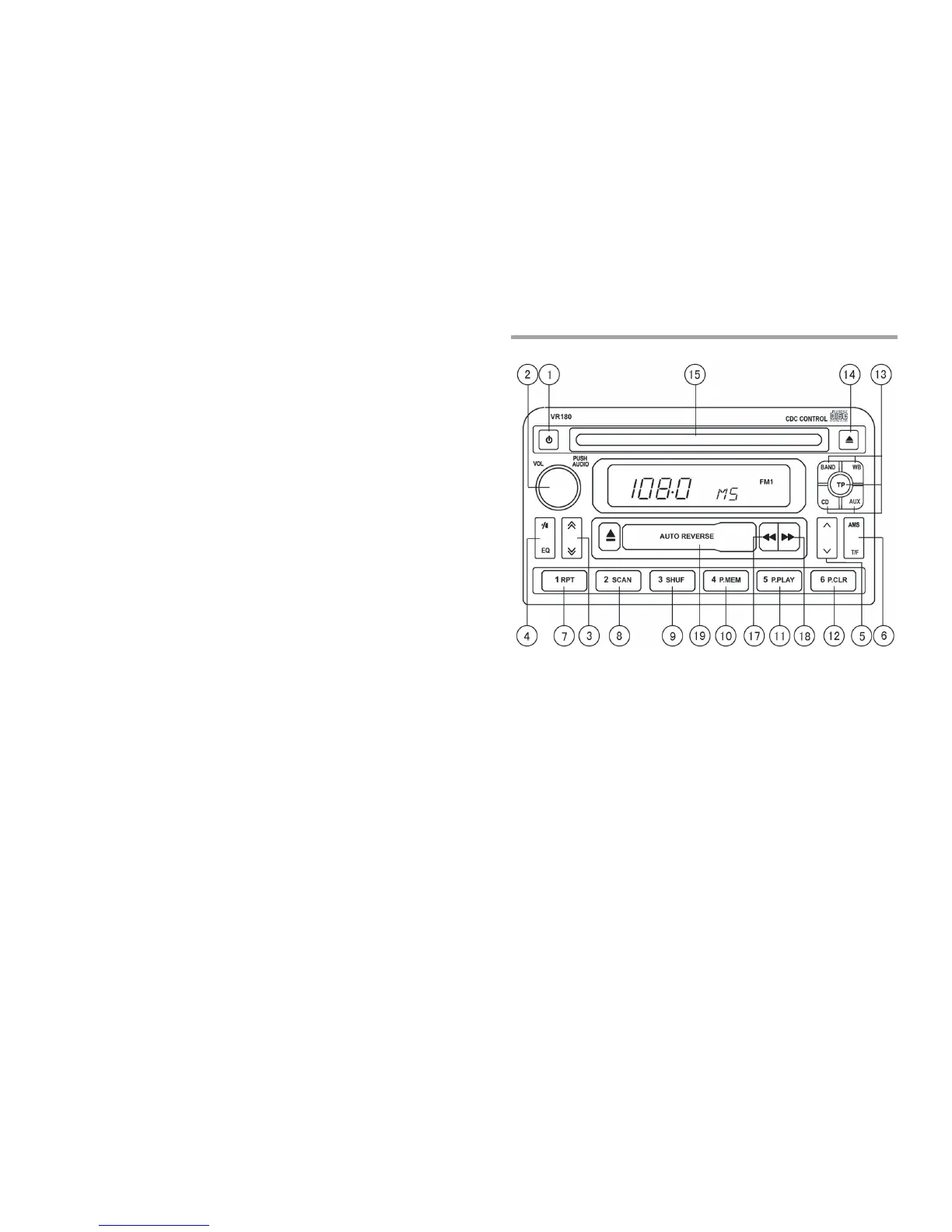
Overview
1. PWR button
--Press the button to turn on/off the radio
2. Audio and time Settings: Rotary / push knob
--volume control: turn the knob to raise or lower the sound level
--sound setting: press this knob to change the sound settings (see
below)
--time control: turn this knob to adjust the time in time setting mode
Sound Settings
Press and adjust as required by pressing and then turning the knob:
--Treble setting (TRE)
--Bass setting (BAS)
--Balance setting (BAL)
--Fader setting (FAD)
3. Auto-Seek button
Overview


 To Next Page