07
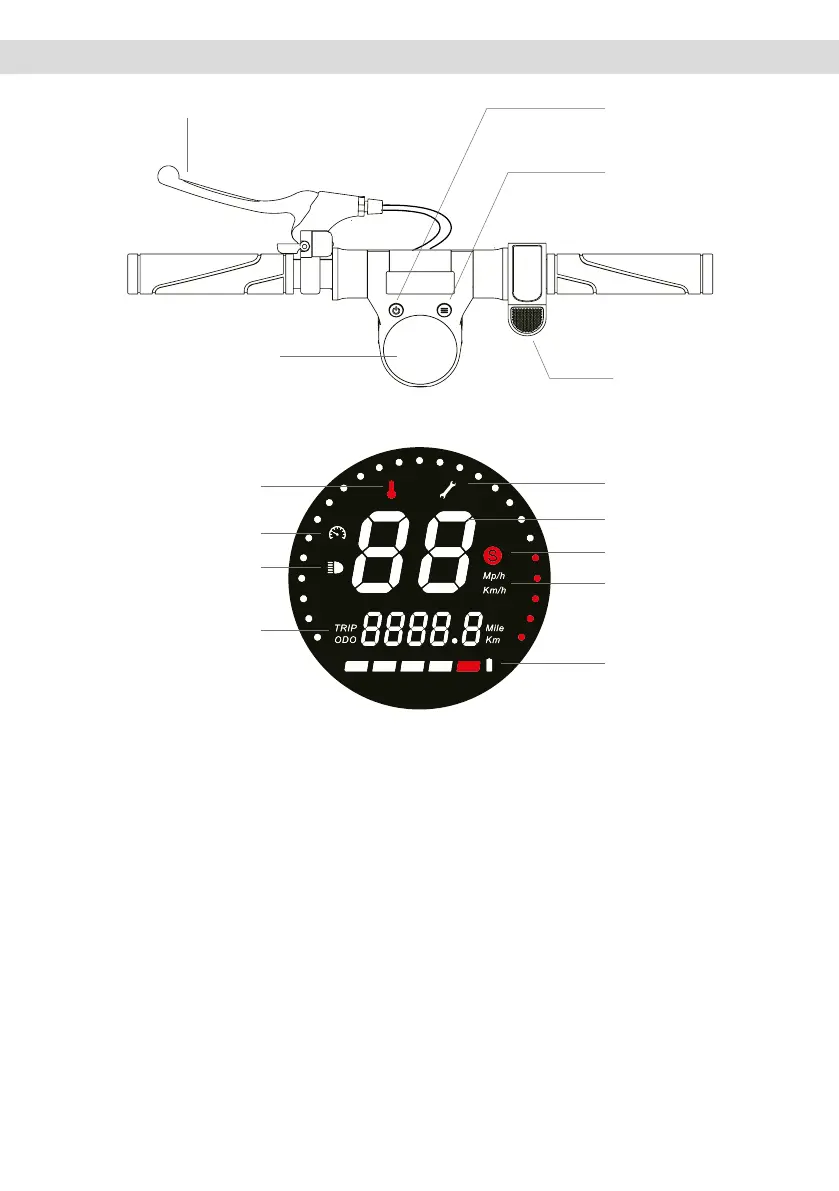
5. Command information / Control panel
1. Switch: long press the power button to turn the power on/off. Press once to switch between ODO/TRIP display.
2. Acceleration: Press the right acceleration button to start and accelerate.
3. Brake: pull the brake lever to brake. Place one foot lightly on the rear mudguard to assist with braking.
4. Brieypressthefunctionkeytodirectlyadjustthespeed:Beginnermode:6Km/hNormalmode:20Km/h
Sport mode: 25Km/h.
5. Headlights: Long press the function button to turn the front and rear headlight on and off.
6. Cruise Control Mode: Maintain current speed for 6 seconds to enter Cruise Control Mode. To exit cruise speed
mode, press the accelerator or brake again.
ON/OFF key
failure
instantaneous speed
speed mode
speed unit
battery
functions key
accelerator lever
display
lights
distance travelled
cruise control
temperature
brake lever



 To Next Page