EasyManua.ls Logo

VRN A8 - 2. Production Function and Operation; 2.1 Scaling Function Operation

VRN A8
20 pages
Print Icon
To Next Page IconTo Next Page
To Previous Page IconTo Previous Page
Loading...
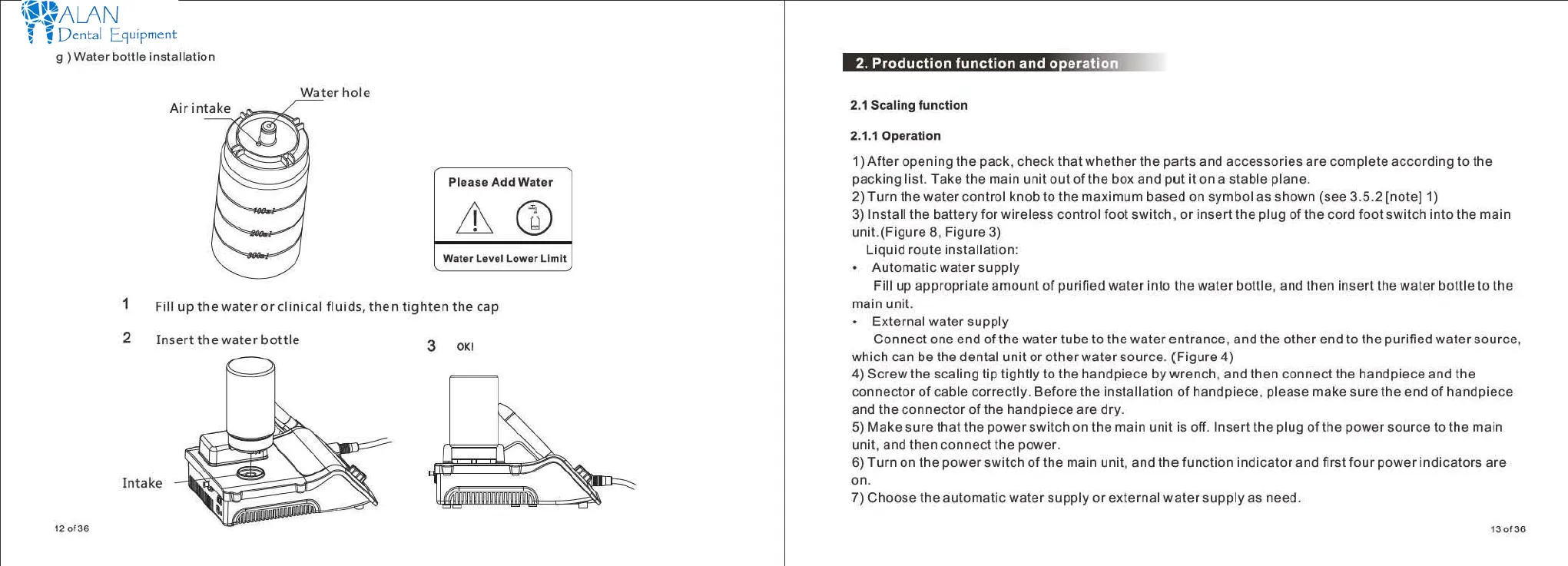
9 ) Water
bott
installation
Waterhole
Ple
ase Add Water
A
W.t.r L.
Yl
I
Lower
Ll
mlt
1 Fill
upthewater
orclinical
fluids
,
then
tighten
the
cap
2
Insert
the
water
bottle
3 0
1(
1
lntake
120136
••
喝."古r.
π
r.
m
司..
ßTiTõllI'õ1'i'W
τ
"...
.E
丛温品
J![
.l!'
2.1
Scallog functlon
2.1.10pera
创。"
1)
After
opening
the pack.
check
that
whether
the parts and
accessories
are
complete
according
to
the
packing
listτake
the main unit
out
of the box
and
put
it on a stable plane
2)
Turn
the
water
control knob
to
the maximum based on symbol as shown (see 3.5.2
[note]η
3)
Install the
battery
for wireless control foot switch.
or
insert
the plug of the cord
foot
switch
into
the main
uni
t.(Figure 8, Figure 3)
Li
quid
route installation
Automatic
water
supply
Fill
up
appropriate
amount
of
purified
water
into the
water
bottle. and
then
insert
the
water
bottle
to
the
main unit
External
water
supply
Connect
one
end
of the
water
tube
to
the
waterentrance
.
and
the
other
end
to
the purified
water
source.
which can be the dental
unit
or
otherwater
source.
(Figure
4)
4)
Screwthe
scaling tip
tightly
to
the handpiece
bywrench
.
and
then
connect
the handpiece and the
connector
of
cable
correctly
.
Before
the installation
of
handpiece. please make sure the end
of
handpiece
and the
connector
of
the handpiece
are
dry
5)
Make sure that the
power
switch on the main unit
is
。何
Insert
the plug
ofthe
power
s
。町
ce
tothe
main
unit. and
then
connect
the power
6)
Turn
on the
power
switch
of
the main unit. and
the
function
indicator
and
first
four
power
indicators are
n
7) Choose the
automatic
water
supply
or
external
water
supply
as need
130136
https://www.alandental.com

Other manuals for VRN A8