
 Need help?
Do you have a question about the VTech Baby First Steps Baby Walker and is the answer not in the manual?
Instructions for battery insertion, usage, safety, and disposal guidelines.
Steps for securely attaching and detaching the main activity panel to the walker.
Details on On/Off/Mode and Volume switches, plus walker folding for storage.
Explanation of the auto power-down feature to preserve battery life.
Features of the light-up piano keys and shape sorter interaction with sounds.
Descriptions of the bouncing bird, toy phone, and spinning gears features and sounds.
Details on the puppy button, door, and mouse features and their interactive sounds.
How the motion sensor activates sounds and phrases during play.
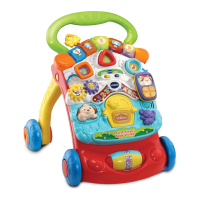
The VTech First Steps® Baby Walker is an interactive toy designed to support a child's development from birth through the early school years. It features a removable activity panel that can be used for sitting play and later attached to the walker as the child grows and begins to walk. The walker is designed to stimulate a child's interest in different textures, sounds, and colours, fostering understanding of cause and effect, and encouraging touch, reach, grasp, sit-up, crawl, and toddle. For pre-schoolers, it offers interactive elements to develop imagination and language, helping them get ready for school by introducing the alphabet and counting in a fun and engaging way. For older children, it provides challenging activities and intelligent technology that adapts to their learning level, with content based on the National Curriculum.
The activity panel is rich with features, including five light-up piano keys, spinning gears, three colourful shape sorters, a toy phone, a bouncing bird, a puppy button, a door, and a twisting mouse. These elements are designed to engage children in various learning and play activities. The walker also includes an On/Off/Mode Switch, allowing users to select between Learning Mode and Music Mode, and a Volume Switch to adjust the sound level.
In Learning Mode, pressing the Light Up Piano Buttons teaches numbers and shapes. In Music Mode, these buttons play piano notes and melodies. If a melody is already playing, pressing the buttons will play the melody one note at a time, with the melody resuming once the buttons are released. The lights on the piano keys flash with the sounds, adding a visual element to the auditory learning.
The Shape Sorter Buttons & Pieces introduce shapes, associated animals, and simple questions in Learning Mode. In Music Mode, they trigger short tunes, melodies, playful phrases, and animal sounds, all accompanied by flashing lights. The Bouncing Bird, when twisted or wiggled, produces bird sounds, a fun phrase, and a short tune in Learning Mode. In Music Mode, it plays a song and a short tune with bird sounds, with lights flashing in sync.
The removable Toy Phone offers playful greetings, sounds, or a song when detached. When reattached to the activity panel, it plays a playful phrase, sounds, or a short tune in both modes, with flashing lights. The Spinning Gears, when twisted, produce playful sounds, a fun phrase, and a short tune in Learning Mode, and a variety of short tunes in Music Mode, also with flashing lights.
The Puppy Button, when pressed, emits a cute puppy sound and a fun phrase or song in Learning Mode. In Music Mode, it plays a song and a short tune with the puppy barking along, with lights flashing. The Door, when opened or closed, teaches about opposites through phrases and sound effects, and plays a song in both modes, with the light flashing. The Twisting Mouse helps identify colours and animals, and produces fun sounds in Learning Mode. In Music Mode, it plays fun sounds, with lights flashing.
A Motion Sensor is integrated into the walker. Moving the activity panel or pushing the walker activates the sensor, triggering playful melodies. Continuous rolling of the wheels leads to more fun sounds and phrases, with the lights flashing.
For convenience, the walker features a storage mechanism. The legs can be folded in by sliding and holding the blue locks on the back of the walker and pushing down on the legs. The walker also has an automatic shut-off feature to preserve battery life, powering down after approximately 60 seconds of inactivity. It can be reactivated by pressing any button. If the walker shuts off during play, it is recommended to change the batteries.
Assembly of the walker requires adult supervision to ensure safety. The bouncing bird, front wheels, walker legs, and walker handle click into place when correctly inserted. The activity panel can be securely attached to the walker by aligning the bottom and pushing until it clicks, and removed by sliding a lock on the top.
Maintenance of the VTech First Steps® Baby Walker is straightforward. It should be kept clean by wiping it with a slightly damp cloth. To prevent damage, the walker should be kept out of direct sunlight and away from direct heat sources. Batteries should be removed if the walker will not be used for an extended period. It is also important not to drop the walker on hard surfaces or expose it to excessive moisture.
Battery installation involves locating the battery cover on the back of the activity panel, loosening the screw with a coin or screwdriver, installing two new AA (AM-3/LR6) alkaline batteries, and then replacing the cover and tightening the screw. It is advised to use new alkaline batteries or fully charged Ni-MH rechargeable batteries for best performance, and to avoid mixing different types of batteries or new and used batteries. Damaged batteries should not be used, and batteries should be inserted with correct polarity. Battery terminals should not be short-circuited. Exhausted batteries should be removed, and batteries should be removed during long periods of non-use. Non-rechargeable batteries should not be charged, and rechargeable batteries should only be charged under adult supervision after being removed from the toy. The cord attaching the door to the mouse is for packaging only and should be cut and discarded for child safety.
 General
| Material | Plastic |
|---|---|
| Batteries Required | Yes |
| Batteries Included | No |
| Color | Multicolor |
| Manufacturer | VTech |
| Features | removable activity panel |
| Dimensions | 16.5 x 18.1 inches |
| Educational Focus | Motor Skills, Language Development, Sensory Development |





 To Next Page