10
Convert from Ride-On Mode to Scooter Mode
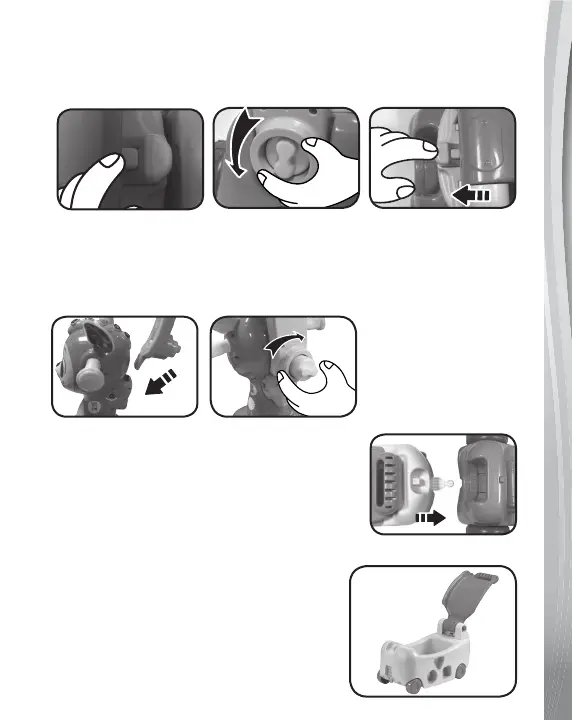
1. Press the small green release button on the back of the Wagon
Body while rotating the Green Lock on the Walker Handle
anticlockwise, then pull the tab while removing the Wagon.
2. Insert the Walker Handle into the slot on the back of the Fawn
Head. Turn the Green Lock clockwise to secure the Walker
Handle. To remove the Walker Handle, press and hold the small
button on the left side of the handle while turning the Green Lock
anticlockwise.
3. You have the option to attach the Wagon
Body to the back of the Scooter. Insert
the hinge on the front of the Wagon Body
to the bottom of the Scooter Base. To
disconnect the Wagon Body, pull on the
hinge.
Convert from Ride-On Mode to Wagon
Mode
Remove the Wagon Body from the Scooter
Base and fold out the seat to make a pull
handle.












 To Next Page