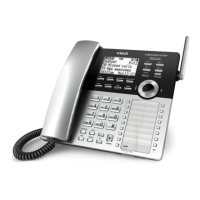
The VTech CTM-A2411-BATT is a cordless analog phone designed for use in managed service environments, offering a blend of traditional corded functionality with the flexibility of cordless operation. This device is part of the VTech CTM-A2510/CTM-A2510-USB series, indicating compatibility and shared features with other models in that line. The phone system consists of a telephone base and one or more cordless handsets, providing versatile communication options.
Function Description:
The primary function of the VTech CTM-A2411-BATT is to facilitate analog telephone communication. It supports both corded and cordless calling, allowing users to make and receive calls from the telephone base or a portable handset. The system is designed for ease of use in professional settings, with features like speed dial keys, message waiting indicators, and call management functions.
Important Technical Specifications:
- Handset Registration: The system supports the registration of up to four cordless handsets to a single telephone base. If the base already has four registered handsets, one must be deregistered before a new one can be added. Handsets can also be deregistered and registered to other compatible VTech CTM-A2510/CTM-A2510-USB telephone bases.
- Battery Charging: Cordless handsets are powered by rechargeable batteries. The CHARGE LED on the charging base or stand illuminates when the handset is correctly placed for charging. A full charge typically takes 16 hours of continuous charging. For optimal performance, handsets should be kept in their charging base or stand when not in use.
- Call Capacity: A maximum of four cordless handsets or accessory Petite phones can be used simultaneously on an external call, enabling conference-like functionality.
- Redial Memory: The last dialed number on both the cordless handset and the telephone base is stored for 15 minutes, allowing for quick redialing.
- Message Waiting Indicator (MWI): The telephone base and handset feature MESSAGE WAITING LEDs that flash when a new voice message is received, providing a visual alert.
- Paging Functionality: The telephone base includes a /FIND HANDSET button, which, when pressed, causes all idle registered cordless handsets to beep for 60 seconds, aiding in locating misplaced handsets.
- Speed Dial Keys: The telephone base and cordless handset are equipped with programmable speed dial keys (up to 10 on the base, plus an 11th speed key on the handset that can be re-labeled but not removed), allowing for quick dialing of frequently used numbers.
- Dataport: The telephone base includes a DATAPORT, suggesting potential for integration or additional connectivity, though specific details are not provided in the excerpt.
- Antibacterial Protection: The telephone base is explicitly labeled as "Antibacterial," indicating a design feature aimed at reducing the spread of germs, which is particularly relevant in shared environments.
- Wall Mount Clip: The telephone base is designed with a wall mount clip, offering flexible installation options.
Usage Features:
- Receiving Calls: When an incoming call is detected, the telephone rings, the LINE key and MESSAGE WAITING LED on the telephone base flash, and the TALK key on the cordless handset flashes. Calls can be answered by lifting the corded handset, pressing TALK or /SPEAKER on the cordless handset (whether off or on the charging base/stand), or pressing /SPEAKER on the telephone base.
- Placing Calls: Calls can be initiated by lifting the corded handset, pressing TALK or /SPEAKER on the cordless handset, or pressing /SPEAKER on the telephone base, then dialing the desired number or using a programmed speed dial key.
- Ending Calls: To end a call, the corded handset should be placed back in the telephone base. For cordless handsets, pressing OFF or placing the handset in its charging base/stand will end the call. Pressing /SPEAKER on the telephone base will end a call when using the base speakerphone.
- Call Switching: The system allows for seamless switching of a call between the corded handset, cordless handset, and the telephone base speakerphone. This is achieved by pressing /SPEAKER on the telephone base to switch to speakerphone, pressing TALK or /SPEAKER on the cordless handset to switch to the cordless handset (if not on the charging base/stand), or lifting the corded handset to switch to the corded handset.
- Call Sharing: During an active call, other cordless handsets can join the conversation by pressing TALK or /SPEAKER.
- Handset Speakerphone: The cordless handset features a speakerphone mode, activated by pressing /SPEAKER during a call, allowing for hands-free communication. Pressing /SPEAKER again switches back to the earpiece.
- Redial Functionality: The last dialed number can be redialed from the corded handset by lifting it and pressing REDIAL, from the cordless handset by pressing TALK or /SPEAKER and then REDIAL, or from the telephone base by pressing /SPEAKER and then REDIAL.
- Volume Adjustment: Listening volume can be adjusted during a call on both the cordless handset (using -/VOLUME/+) and the telephone base (using +/VOLUME or -/VOLUME). Ringer volume on the telephone base can also be adjusted when the phone is idle.
- Call Waiting: When a call waiting tone is heard during an active call, pressing FLASH on either the cordless handset or the telephone base puts the current call on hold and connects to the new incoming call. Repeatedly pressing FLASH allows switching between calls.
- Mute Function: During a call, pressing MUTE on the cordless handset or telephone base mutes the microphone, allowing the user to hear the other party without being heard. The MUTE key illuminates when active and turns off when pressed again to resume conversation.
- Hold Function: Calls can be placed on hold from the cordless handset by pressing HOLD (TALK key and HOLD key on the telephone base flash) or from the telephone base by pressing HOLD (HOLD key flashes). To release a call from hold, press TALK or /SPEAKER on the cordless handset, or /SPEAKER on the telephone base. Calls on hold will automatically end after a preset duration.
- Find Handset: The /FIND HANDSET button on the telephone base can be used to locate misplaced cordless handsets. Pressing it causes all idle registered handsets to beep for 60 seconds. Paging can be stopped by pressing /FIND HANDSET again or any key on a cordless handset.
Maintenance Features:
- Battery Management: Regular charging of the cordless handset battery is essential for continuous operation. The 16-hour initial charge and the recommendation to keep handsets in their charging bases when not in use highlight the importance of proper battery maintenance.
- Registration/Deregistration: The ability to register and deregister handsets provides flexibility for system expansion, replacement, or re-assignment of handsets, simplifying maintenance and configuration changes.
- Antibacterial Surface: The antibacterial surface on the telephone base contributes to hygiene maintenance, particularly in high-traffic or shared environments, by inhibiting bacterial growth.

 Need help?

 To Next Page
 General