
 Need help?
Do you have a question about the VTech DJ Beat Boxer and is the answer not in the manual?
Instructions on how to safely remove packaging locks from the product packaging.
Steps to deactivate the demonstration mode and enable full functionality.
Guide for safely installing and replacing the batteries in the unit.
Specific guidance for charging and handling rechargeable batteries.
Instructions for the volume switch and changing play modes via the nose button.
Guide on how to record sounds and play them back with the music.
Explanation of the unit's power-saving auto-shutoff feature.
Demonstrates how to use the DJ Beat Boxer in beatbox mode.
Explains how to create music mixes and add sounds in this mode.
Guide to interactive play and responses in nurturing mode.
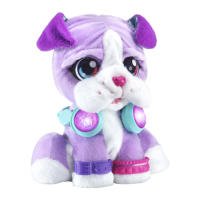
The VTech DJ Beat Boxer™ is a music-mixing pupster designed to engage children in interactive play through sound and music creation. This toy is part of VTech's range of electronic learning computers, aiming to provide cool, aspirational, and inspiring experiences for curriculum-related learning. It caters to a broad age range, from birth to 10 years, with specific features tailored to different developmental stages. For younger children (Birth-36 months), it offers stimulating textures, sounds, and colours, encouraging responses to sensory input, understanding cause and effect, and developing motor skills like touching, reaching, grasping, sitting up, crawling, and toddling. For pre-schoolers (3-6 years), it provides interactive toys to foster imagination and language development, helping them prepare for school by learning the alphabet and counting, making learning fun and exciting, and encouraging creativity through drawing and music. For older children (4-10 years), it offers challenging activities that keep pace with growing minds, intelligent technology that adapts to their learning level, and National Curriculum-based content.
The DJ Beat Boxer™ allows users to start music mixing by pressing its headphones, scratching its head, booping its nose, and stroking its paw for various sounds. The toy features several interactive points: a Forehead Touch Pad, a Nose Button, a Recording Button (located in DJ's ear), Right and Left Headphone Buttons, and a Paw Touch Pad. It also includes an Off/Low/High Volume Switch for controlling the sound output.
To begin using the DJ Beat Boxer™, it's important to exit the Try-Me mode, which is active when the product is in its packaging. This is done by sliding the Off/Low/High Volume Switch to the Off position and then turning the unit On again.
The device offers three main play modes: Beatbox Mode, Music Mixing Mode, and Nurturing Mode, each accessed by pressing and holding the Nose Button. Once a mode is selected, pressing and releasing the Nose Button will play cool sounds specific to that mode.
In Beatbox Mode, users can pick a melody using the headphone buttons. They can then layer on an extra beat and add their recorded sound/voice. Additional beatbox sound effects can be added by interacting with the Forehead Touch Pad, and cool sound effects by interacting with the Nose Button. Users can tap to the beat using the Paw Touch Pad and record their voice or other sounds using the Recording Button.
Similarly, in Music Mixing Mode, users can pick a tune with the headphone buttons. They can layer on some harmony and add their recorded sound/voice. Music sound effects are added via the Forehead Touch Pad, and cool sound effects via the Nose Button. Tapping to the beat is done with the Paw Touch Pad, and voice or sound recording with the Recording Button.
The Nurturing Mode focuses on interactive responses. Users can play funny sounds using the headphone buttons and hear their recorded sound/voice. Cute puppy responses are triggered by the Forehead Touch Pad and Paw Touch Pad, while cute and funny sounds are activated by the Nose Button. Voice or sound recording is still available through the Recording Button.
A key feature of the DJ Beat Boxer™ is its recording capability. By pressing and holding the Record Button in DJ's ear, the headphones will light up red, indicating it's ready to record. The toy will start recording when it detects sound, and the headphones will turn green. Once recording is complete, the recording will play back. Pressing and releasing the Record Button allows users to hear their recording and add it to the music.
To preserve battery life, the unit includes an automatic shut-off feature, powering off after several seconds of inactivity. It can be turned on again by pressing the Nose Button, Left Headphone Button, or Right Headphone Button. If the unit repeatedly shuts off or exhibits abnormal responses, replacing the batteries is recommended.
Battery removal and installation require adult assembly. The unit uses 4 new AA (AM-3/LR6) batteries. For optimal performance, alkaline or fully charged Ni-MH rechargeable batteries are recommended. The battery cover is located on the back of the unit and secured with a screw. Batteries should be inserted with the correct polarity, and mixing old and new batteries or different types of batteries (alkaline, standard, rechargeable) should be avoided. Batteries should be removed during long periods of non-use and exhausted batteries should be disposed of safely, not in fire. Rechargeable batteries must be removed from the toy before charging and charged under adult supervision. Non-rechargeable batteries should not be charged.
For care and maintenance, the unit should be kept clean by wiping it with a slightly damp cloth. It should be kept out of direct sunlight and away from direct heat sources. Batteries should be removed if the unit will not be used for an extended period. The unit should not be dropped on hard surfaces or exposed to moisture or water.
In case of troubleshooting, if the unit stops working or malfunctions, the recommended steps are: turn the unit Off, remove and then replace the batteries after a few minutes, and then turn the unit On again. If the problem persists, installing a brand new set of batteries is advised. If issues continue, contacting Consumer Services is recommended.
VTech emphasizes its commitment to the environment. The product and its batteries should be disposed of responsibly, as they contain substances that can be damaging to the environment and human health. The crossed-out wheelie bin symbols indicate that they should not be disposed of with domestic waste. Chemical symbols (Hg, Cd, Pb) indicate the presence of mercury, cadmium, or lead above specified values. VTech encourages giving the toy a second life by disposing of it at electricals collection points for recycling.
 General
| Power Source | Battery |
|---|---|
| Batteries Included | Yes |
| Batteries Required | Yes |
| Battery Cell Composition | Alkaline |
| Number of Players | 1 |
| Manufacturer | VTech |
| Country of Origin | China |
| Origin | China |
| Brand | VTech |
| Material Type | Plastic |
| Color | Multicolor |
| Number of Pieces | 1 |
| Assembly Required | No |
| Product Type | Toy |
| Recommended Age | 3 years and up |
| Release Date | 2019 |
| Department | Toys |
| Age Range (Description) | 3 years and up |
| Included Components | DJ Beat Boxer |
| Battery Cell Type | AA |
| Warranty Description | Unknown |



 To Next Page