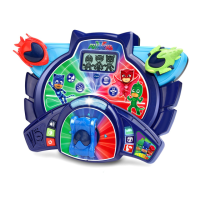
The VTech® PJ Masks Super Learning Headquarters is an interactive educational toy designed to engage children in learning through the popular PJ Masks characters. It offers 12 exciting activities that reinforce learning in science, geography, food categories, matching, and problem-solving. The device features three different play modes and allows children to swap between three PJ Masks vehicles—the Cat-Car, Gekko-Mobile, and Owl Glider—to control on-screen action.
Function Description:
The Super Learning Headquarters aims to provide a fun and engaging learning experience for children, adapting to their developmental stages from birth to 10 years. It aligns with VTech's philosophy of creating toys that teach and entertain at the right level for different age groups:
- Birth-36 months (VTech Baby): Focuses on stimulating interest in different textures, sounds, and colours; understanding cause and effect; and developing motor skills like touching, reaching, grasping, sitting up, crawling, and toddling.
- 3-6 years (Pre-School): Offers interactive toys to develop imagination and encourage language development. Children at this stage are encouraged to learn the alphabet and counting, express creativity through drawing and music, and enjoy learning in an exciting way.
- 4-10 years (Electronic Learning Computers): Provides cool, aspirational, and inspiring computers for curriculum-related learning. It offers challenging activities that keep pace with a growing mind, intelligent technology that adapts to the child's learning level, and National Curriculum-based content to support school learning.
The device itself is a central unit with a screen and various interactive buttons and controls. Children plug in one of the three PJ Masks vehicles to interact with the games. The activities are designed to be educational and entertaining, featuring scenarios where children help the PJ Masks heroes save the day while learning.
Important Technical Specifications:
- Battery: Requires 2 new AA (AM-3/LR6) size batteries.
- Automatic Shut-Off: The unit automatically turns off after several minutes of inactivity to preserve battery life. A warning is displayed on screen when batteries are very low.
- LED: Features a light-up LED that illuminates in multiple colours.
- Display: LCD screen with adjustable contrast (3 steps).
- Volume: Adjustable sound volume (3 steps).
- Product Code: 91-003508-006 (UK).
- Copyright: ©2018 Frog Box/Entertainment One UK Limited.
Usage Features:
- On/Off Button: Turns the unit on and off.
- LCD Contrast Button: Adjusts screen contrast using the Left and Right Arrow buttons, confirmed by the Windscreen (Enter) button.
- Volume Button: Adjusts sound volume using the Left and Right Arrow buttons, confirmed by the Windscreen (Enter) button.
- Mode Selector: A slide switch to choose one of three play modes: Vehicles Mode, Science Mode, and Problem Solving Mode.
- 4 Location Buttons: Allows selection of one of four locations to play a game. These include Park, Fun Fair, Museum, and HQ.
- 4 Direction Arrow Buttons + Enter Button (the Windscreen): Used to navigate on the screen, select options, and confirm selections. The Windscreen button on the plugged-in vehicle acts as the Enter button.
- 3 Character Buttons: Pressing these buttons (Catboy, Owlette, Gekko) plays an animation of the character with a brief introduction or fun phrases.
- PJ Masks Vehicles (Cat-Car, Gekko-Mobile, Owl Glider): Three plug-in vehicles that control on-screen action. They must be properly clicked into place to start playing. Each vehicle has a Windscreen (Enter) button.
Activities Overview (12 activities across 3 modes):
Vehicles Mode:
- Activity 1: Alphabet Balls: Race through the park to stop Luna Girl and learn about letters. Features racing and learning games with 3 levels of difficulty for obstacle speed and alphabet ball count.
- Activity 2: Number Chase: Help the PJ Masks chase Romeo and learn about numbers. Features racing and learning games with 3 levels of difficulty for obstacle speed and branch count.
- Activity 3: Beginning Letters: Chase Night Ninja to retrieve stolen artwork and learn about beginning letters. Features racing and learning games with 3 levels of difficulty for obstacle speed and letter variety.
- Activity 4: Shape Puzzle: Use pattern logic skills to fix PJ Masks vehicles by matching patterns. Offers 3 levels of difficulty.
Science Mode:
- Activity 5: Butterfly Life Cycle: Learn about the butterfly life cycle by choosing, feeding, and playing with a caterpillar.
- Activity 6: Fruit or Vegetable?: Sort mixed-up fruits and vegetables into correct categories at the fun fair.
- Activity 7: Around the World: Learn facts about countries and cities at the museum.
- Activity 8: Animal Footprints: Match animal footprints and shadows with correct animal names using the HQ surveillance camera.
Problem Solving Mode:
- Activity 9: Fix the Pipes: Help the PJ Masks fix town water fountain pipes broken by Luna Girl by selecting the correct pipe shapes.
- Activity 10: Hide and Seek: Find musical instruments stolen by Night Ninja and hidden in boxes at the Fun Fair.
- Activity 11: Picture Matching: Fix paintings broken by Romeo at the museum by matching pictures to shapes.
- Activity 12: Headquarters Code: Watch and repeat sequences of arrow flashes by moving the vehicle in the same directions.
Maintenance Features:
- Cleaning: Keep the unit clean by wiping it with a slightly damp cloth.
- Storage: Keep the unit out of direct sunlight and away from direct heat sources. Remove batteries during long periods of non-use.
- Handling: Do not drop the unit on a hard surface or expose it to excess moisture.
Battery Notice:
- Use new alkaline or fully charged NI-MH rechargeable batteries for best performance.
- Use only recommended battery types.
- Do not mix battery types (alkaline, standard, rechargeable) or new and used batteries.
- Do not use damaged batteries.
- Insert batteries with correct polarity.
- Do not short-circuit battery terminals.
- Remove exhausted batteries from the toy.
- Do not dispose of batteries in fire.
- Non-rechargeable batteries are not to be charged.
- Rechargeable batteries (if removable) must be removed before charging and charged under adult supervision.
Disposal:
- Products and batteries marked with a crossed-out wheelie bin symbol should not be disposed of in domestic waste, as they contain substances harmful to the environment and human health.
- Chemical symbols (Hg, Cd, Pb) indicate the presence of mercury, cadmium, or lead above specified values.
- A solid bar indicates the product was placed on the market after 13th August 2005.
- Dispose of products and batteries responsibly. For more information, visit www.recycle-more.co.uk and www.recyclenow.com.

 Need help?


 To Next Page
 General